
핵심 요약
- Amazon Aurora writes run on one primary instance. The largest, db.r8g.48xlarge, is the ceiling.
- Read replicas and Serverless v2 add no write capacity; sharding does, but you maintain it.
- Amazon Aurora Limitless scales writes only for PostgreSQL, not Aurora MySQL.
- TiDB scales writes by adding nodes and speaks MySQL, so no app rewrite.
If you have ever run Amazon Aurora at scale, you know the moment I mean. Write latency on the primary starts creeping up during peak hours. You bump the writer to the next instance class, and the relief buys you a quarter. You bump it again. Then one day you open the AWS console to size up, and there is no larger box to pick. You are already on the biggest instance Aurora sells, and the write graph is still climbing.
I see this in the field more than any other Aurora problem. It is not a tuning issue and it is not a bad query. It is the ceiling of vertical scaling, and you cannot buy your way past it. Aurora is a genuinely good database, but its write path runs on a single instance, and a single instance has a maximum size. Once your writes outgrow that box, your options get narrow fast. This blog is the walkthrough I usually give: What actually happens when Aurora’s vertical scaling runs out, why the obvious escape hatches don’t fix the write problem, and what it takes to scale writes sideways without rewriting your application.
Where Amazon Aurora’s Vertical Ceiling Actually Is
Aurora scales writes vertically, so your write throughput is capped by the size of one primary instance. As of mid-2026, the largest Aurora instance class is db.r8g.48xlarge, built on AWS Graviton4: 192 vCPUs and 1,536 GiB (1.5 TiB) of memory, running roughly $23 per hour on-demand in us-east-1 before storage and I/O, and closer to $26 per hour for Aurora MySQL. That is a big machine. For most workloads, it is more than enough.
The size of the ceiling is not the problem. The problem is that it is a ceiling. Aurora runs one writer instance per cluster. You can hang up to 15 read replicas off it and the cluster volume auto-scales to 128 TiB, but every write still funnels through that one primary. When your write rate, your hot dataset, or your connection count outgrows what a single db.r8g.48xlarge can serve, there is no next size. You have hit the architectural limit of vertical scaling, and no amount of AWS budget moves it.
That single writer is also a single failure domain. When it goes, the cluster promotes a replica, and writes pause for the length of the failover. One box sets your write ceiling and your write availability at the same time.
Think of it like adding floors to a building on a single foundation. You can keep building up for a while, but eventually the foundation, not the budget, decides how tall you get. That is the moment that matters, because the workarounds teams reach for next each solve a different problem than the one you actually have.
Why the Usual Escape Hatches Don’t Scale Writes
When teams hit the writer ceiling, they usually try three things. Each one helps with something. None of them adds write capacity to a single logical database.
- Read replicas scale reads, not writes. Adding Aurora replicas is the right call when read traffic is the bottleneck. But replicas serve reads only. They take zero write load off the primary, and they add replica lag that breaks read-after-write consistency for any code path that reads what it just wrote. If your bottleneck is write throughput, replicas do nothing for it.
- Aurora Serverless v2 automates sizing, not scale-out. Serverless v2 moves capacity up and down automatically, which is great for spiky or unpredictable traffic. But it scales the same single writer vertically. Its upper bound is still one instance’s worth of capacity. Serverless changes how you pay for the ceiling. It does not change where the ceiling is.
- Application-level sharding works, and it costs you the application. The classic answer is to shard in your app: split customers across multiple Aurora clusters, route every query to the right shard, and handle cross-shard joins and transactions in code. This genuinely scales writes. It also means you now own a distributed-systems layer inside your application: Re-routing every query, giving up cross-shard transactions or rebuilding them by hand, and paying that complexity tax on every feature you ship after. Every team I have watched do this says the same thing. The migration is the easy part. Living with it is the cost.
There is a fourth option specific to Aurora, and it deserves an honest look, because AWS positions it as the answer to exactly this problem.
What About Amazon Aurora Limitless?
Amazon Aurora Limitless Database is AWS’s horizontal write-scaling option, and for the right workload it answers the single-writer ceiling. It spreads writes across shards behind one endpoint, with AWS managing routing and cross-shard coordination so your application talks to what looks like a single database. Credit where due: Managed sharding beats hand-rolled sharding.
Two facts decide whether it fits you. First, it is PostgreSQL-compatible only. If you run Aurora MySQL, it is not available, full stop. Second, it is still sharding. You choose shard keys, collocate related tables, and accept that cross-shard queries run slower. Pick the shard key wrong and cross-shard operations become your new bottleneck.
Read past the headline and the constraints add up:
- Shard topology is frozen at creation. Router and shard count is set by the max capacity you pick up front; only node size scales later. Under-provision and you cannot dial it up.
- Cross-shard referential integrity goes away. A foreign key on a sharded table must include the shard key. For a schema not designed shard-first, that is a redesign.
- The shard key is effectively permanent. You cannot drop or retype a shard-key column. Wrong choice means a rebuild.
- Most of the Postgres extension ecosystem stays behind, and Limitless runs on special engine versions.
- It cannot be a replication source, which constrains DR and CDC pipelines.
- The configuration is fixed: I/O-Optimized only, 6,144 ACUs, five clusters per Region.
So Limitless fits if you are on Aurora PostgreSQL, your data shards cleanly on one key, and you are building the schema from the start. If you are on Aurora MySQL, your access patterns do not partition neatly, or your schema already exists, you are back to looking for a database that scales writes without making sharding your job.
Scaling Writes Horizontally Without Rewriting Your App
The alternative to a bigger box is a different shape: A distributed SQL database that scales writes across many nodes while still presenting one logical database to your application. That is the category 티DB lives in.
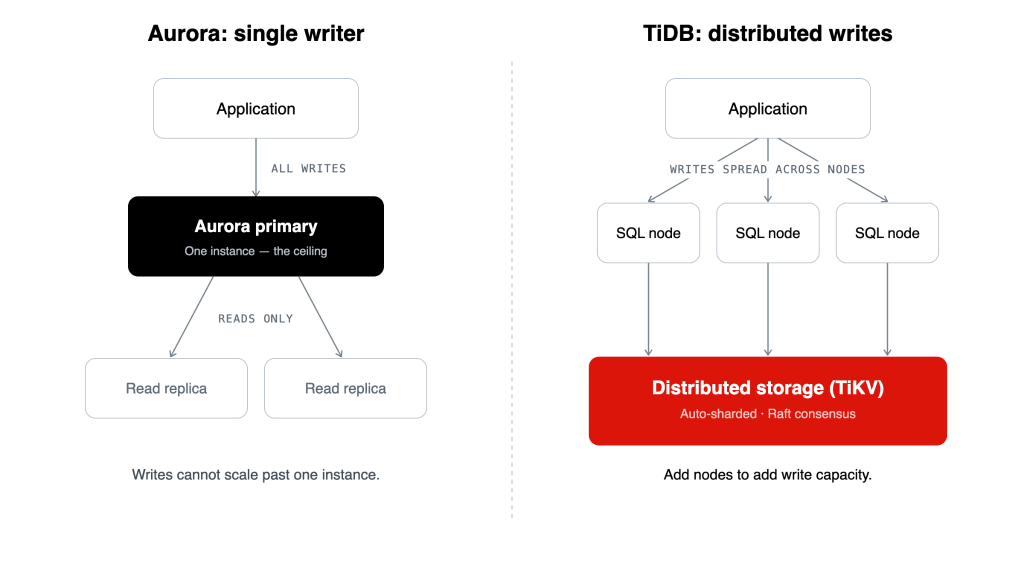
Figure 1. Amazon Aurora routes all writes through one primary instance; TiDB spreads writes across nodes backed by distributed storage.
TiDB separates compute from storage. A stateless SQL layer handles connections and query planning, and a distributed storage layer (TiKV) holds the data, split automatically into ranges and kept consistent with the Raft consensus protocol. Adding write capacity means adding nodes. There is no single primary to outgrow, and there is no sharding logic for you to write, because the database distributes the data itself.
The part that matters most if you are on Aurora MySQL is compatibility. TiDB speaks the MySQL wire protocol, so your existing drivers, ORMs, and most of your SQL keep working. The target is a horizontally scalable database that still looks like MySQL to your application. That is the whole difference between changing your database and rewriting your stack.
And because the storage layer keeps a columnar replica of the same data, the cluster serves real-time analytics alongside the transactional workload, so you are not bolting a separate warehouse onto the system the way teams usually end up doing on Aurora.
The Honest Edge
Distributed SQL is not a magic word, and I am not going to pitch it like one. A distributed database adds network hops a single instance never had, and a few single-node query patterns need rethinking for a distributed engine. The honest framing is a swap of constraints. You trade a hard write ceiling and an eventual sharding project for a distributed architecture you operate from day one. For a team whose growth has already slammed into Aurora’s writer limit, that is almost always the better trade. Plaid is the customer example I point to most: It moved off managed MySQL to TiDB to get past exactly this scaling and operational ceiling, without rewriting its application on top of a hand-built sharding layer.
The Takeaway
Here is how the options compare on the three questions that matter when you have hit the writer ceiling:
| Option | Scales writes? | Keeps MySQL? | Who handles sharding? |
|---|---|---|---|
| Read replicas | No (reads only) | Yes | N/A |
| Aurora Serverless v2 | No (vertical only) | Yes | N/A |
| Application-level sharding | Yes | Yes | You, in app code |
| Aurora Limitless | Yes (sharded) | No (PostgreSQL only) | AWS runs the shards, you pick the key and the shard count is fixed at creation |
| Distributed SQL (TiDB) | Yes | Yes | The database, automatically |
Here is the mental model to keep. Vertical scaling buys you time, not headroom. Aurora’s runs out at a single instance, and the standard workarounds either solve a different problem or hand you a distributed-systems project to babysit. Aurora Limitless does scale writes out, but only for PostgreSQL workloads that shard cleanly, and the managed wrapper does not remove the sharding decisions, it just operates them for you. If you run MySQL-compatible workloads and you have hit the writer ceiling, a distributed SQL database is the path that scales writes sideways while leaving your application intact.
If you want to see what that migration actually looks like, our Amazon Aurora vs. TiDB comparison breaks down the architectural differences side by side.
자주 묻는 질문
Does Amazon Aurora Limitless support MySQL?
No. Aurora Limitless is PostgreSQL-compatible only, and AWS has not announced plans to support other engines. If you run Aurora MySQL and need horizontal write scaling, Limitless is not an option for you.
Is Amazon Aurora Limitless actually limitless?
It scales writes well beyond a single instance, but the name oversells it. Limitless runs only on the I/O-Optimized configuration, the router and shard count is fixed when you create the shard group, capacity tops out at 6,144 ACUs before you have to contact AWS, and there is a quota of five Limitless clusters per Region. It is horizontal scaling with edges, not an unbounded resource.
What is the largest Amazon Aurora instance size?
As of mid-2026, the largest Aurora instance class is db.r8g.48xlarge, with 192 vCPUs and 1,536 GiB of memory, powered by AWS Graviton4. It is the top of Aurora’s vertical scaling range; there is no larger single instance available.
Can Amazon Aurora scale writes horizontally?
Standard Aurora cannot. It runs a single writer instance per cluster, so write throughput is capped by that one instance. Aurora Limitless Database adds horizontal write scaling through sharding, but it is available only for Aurora PostgreSQL, not Aurora MySQL.
Do Amazon Aurora read replicas help with write performance?
No. Aurora read replicas serve read traffic only and take no write load off the primary. They also introduce replica lag, which can break read-after-write consistency. They are the right tool for read bottlenecks, not write bottlenecks.
What is the difference between Amazon Aurora Limitless and a distributed SQL database like TiDB?
Aurora Limitless shards a PostgreSQL workload across multiple writer instances and requires you to choose shard keys and manage data collocation. A distributed SQL database like TiDB distributes data automatically across nodes, scales writes by adding nodes, and supports the MySQL wire protocol, so a MySQL-compatible application can move to it without rewriting around a sharding layer.
How do I migrate from Amazon Aurora to TiDB without rewriting my application?
Because TiDB is compatible with the MySQL wire protocol, existing MySQL drivers, ORMs, and most SQL continue to work. The migration focuses on data movement and validation rather than rewriting application code around shards. See the Aurora vs. TiDB comparison and the Plaid customer story for what the process involves in practice.
Experience modern data infrastructure firsthand.

TiDB Cloud 전용
예측 가능한 워크로드를 위한 완전 관리형 클라우드 DBaaS
TiDB Cloud 스타터
워크로드 자동 확장을 위한 완전 관리형 클라우드 DBaaS