

An open-source starter kit for building a “Lovable.dev”-style AI agent
More and more, we’re seeing AI agents build entire applications from a single prompt. Platforms like Lovable.dev and Manus are pioneering this space. Many of them are using TiDB Cloud to power their data layer. So, we decided to build one too, as a public, open-source dev kit available on GitHub that you can use as a starting point to build your own AI-driven development platform.
What can this agent do?
This agent is an AI chat app and codegen platform that ties together everything you need to prompt (i.e., vibe code) complete web applications end-to-end. It can:
- Generate complete web apps from a prompt: You describe what you want to build, and the agent scaffolds it automatically with the correct files, dependencies, and setup.
- Provision a TiDB Cloud database automatically: Every generated project gets its own TiDB Cloud cluster including database, schema, and a connection string fully preconfigured. Each instruction within the same project is versioned as a separate TiDB Cloud branch, ensuring isolated and trackable iterations.
- Track project versions: The agent stores every generated app and its database credentials (user, password, branch info), so you can revisit previous versions or roll back safely. Most importantly, your database always stays in sync with the selected project version.
- Run and preview apps instantly: Test each generated project directly from the UI or open the preview URL immediately.
- Keep context between generations: The agent remembers your previous instructions and builds on them, enabling iterative refinement instead of isolated one-shot generations.
- Scale down when idle: Each generated app uses TiDB Cloud, which automatically scales to zero when unused.
Architecture Overview
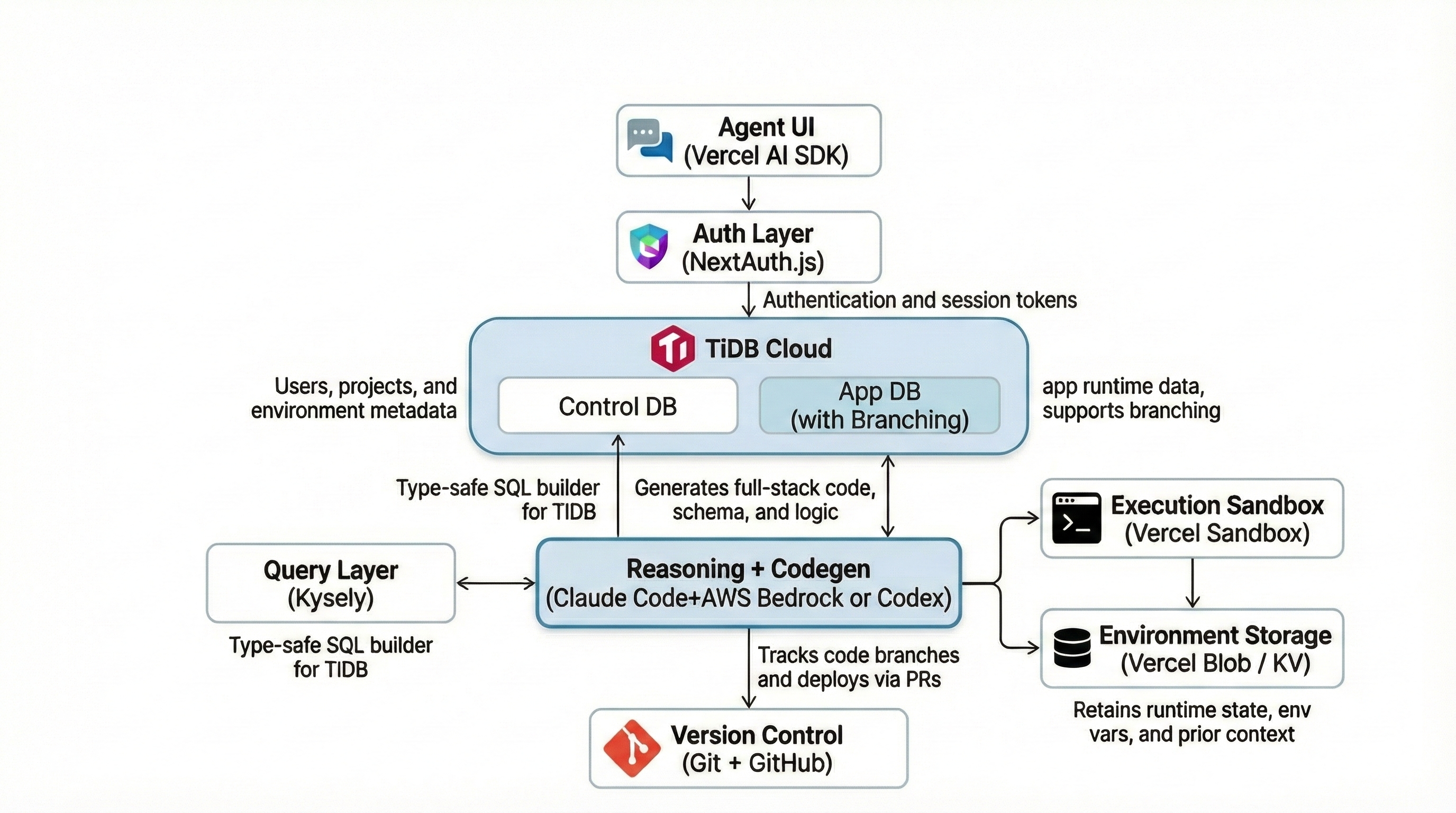
This architecture transforms natural-language prompts into production-ready web apps by combining:
- Codex (gpt-5.1-codex) or Claude Code for reasoning and codegen
- TiDB Cloud for cluster-level, branchable data environments
- Kysely for type-safe SQL
- Vercel for execution and deployment
- GitHub for version control
At the center of this stack is TiDB Cloud, acting as the central nervous system for the entire operation. It serves as both the control-plane database for the platform itself and provides the branchable, on-demand data environments for every app the agent generates.
How It Works: The Agent’s End-to-End Flow
This entire process can be broken down into two key parts: the tools the agent needs to do its job, and the step-by-step workflow it follows to build an application.
Part 1: The Agent’s Toolkit
Before the agent can generate or deploy anything, it must authenticate itself against all the external systems it orchestrates. These credentials form the control plane — the unified interface through which the agent provisions environments, generates code, manages data, and ships applications.
The agent requires:
- GitHub tokens: Creates repositories, pushes generated code, and manages branches. GitHub becomes the source of truth for code checkpoints.
- Vercel tokens: Creates ephemeral sandboxes, uploads build artifacts, and deploys web apps. Vercel acts as the execution layer.
- Codex or Claude Code API keys: Enable reasoning and planning. The model acts as the brain of the system.
- TiDB Cloud API keys: Allow the agent to programmatically create, manage, and branch TiDB Cloud clusters. This provides isolated data environments and the backbone for safe iteration.
Together, these credentials let the agent fully automate the lifecycle: plan → provision → generate → migrate → deploy → iterate.
Part 2: The App-Building Workflow in Action
Now, let’s see how the agent uses its toolkit in a real-world scenario. From the initial prompt to the final deployment, the agent follows a precise, automated sequence to turn an idea into a running application.
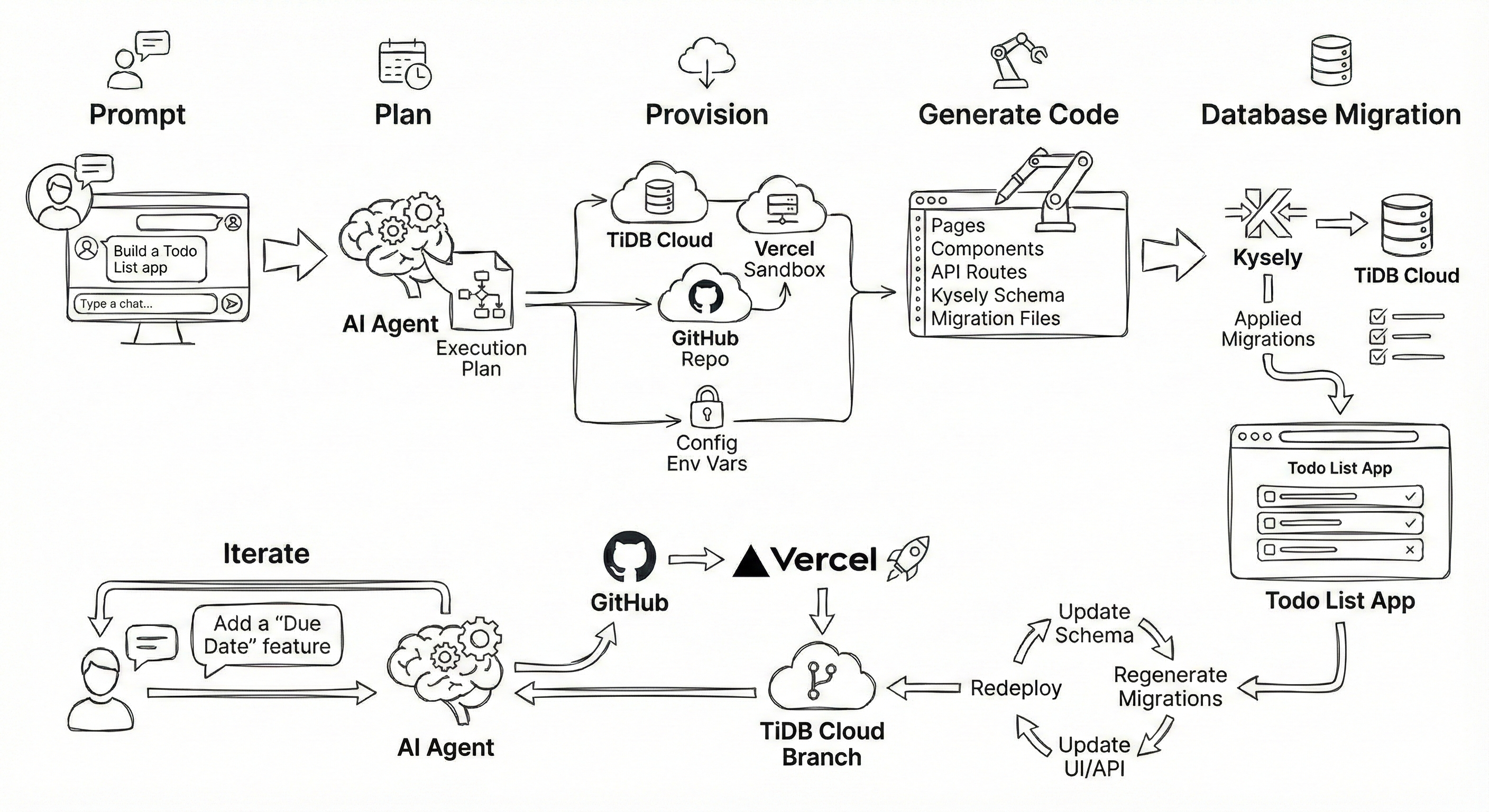
Step 1: Prompt
It begins when the user creates a request, such as: “Build a Todo List app.”
Step 2: Plan
Immediately upon receiving the prompt, the model analyzes the requirements and generates a comprehensive execution plan.
Step 3: Provision
Once the plan is set, the agent provisions the necessary infrastructure. It creates a new TiDB Cloud cluster, a Vercel Sandbox, and a GitHub repo while simultaneously configuring the required environment variables.
Step 4: Generate Code
With the environment ready, Codex or Claude Code proceeds to generate the application code. This includes creating pages, components, and API routes, alongside the Kysely schema and migration files.
Step 5: Database Migration
Next, to ensure data consistency, Kysely applies the typed migrations directly to the TiDB Cloud cluster.
Step 6: Deploy
Following the successful migration, the agent commits the code to GitHub and automatically triggers a Vercel deployment to bring the app live.
Step 7: Iterate with Follow-Up Instruction
Finally, the process becomes cyclical. For example, when you provide a follow-up instruction like “Add a username field,” the agent creates a new TiDB Cloud branch. It then updates the schema, regenerates and applies migrations, updates the UI/API code, and redeploys. Because of this branching capability, everything stays isolated and fully reversible.
Magic Features: Where It All Clicks
While the workflow seems straightforward, a few key techniques are what make this system robust, safe, and efficient. Let’s look at the ‘magic’ that makes it all click.
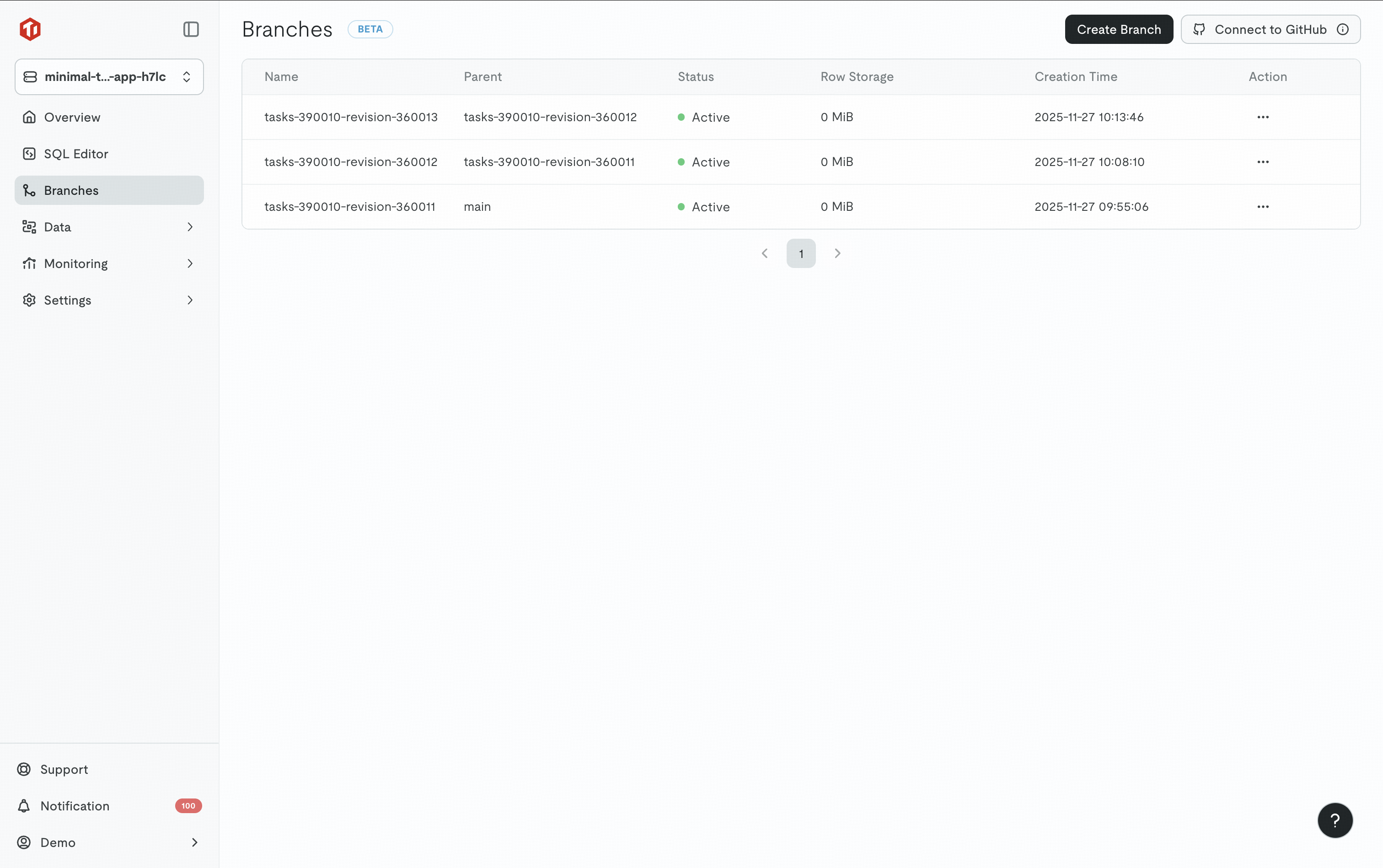
Technique 1: Syncing Code and Data with Git + TiDB Branches
Every instruction becomes a lightweight checkpoint for both code and data. Each version stores the Git repo name and branch name alongside the TiDB Cloud cluster ID and branch name, ensuring perfect code–data synchronization.
Example: Creating a TiDB Cloud Branch Programmatically
import fetch from "node-fetch";

const SERVERLESS_API_BASE = "https://serverless.tidbapi.com/v1beta1";

async function createBranch(clusterId, newBranchName, publicKey, privateKey) {
  const url = `${SERVERLESS_API_BASE}/clusters/${clusterId}/branches`;
  const body = JSON.stringify({ displayName: newBranchName });

  const response = await fetch(url, {
    method: "POST",
    headers: {
      "Content-Type": "application/json",
      Authorization:
        "Basic " + Buffer.from(`${publicKey}:${privateKey}`).toString("base64"),
    },
    body,
  });

  if (!response.ok) {
    const text = await response.text();
    throw new Error(`Failed to create branch: ${response.status} ${text}`);
  }

  const data = await response.json();
  return data.branchId;
}

createBranch(
  "1234567890",
  "new-feature-branch",
  process.env.TIDB_CLOUD_PUBLIC_KEY,
  process.env.TIDB_CLOUD_PRIVATE_KEY
)
  .then((branchId) => console.log("Branch created:", branchId))
  .catch(console.error);
Technique 2: Safe, Type-Safe Schema Migrations with Kysely
When the agent needs to change the schema, it generates a Kysely migration file. This makes schema evolution safe, reversible, and fully automated.
Example: A Kysely Migration File
import type { Kysely } from "kysely";

export async function up(db: Kysely<any>) {
  await db.schema
    .alterTable("todo_list")
    .addColumn("username", "varchar(255)", (col) => col.notNull().defaultTo(""))
    .execute();
}

export async function down(db: Kysely<any>) {
  await db.schema
    .alterTable("todo_list")
    .dropColumn("username")
    .execute();
}
This is critical for iterative development. Because Kysely generates both an “up” and a “down” migration for every schema change, the agent can not only apply new structures but also safely reverse them. This ensures that every iteration is clean and fully reversible without manual database intervention.
Technique 3: On-Demand Dev Environments with Scale-to-Zero
TiDB Cloud automatically scales down to $0 when idle. This enables:
- Ephemeral, AI-generated apps.
- On-demand development environments.
- Branch-per-instruction workflows.
- Burst-heavy workloads from agents.
The agent can create many isolated environments without persistent costs.
Wrapping Up
This starter kit is more than just code; it’s a blueprint for building dynamic, AI-driven applications. The key takeaway is treating your database not as a static box, but as a programmable, API-driven resource. We’ve open-sourced the entire project for you to explore. We encourage you to fork the repo, use the code, and see what you can create.
Ready to Build Your Own? Try TiDB Cloud for free to test out the database branching and scale-to-zero features used in this project. No credit card is required to get started.
Spin up a database with 25 GiB free resources.
TiDB Cloud Dedicated
A fully-managed cloud DBaaS for predictable workloads
TiDB Cloud Starter
A fully-managed cloud DBaaS for auto-scaling workloads