
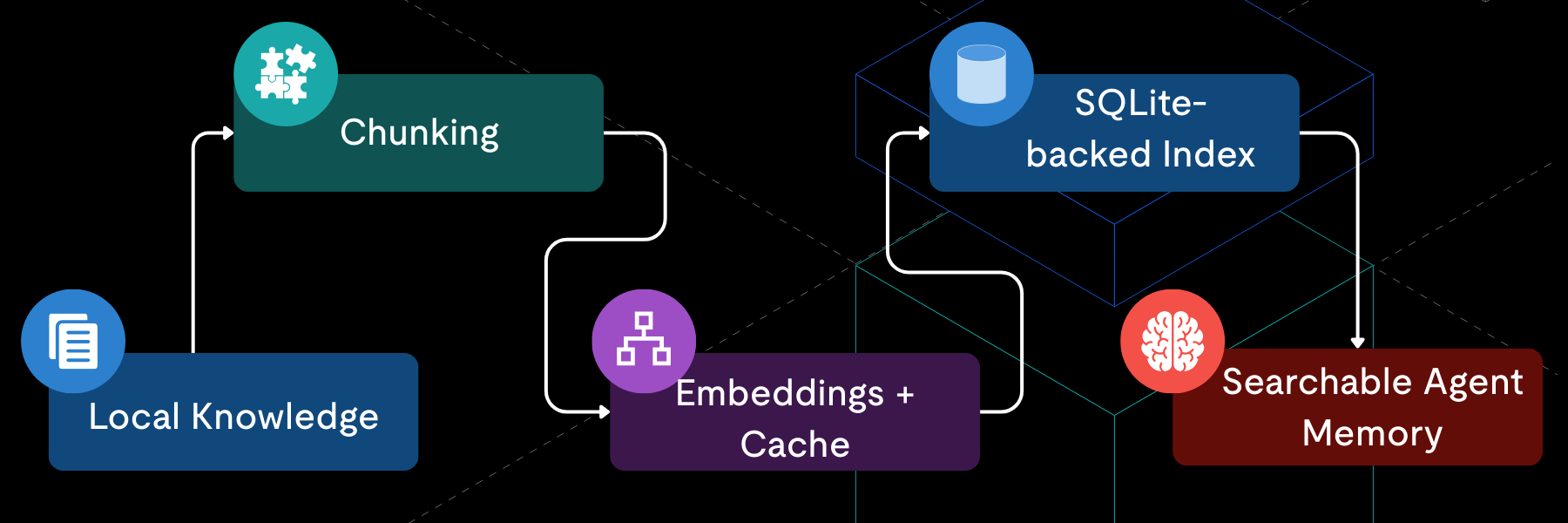
Editor’s Note: At PingCAP, we build distributed systems (TiDB), but we appreciate elegant engineering at any scale. OpenClaw demonstrates a perfect use case for local-first RAG databases: when you need zero-ops, total data privacy, and instant startup for a single user, SQLite is a highly pragmatic choice.
We believe in choosing the right tool for the job. SQLite excels on the desktop; TiDB is built for the cloud and scale. Understanding the boundaries of the local architecture helps us understand when (and why) we eventually graduate to distributed systems.
For now, let’s dive into how OpenClaw leverages a local file to build a personal RAG system.
Analysis Context:
- Target Project: OpenClaw (and variants Moltbot/ClawdBot)
- Version Analyzed:
mainat9025da2(2026-01-30) - Scope:
src/memory/*implementation
OpenClaw advertises “Persistent Memory” as a core promise: it remembers your context and becomes uniquely yours. If you read that as an engineer, the natural follow-ups are: Where is it stored? Do I need to run a Docker container? Is it sending my data to a vector cloud?
The answer lives in src/memory: OpenClaw persistent memory is a RAG-lite local indexing system powered entirely by SQLite.
It chunks your local Markdown knowledge, generates embeddings, and stores the resulting index in a local .sqlite file. Retrieval is done via vector search, keyword search, or a hybrid of both.
The Challenges of Desktop RAG for AI Agents
Building a memory system for a personal AI agent comes with a unique set of constraints that differ wildly from server-side RAG:
- Zero-Ops: Users should not have to install Postgres, run Docker, or manage credentials just to use an agent.
- Local-First: The “Knowledge Base” is usually just a folder of Markdown files (
MEMORY.md) on the user’s disk. The index needs to respect this locality. - Resilience: The system must work even if advanced features (like local vector extensions) fail to load.
Why SQLite is the Best Database for Local-First AI
Given these constraints, the codebase shows a clear decision path.
Why not a Vector Database? Dedicated vector databases offer powerful indexing, but they typically assume a service-oriented architecture (ingested data, separate processes). For a local tool, asking users to run a separate vector service introduces significant friction.
Why not MySQL or PostgreSQL? While we advocate for full RDBMSs in production, they introduce operational overhead on a personal machine. OpenClaw needs to be “download and run.” Requiring a local mysqld process or valid connection strings violates the zero-config goal.
The Decision? SQLite fits this specific niche well:
- No Server Dependency: No ports, no background processes.
- Single-File Portability: The entire index is just a
.sqlitefile, making backups trivial. - Ecosystem: With extensions like
FTS5(Full-Text Search) andsqlite-vec(Vector Search), it provides a functional RAG stack in a single binary.
| Feature | SQLite (OpenClaw) | Dedicated Vector DB | Traditional RDBMS |
| Setup | Zero-Ops (Download & Run) | Requires separate service/Docker | Needs server process & config |
| Portability | Single .sqlite file | High overhead to move data | Complex migration |
| Search | Vector + Keyword (Hybrid) | Specialized Vector | Primarily Keyword/Relational |
Implementing Vector Search and Hybrid Retrieval in SQLite
OpenClaw treats SQLite not just as storage, but as the state machine for the indexing process.
The Data Flow
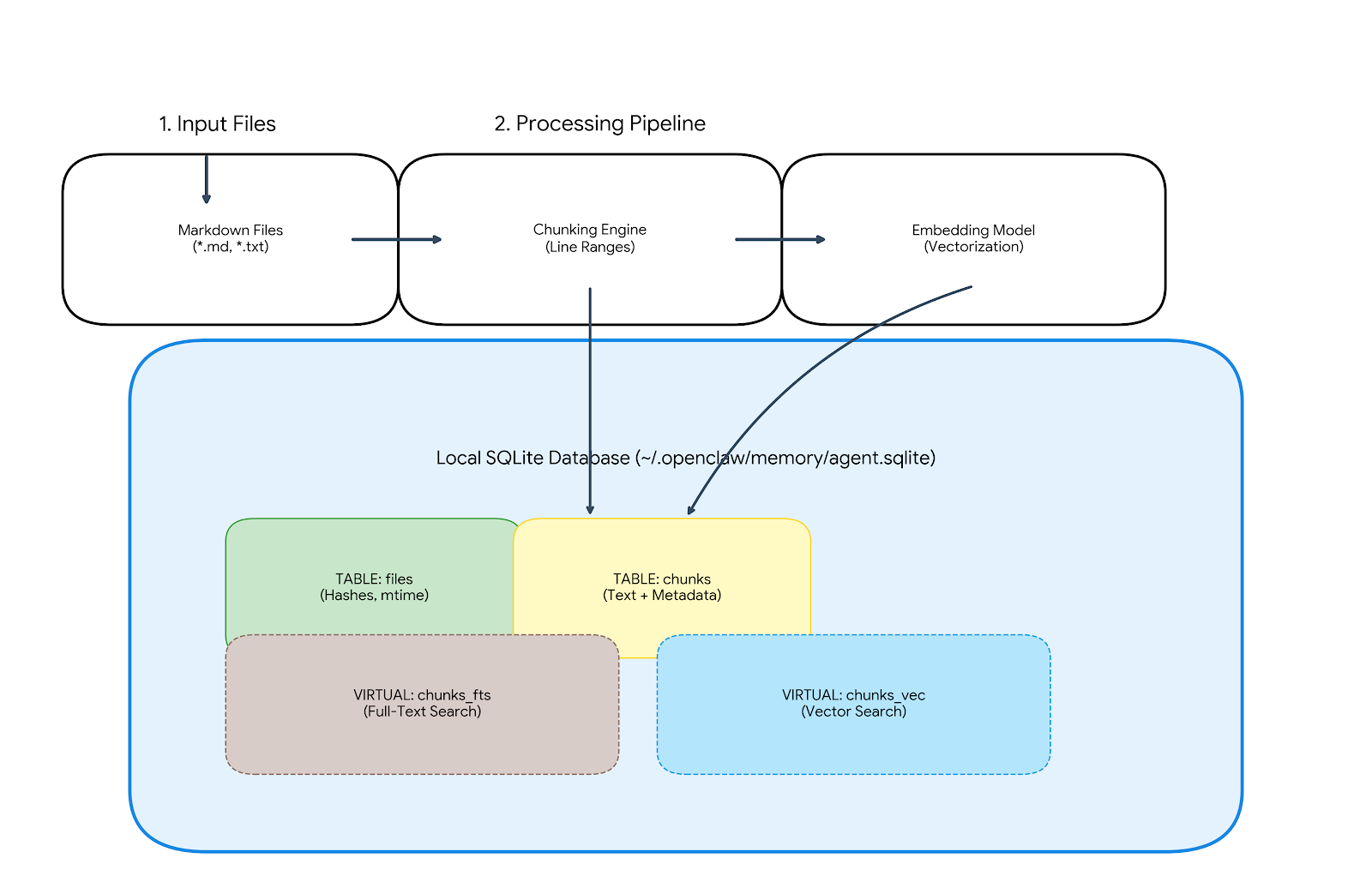
- Input: Markdown files (
memory/**/*.md) and session transcripts. - Processing: Chunks text by line ranges and generates embeddings.
- Output: Top-K chunks fed into the prompt builder.
The Storage Layout
The index is stored in ~/.openclaw/memory/{agentId}.sqlite (or ~/.clawdbot, ~/.moltbot depending on your fork).
~/.openclaw/
└── memory/
    ├── my-agent.sqlite       # The active index
    ├── my-agent.sqlite-wal   # Write-Ahead Log
    └── my-agent.sqlite-shm   # Shared Memory
The database consists of four core tables and two optional virtual tables:
- files: Tracks
mtime, size, and content hashes to skip re-indexing unchanged files. - chunks: The source of truth. Stores the text, line ranges, and JSON-serialized embeddings.
- chunks_vec (Virtual): If
sqlite-vecis loaded, this table stores the binary float vectors for fast similarity search. - chunks_fts (Virtual): If FTS5 is available, this table indexes text for keyword search.
The Code: Indexing and Retrieval
Let’s look at how OpenClaw queries this structure. We prioritize graceful degradation. That means if the vector extension is missing, the system falls back to a slower, more functional path.
1. Vector Search (The Fast Path)
When sqlite-vec is available, we can perform vector similarity search directly in SQL.
The Query: We join the specialized vector table (chunks_vec) with our metadata table (chunks) to fetch the text context. Note the use of vec_distance_cosine for scoring.
SELECT c.id, c.path, c.start_line, c.end_line, c.text,
       vec_distance_cosine(v.embedding, ?) AS dist
FROM chunks_vec v
JOIN chunks c ON c.id = v.id
WHERE c.model = ?
ORDER BY dist ASC
LIMIT ?
The Mechanism: The returned dist is the cosine distance. Lower values indicate higher similarity. This approach pushes the computation into the database engine, keeping the Node.js process light.
2. The Fallback (The Safe Path)
If the user’s environment doesn’t support the native vector extension (a common issue with cross-platform Node.js modules), OpenClaw doesn’t crash. It falls back to a “brute-force” approach in JavaScript:
- Load candidate chunks from SQLite.
- Compute cosine similarity in memory using pure JS.
- Sort and return the Top-K.
This ensures the memory feature remains functional, even if it performs slower on larger datasets.
The Resilience Logic
OpenClaw uses a try-catch pattern to detect the presence of the sqlite-vec extension. If the extension fails to load or the query throws an error, it pivots to a “brute-force” memory calculation.
async function searchMemory(queryVector, limit = 5) {
  try {
    // 1. THE FAST PATH: Native Vector Search [cite: 58]
    // Utilizes the 'sqlite-vec' extension for database-level cosine distance[cite: 59, 61].
    return await db.all(`
      SELECT c.text, vec_distance_cosine(v.embedding, ?) AS dist
      FROM chunks_vec v
      JOIN chunks c ON c.id = v.id
      ORDER BY dist ASC LIMIT ?`, [queryVector, limit]); [cite: 63, 68, 69]

  } catch (err) {
    console.warn("sqlite-vec not found. Falling back to JS-based search."); [cite: 73]

    // 2. THE SAFE PATH: Brute-Force JavaScript [cite: 72, 74]
    // Load all candidates and compute similarity in the Node.js process[cite: 75, 76].
    const allChunks = await db.all("SELECT id, text, embedding FROM chunks"); [cite: 75]

    return allChunks
      .map(chunk => ({
        ...chunk,
        dist: cosineSimilarity(queryVector, JSON.parse(chunk.embedding)) // Pure JS calculation [cite: 53, 76]
      }))
      .sort((a, b) => a.dist - b.dist) // Sorting manually in memory [cite: 76]
      .slice(0, limit); [cite: 76]
  }
}
3. Hybrid Search (Best of Both Worlds)
For more accurate retrieval, we combine vector search (which understands meaning) with keyword search (which matches exact terms).
The Keyword Query: We use SQLite’s native FTS5 module with the BM25 ranking function.
-- Conceptual FTS Query
SELECT *, bm25(chunks_fts) as rank
FROM chunks_fts
WHERE chunks_fts MATCH 'OpenClaw AND Memory'
ORDER BY rank
We then merge these results with the vector results using a weighted scoring formula:
Providing the agent with a balanced view of the user’s knowledge.
Wrap Up
OpenClaw’s memory system is a lesson in right-sizing your architecture.
By choosing SQLite, the maintainers avoided the complexity of a distributed system for a single-user tool. They gained ACID compliance, portability, and a rich query language without the ops burden.
SQLite is the right tool for the job today because it offers total data privacy and instant startup for a single user. But “Technical Honesty” means knowing when to graduate. When you hit the scaling wall—where multi-tenancy and horizontal scale are required—you don’t have to change your SQL mindset; you just change your database.
However, architectures evolve. If you were to take this “memory” concept and scale it to a multi-tenant SaaS platform serving thousands of agents, the “local file” constraint would become a bottleneck. That is the moment to move from SQLite to a distributed SQL database like TiDB—keeping the SQL semantics you use, but adding the scale you need.
But for a local agent, a .sqlite file offers the right balance of simplicity and capability.
Experience modern data infrastructure firsthand.

TiDB Cloud Dedicated
A fully-managed cloud DBaaS for predictable workloads
TiDB Cloud Starter
A fully-managed cloud DBaaS for auto-scaling workloads