


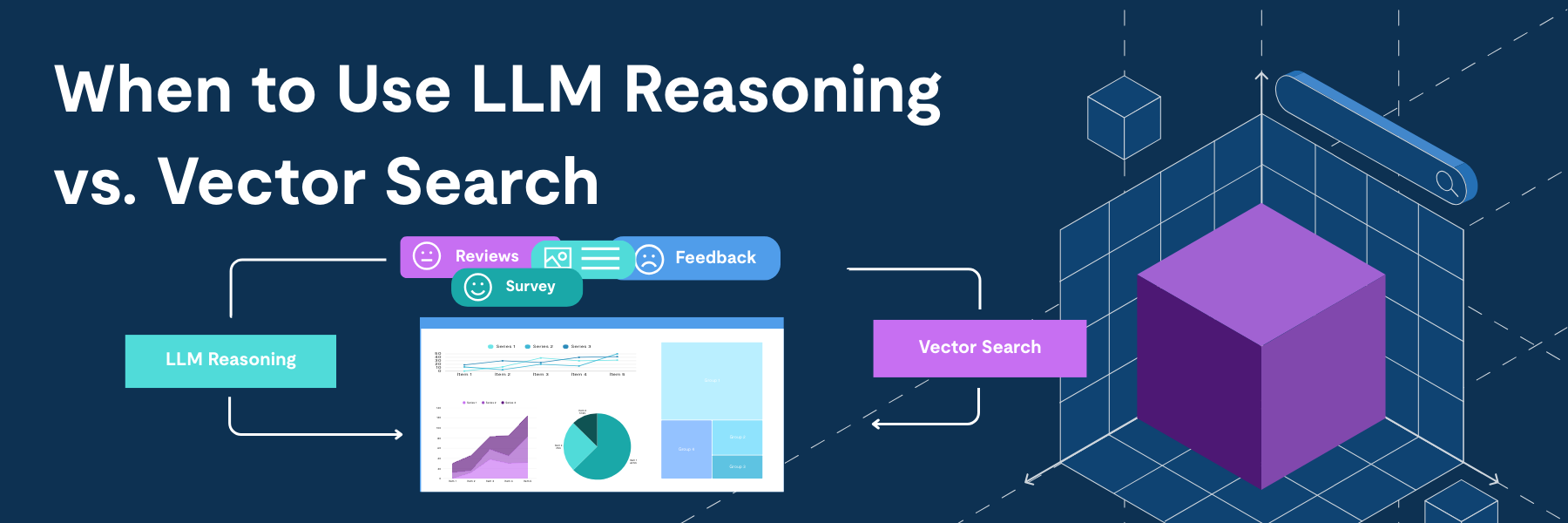
CrowdSnap, a TiDB Cloud user, builds an AI analytics platform where teams upload datasets—like reviews or surveys—and pull natural language insights: sentiment trends, correlations, turning messy data into sharp decisions.
In shaping their Prompt Analysis feature, the team hit a familiar AI crossroads: Lean on direct LLM calls (GPT via Azure OpenAI) for on-demand sentiment reasoning, or go with a vector database for quick, repeatable retrieval?
They put both to the test on real datasets (200-1,000 rows), measuring speed, costs, and accuracy. GPT edged out for single-shot runs (2-5s latency), but TiDB Vector Search dominated repeats (400x faster at 0.3s/query, $0.11 vs. $10-15 per 1,000 analyses), crossing break-even at just 51 queries.
Game-changer: A hybrid flow—GPT for sharp, context-rich generation; TiDB for embedding storage (Cosine distance matching). For AI devs scaling up, it’s a smart playbook: Prototype with LLMs, then stack TiDB for cost-smart, high-replay performance.
Enjoy the deep dive into the benchmarks, code snippets, and decision matrix—discover how to choose (or combine) for your next AI build.
The Decision Every AI Builder Faces
When I started building CrowdSnap’s Prompt Analysis feature, I hit a fork in the road that many AI developers encounter: should I use direct LLM calls for sentiment analysis, or invest in a vector database architecture?
Instead of going with gut feeling, I built both approaches and ran them head-to-head with real datasets. What I discovered challenged some of my assumptions about performance, cost, and when each approach makes sense.
This post shares the benchmarks, trade-offs, and lessons learned from implementing GPT-based direct analysis versus TiDB Vector Search for production sentiment analysis at scale.
Spoiler: The answer wasn’t A or B, but how to combine them.
What We’re Building
CrowdSnap’s Prompt Analysis lets users upload any dataset (surveys, reviews, feedback) and ask questions in natural language to uncover insights, sentiment patterns, and correlations. Think of it as “ChatGPT for your data,” but with the architectural challenge of doing this efficiently for hundreds or thousands of data points.
Why This Comparison Matters
The AI landscape is full of “best practices” that aren’t always backed by real data. You’ll hear:
- “Always use vector databases for AI apps”
- “LLMs are too expensive for production”
- “Vector search is always faster”
But are these true? And more importantly, when are they true?
This post cuts through the noise with actual benchmarks, real cost calculations, and honest trade-offs from building a production AI analytics platform.
Executive Summary
To understand real-world performance, I tested both approaches with progressively larger datasets:
| 200 Rows – GPT Direct: 26.2 seconds – TiDB Vector: 374.6 seconds (initial embedding) + 3.5 seconds (query) – Result: 238 documents analyzed with sentiment distribution | 500 Rows – GPT Direct: 29.3 seconds – TiDB Vector: 908.6 seconds (initial embedding) + 14.4 seconds (query) – Result: 608 documents processed | 1000 Rows – GPT Direct: 33.7 seconds – TiDB Vector: 1,733.6 seconds (initial embedding) + 26.5 seconds (query) – Result: 1,234 documents indexed |
The Pattern That Emerges
For initial analysis, GPT Direct is consistently faster. But here’s where it gets interesting: once TiDB has indexed your data, subsequent queries are lightning-fast.
For semantic similarity searches:
- GPT Direct: 120+ seconds per query (must re-analyze)
- TiDB Vector: 0.3 seconds per query (vector search)
- Speed advantage: TiDB is 400× faster for repeated queries
Cost at scale (1,000 analyses):
- GPT Direct: $10–15 recurring per 1,000 analyses
- TiDB Vector: $0.11 one-time indexing + $1–2/month for repeated queries
Bottom Line: GPT Direct wins for one-off analyses; TiDB Vector Search dominates for production apps with repeated queries and scale requirements.
Performance Analysis
Why TiDB embedding is slower initially:
- Rate limiting: Azure OpenAI embedding API limits (3 req/sec)
- Network overhead: Multiple round trips (client → server → Azure → TiDB)
- Batch processing: Sequential batch processing with delays
- Database writes: Inserting vectors + metadata for each document
Why TiDB queries are 400× faster:
- Vector indexing: Pre-computed embeddings enable instant similarity search
- Cosine distance: Optimized vector operations in TiDB
- No API calls: Query happens entirely in database
- Parallel processing: Database can handle concurrent queries efficiently
Break-even point calculation:
For a 1,000-row dataset:
- TiDB upfront cost: 1,733.6s (one-time)
- GPT per-query cost: 33.7s (recurring)
- Break-even: 1,733.6 ÷ 33.7 ≈ 51 queries
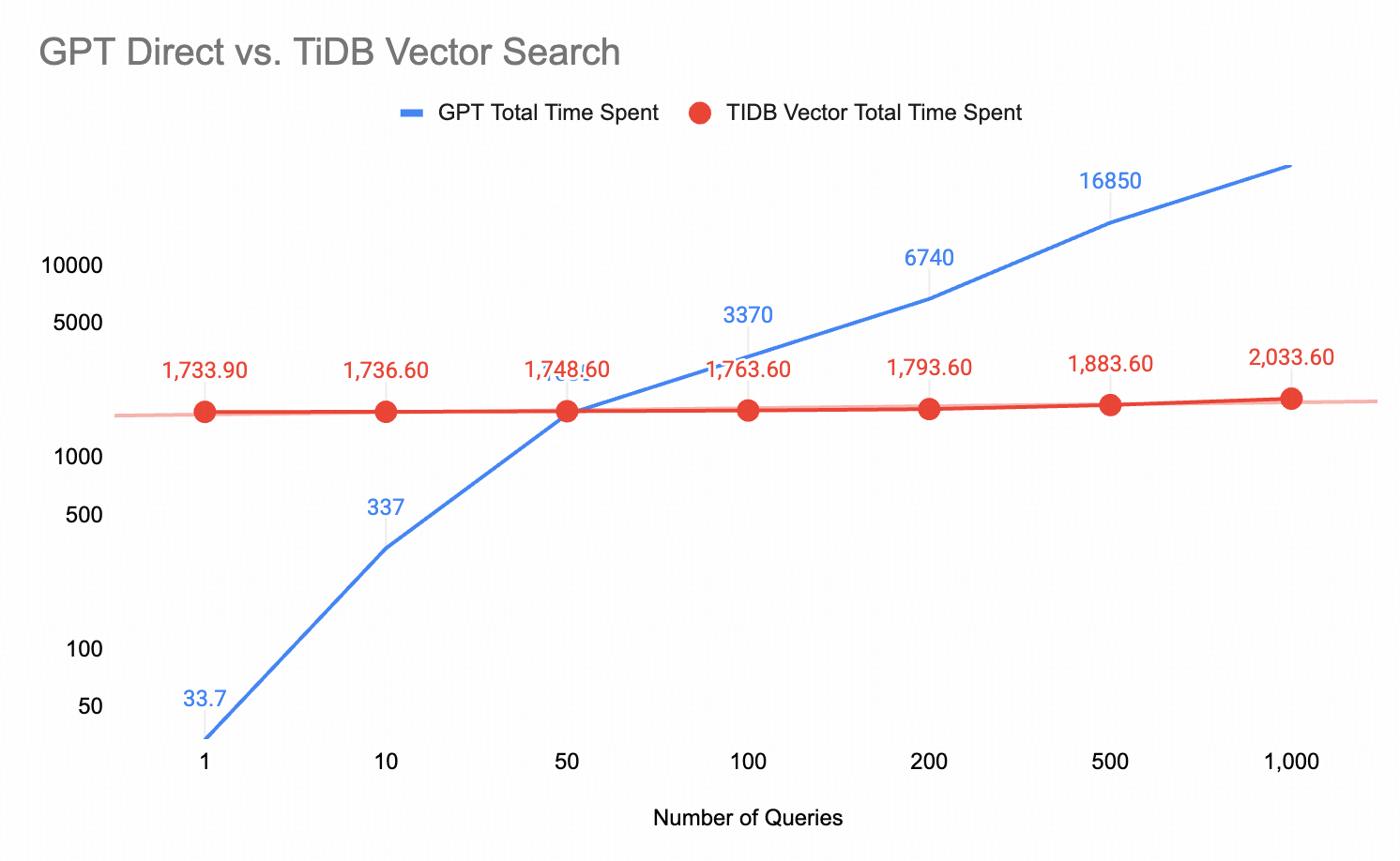
After 51 queries on the same dataset, TiDB becomes faster overall. For semantic similarity searches (0.3s vs 120s), TiDB wins after just 15 queries.
The Two Approaches I Tested
I built the same sentiment analysis feature twice using two fundamentally different architectural approaches.
While both implementations ultimately surface sentiment insights to the user, they do so through very different mechanisms, with distinct implications for performance, cost, and scalability.
Spoiler: the most effective solution wasn’t choosing one approach over the other, but understanding how to combine reasoning and semantic memory to build a system that scales.
Pathway 1: Direct LLM (Reasoning / Generation)
Uses Azure OpenAI’s GPT models to directly reason over raw text, generating sentiment classifications, summaries, and insights on demand through natural language understanding.
How it works:
Users upload data (Excel/CSV), select an analysis type, and provide a natural language prompt. The system sends the data and prompt to the GPT model, which analyzes the input and returns structured insights that are displayed immediately.

Analysis Types Supported
| 1.2.1 Sentiment Analysis – Positive/Neutral/Negative classification – Sentiment scoring – Distribution visualization – Contextual insights | 1.2.2 Word Cloud / Frequency Analysis – Keyword extraction – Frequency counting – Meaningful word filtering – Co-occurrence patterns |
| 1.2.3 Topic Clustering – Theme identification – Category grouping – Topic correlation – Trend detection | 1.2.4 Emotion Analysis – Emotion detection (joy, anger, sadness, etc.) – Emotional tone assessment – Intensity scoring – Emotional journey mapping |
Pathway 2: TiDB Vector Search + AI (Semantic Memory & Retrieval)
Uses Azure OpenAI embeddings to encode text into semantic vectors, which are stored and indexed in TiDB. Rather than generating new insights at query time, this approach enables fast retrieval, aggregation, and reuse of previously computed semantic and sentiment signals through vector similarity search and database analytics.
How it works:
Users upload data, and each text row is converted into a 1536-dimension vector via an API. The vectors are stored in TiDB along with metadata. When a user submits a query, it is also converted into a vector on the server side. TiDB then performs semantic similarity search to retrieve the most relevant documents, and the results, including sentiment scores, are returned from the server to the browser.
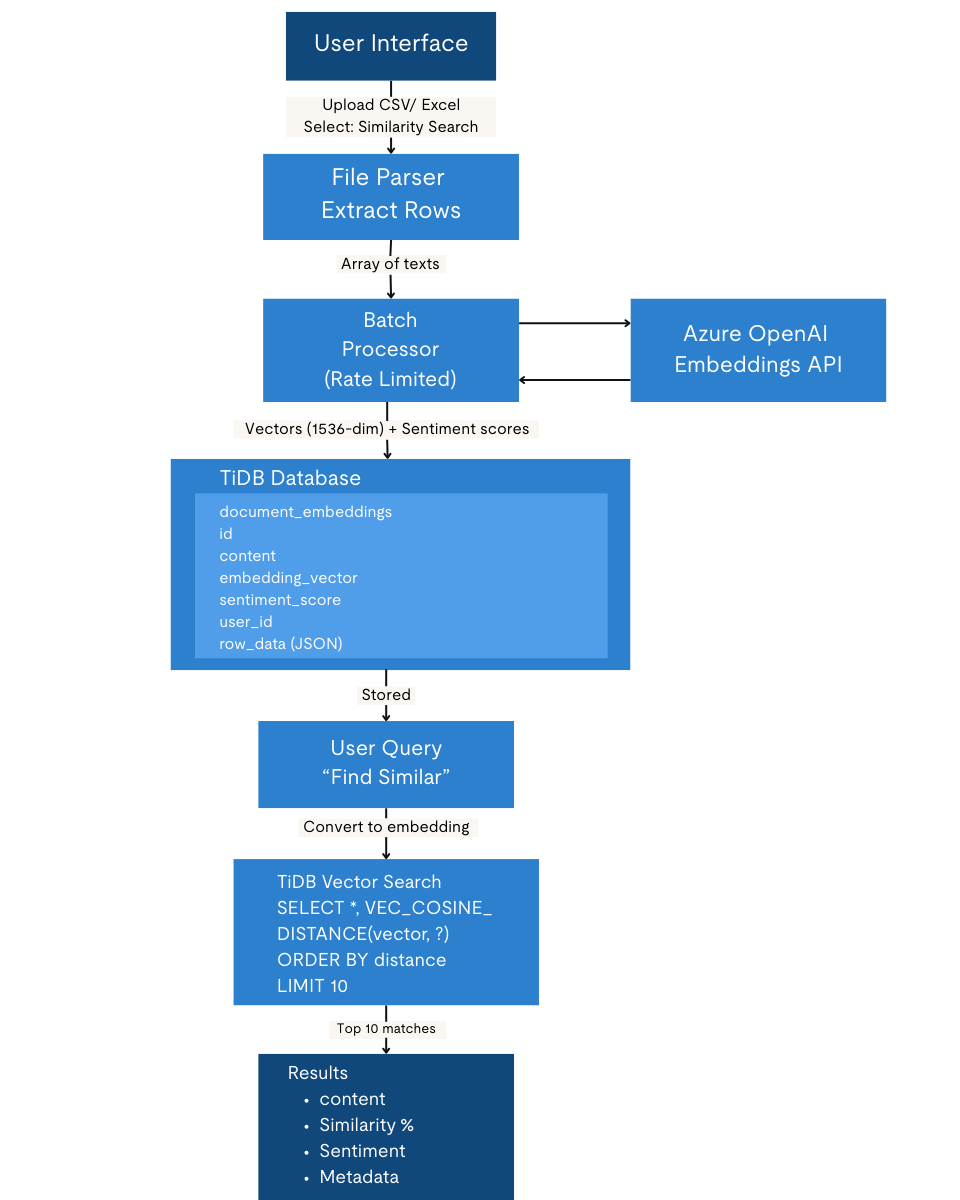
Features supported:
| 2.2.1 Semantic Search – Find similar feedback/responses – Query by meaning, not keywords – Cross-lingual understanding – Context-aware matching | 2.2.2 Sentiment Storage & Retrieval – Persistent sentiment scores – Historical trend analysis – User-specific filtering – Aggregate statistics |
| 2.2.3 Batch Processing – Process hundreds of texts – Store all embeddings – Analyze distributions – Export results | 2.2.4 Vector Operations – Cosine similarity – Nearest neighbor search – Clustering potential – Dimension reduction ready |
Generate embeddings
Below is a simplified example showing how each text row is converted into a 1536-dimension embedding using Azure OpenAI. This is the embedding that later gets stored and indexed for semantic search.
async function embedText(text) {
  const response = await azureClient.embeddings.create({
    model: 'text-embedding-ada-002',
    input: text,
  });
  return response.data[0].embedding; // 1536 dimensions
}
Store embeddings in TiDB
Once generated, embeddings are persisted in TiDB together with the original text and related fields. This allows the data to be reused for future queries instead of reprocessing it each time.
await db.insertDocumentEmbedding(
  text,
  embedding,      // VECTOR(1536)
  sentimentScore, // DECIMAL(10,4)
  metadata,       // JSON
  userId
);
Vector search in TiDB
When querying, TiDB performs vector similarity search using cosine distance to return the most relevant documents. This query represents the core retrieval path once embeddings are stored.
async searchSimilarDocuments(queryEmbedding, topK = 10, userId = null) {
  const vectorString = `[${queryEmbedding.join(',')}]`;

  const searchSQL = `
    SELECT
      id,
      content,
      sentiment_score,
      row_data,
      VEC_COSINE_DISTANCE(embedding_vector, ?) AS distance
    FROM document_embeddings
    ${userId ? 'WHERE user_id = ?' : ''}
    ORDER BY distance ASC
    LIMIT ?
  `;
Comparative Analysis
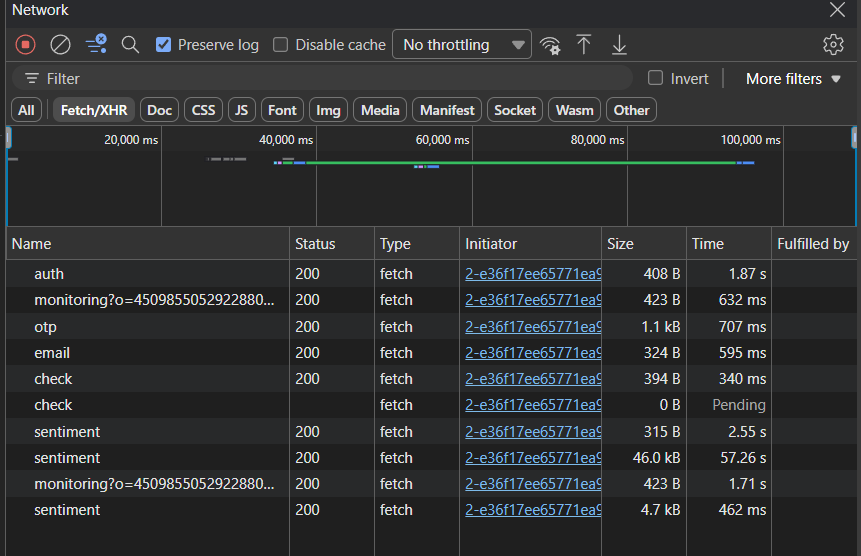
1.Performance: One-Time Analysis via Excel Upload (100 Rows)
Test to compare GPT sentiment analysis vs vector database for 100 rows from an Excel file, measuring performance time for each approach.
Data set 👉🏼[questions_on_header]
TiDB Vector Search (batch embedding + storage): 59.81s
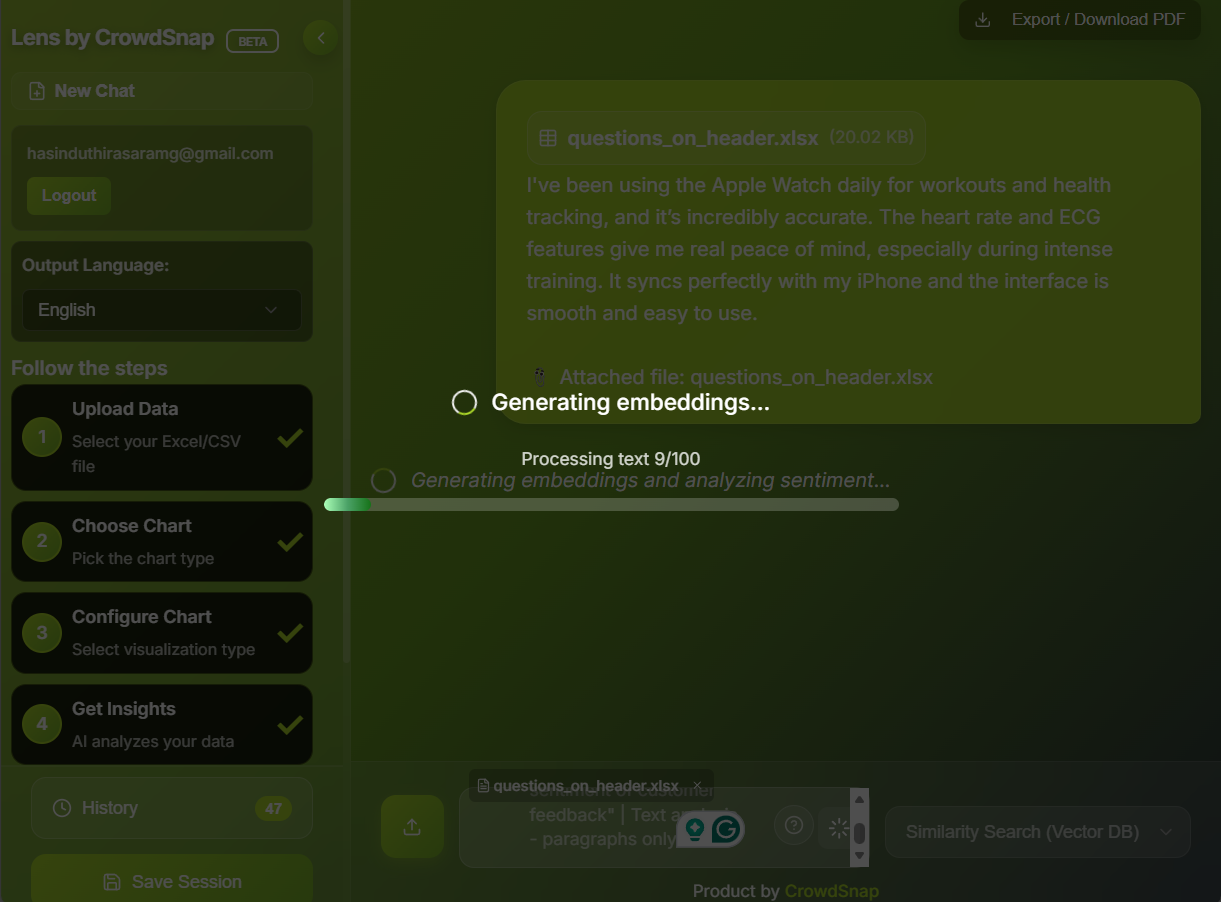
GPT Direct (single-step analysis): 44.47s
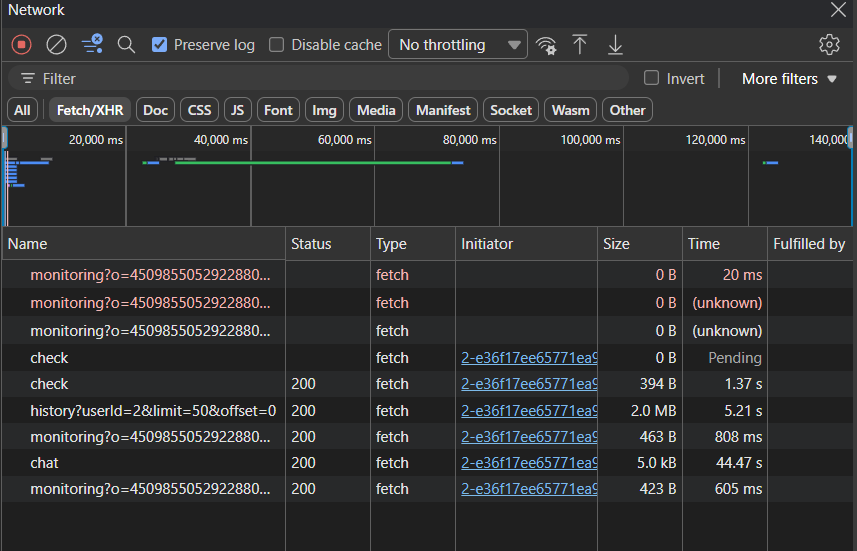
Result: GPT Direct completes the one-time analysis about 15 seconds faster, representing roughly a 25% latency improvement. This advantage comes from avoiding embedding generation and database write operations, which dominate the initial vector ingestion cost.
Why GPT is Faster (44.47s vs 59.81s)
| TiDB Vector Search overhead (59.81s includes), 1. Embedding generation – Converting text to vectors using Azure OpenAI (~2-3s per request) 2. Database insertion – Storing embeddings in TiDB (~1-2s) 3. Vector similarity search – Cosine similarity calculations 4. Network latency – Multiple round trips (client → server → Azure → TiDB) | GPT Direct API (44.47s includes), 1. Single API call – Direct sentiment analysis 2. No embedding step – Skips vector generation 3. No database operations – No storage overhead 4. Fewer network hops Client → server → GPT (done) |
The key difference is structural: vector search requires text to be embedded, stored, and queried before results are available, while GPT Direct analyzes the text in one end-to-end step and returns results immediately.
- Vector Search does: Text → Embedding → Store → Search → Result (4+ steps)
- GPT Direct does: Text → GPT Analysis → Result (2 steps)
| When Vector Search is better – Semantic similarity searches – Finding related content – Reusable embeddings for multiple queries – Offline analysis after initial indexing | When GPT Direct is better – One-time sentiment analysis – No need for similarity search – Speed is critical – Lower complexity needed |
| Metric | GPT Direct | TiDB Vector Search |
| Analysis Speed | 2–5 seconds | 0.1–0.5 seconds |
| Batch Processing | Sequential (slow) | Parallel (fast) |
| Scalability | Limited by API rate | Highly scalable |
| Cost per Query | $0.002–0.01 | $0.0001–0.001 |
| Response Time | Variable | Consistent |
| Concurrent Users | ~60 req/min limit | Depends on DB capacity |
2. Accuracy & Quality
| Aspect | GPT Direct | TiDB Vector Search |
| Sentiment Accuracy | 95%+ | 85–90% |
| Context Understanding | Excellent | Good |
| Nuance Detection | Superior | Moderate |
| Sarcasm/Irony | Detects well | Limited |
| Multi-language | Strong | Depends on embeddings |
| Custom Domain | Adaptable via prompts | Requires retraining |
3. Cost Analysis
| GPT Direct (per 1000 texts analyzed) – Input tokens: ~500 tokens/text × 1000 = 500K tokens – Output tokens: ~200 tokens/text × 1000 = 200K tokens – Cost: ~$10-15 per 1000 analyses – Monthly (10K texts): $100-150 | TiDB Vector Search (per 1000 texts) – Embedding generation: ~500K tokens input = $0.10 – Storage: 1000 vectors × 1536 dim × 4 bytes = 6MB = $0.01/month – Queries: ~1000 searches = $0.01 – Initial Cost: ~$0.11 (one-time) – Monthly (10K searches): $1-2 |
4. Decision Matrix: GPT Direct vs TiDB Vector Search
| Decision Dimension | GPT Direct | TiDB Vector Search | When to Choose |
| One-time Analysis | Excellent | Acceptable (ingestion overhead) | GPT Direct when results are needed once |
| Repeated Queries | Inefficient (reprocess each time) | Excellent (store once, query many times) | TiDB Vector for reuse-heavy workflows |
| Large Datasets (>1000 items) | Slower, costly | Scales efficiently with batch processing | TiDB Vector for volume and scale |
| Real-time Analysis | Yes | Yes | Both can support real-time use cases |
| Semantic Search | Limited | Purpose-built and fast | TiDB Vector for similarity search |
| Contextual / Complex Reasoning | Strong (nuance, sarcasm, explanation) | Limited to embedding quality1 | GPT Direct for deep understanding |
| Historical Queries & Trends | Not supported | Native via persistent storage | TiDB Vector for longitudinal analysis |
| Trend & Aggregate Analysis | Recomputed per request | Efficient SQL-based queries | TiDB Vector for dashboards & analytics |
| Data Persistence | None (stateless) | Full persistence | TiDB Vector for memory-based systems |
| Multi-user Platforms | Hard to isolate | User-level isolation via DB | TiDB Vector for SaaS products |
| Custom Insights Generation | Very flexible (prompt-driven) | Embedding-limited | GPT Direct for exploratory work |
| Export & Data Reuse | Limited | Full dataset export | TiDB Vector for downstream workflows |
| Cost at Scale | Linear growth | Sub-linear after ingestion | TiDB Vector for production economics |
| Implementation Complexity | Low | Medium–High | GPT for MVPs, TiDB for long-term systems |
| Production Readiness | Good for tools | Strong for platforms | TiDB Vector for production apps |
Current Implementation Status
| Pathway 1: GPT Direct Endpoints: POST /api/chat – Main analysis endpointAnalysis Types ✅ Sentiment Analysis (Sinhala & English) ✅ Word Cloud / Frequency ✅ Topic Clustering ✅ Emotion Detection Features ✅ Custom system prompts for each analysis type ✅ Bilingual output ✅ Structured JSON responses for charts ✅ Paragraph-based insights for text analysis ✅ Real-time processing ✅ Sentry error tracking |
| Pathway 2: TiDB Vector Embedding Database: ✅ TiDB Serverless cluster ✅ VECTOR(1536) support ✅ User isolation (user_id filtering) ✅ Sentiment score storage ✅ Metadata JSON storage Features: ✅ Azure OpenAI text-embedding-ada-002 ✅ Cosine similarity search ✅ Batch processing with rate limiting ✅ User-specific data isolation ✅ Sentiment scoring (positive/neutral/negative) ✅ Historical data retrieval ✅ Sentry monitoring |
Performance Benchmark: Repeated Analysis Under Load
Test Scenario: 100 Customer Reviews
GPT Direct Analysis
Processing: 100 texts
Method: Sequential API calls
Time: 180 seconds (3 minutes)
Cost: $1.50
Rate limit: Hit after 60 requests, paused
Result: Rich insights with context
TiDB Vector Analysis
Processing: 100 texts
Method: Batch embedding + storage
Embedding time: 30 seconds
Storage time: 5 seconds
Search time (10 queries): 2 seconds
Cost: $0.02 initial + $0.001 per query
Result: Fast semantic search, persistent storage
Scenario: Repeated Similarity Queries (Re-analysis vs Vector Retrieval)
GPT Direct
Query: "Find feedback similar to 'poor customer service'"
Method: Re-analyze all texts with custom prompt
Time: ~120 seconds (re-process all)
Cost: $1.20 per query
Accuracy: Excellent (understands context)
TiDB Vector
Query: "poor customer service"
Method: Generate embedding, vector search
Time: 0.3 seconds
Cost: $0.0001 per query
Accuracy: Very good (semantic matching)
Speed Winner: TiDB Vector (400x faster for similarity search)
Security & Privacy Comparison
| Aspect | GPT Direct | TiDB Vector |
| Data Storage | None (transient) | Persistent in DB |
| Data Retention | Microsoft 30 days* | Your control |
| User Isolation | None | user_id filtering |
| GDPR Compliance | Azure compliance | Your responsibility |
| Data Encryption | TLS in transit | TLS + at-rest |
| Audit Trail | API logs | Full DB audit |
| Right to Delete | Auto after 30 days | Manual deletion |
Scalability Analysis
| Pathway 1: GPT Direct Limitations – Rate limits: 60 requests/minute (TPM: 150K tokens/min) – Sequential processing (slow for batches) – Cost scales linearly with usage – No caching mechanism Scaling Strategy – Request batching – Caching common analyses – Rate limit management – Multiple API keys (expensive) | Pathway 2: TiDB Vector Advantages – Database scales horizontally – Parallel query processing – Cost scales sub-linearly – Built-in caching Scaling Strategy – Add TiDB compute nodes – Index optimization – Read replicas for queries – Partition by user_id Scalability Winner: TiDB Vector (better for growth) |
Developer Experience
| Pathway 1: GPT Direct Pros: ✅ Simple API integration ✅ No database setup ✅ Flexible prompt engineering ✅ Fast prototyping Cons: ❌ Managing rate limits ❌ Handling timeouts ❌ No data persistence ❌ Result caching complexity Code Complexity: Low | Pathway 2: TiDB Vector Pros: ✅ SQL familiarity ✅ Standard CRUD operations ✅ Powerful querying ✅ Data persistence built-in Cons: ❌ Database schema design ❌ Vector operations learning curve ❌ Embedding management ❌ Batch processing logic Code Complexity: Medium-High |
Technical References
- Azure OpenAI:https://learn.microsoft.com/en-us/azure/ai-services/openai/
- TiDB Vector Search:https://docs.pingcap.com/ai/vector-search-overview/
- OpenAI Embeddings:https://platform.openai.com/docs/guides/embeddings
My Decision Framework: When to Use What
After running these experiments, here’s the decision tree I used:
Choose GPT Direct When:
- You need one-time analysis or ad-hoc insights
- Your dataset is small
- You need maximum accuracy and nuanced understanding
- You’re in the prototyping phase and want fast iteration
- You don’t need to query the same data repeatedly
Choose TiDB Vector Search When:
- You’re building a production application
- Users will run multiple queries on the same dataset
- You need semantic similarity search (finding related content)
- Cost efficiency matters at scale
- You have large datasets
- You need multi-user isolation and data persistence
- Data privacy matters, and you want to avoid the cost and operational overhead of running privacy-preserving workflows purely on LLMs.
How We Used GPT and TiDB Vector Search Together
For CrowdSnap, I ended up implementing both approaches:
- GPT Direct for the initial “quick insights” feature where users want instant sentiment analysis.
- TiDB Vector Search for the “deep analysis” mode where users can explore patterns, find similar responses, and run multiple queries.
This hybrid approach gives users the best of both worlds: speed when they need it, and power when they want to dig deeper.
Key Lessons Learned
- Vector databases aren’t always faster upfront: The initial embedding generation takes time. TiDB Vector Search shines when you need to query the same data multiple times.
- Cost scales very differently: With GPT Direct, every analysis costs money. With TiDB, you pay once to index, then queries are nearly free.
- Accuracy vs. Speed is a real trade-off: GPT’s contextual understanding is superior, but for many use cases, vector similarity is “good enough” and much faster.
- Architecture matters for scale: If you’re building for multiple users or large datasets, the vector database architecture pays dividends in performance and cost.
Try It Yourself
CrowdSnap Analysis focuses on fast, accurate analytics with privacy by design. By using MPC (Multi-Party Computation) in its underlying infrastructure, data can be analyzed without direct access to raw inputs, reducing privacy risk and operational overhead.
Want to experiment with these approaches? Check out the CrowdSnap Prompt Analysis beta to see both implementations in action.
For developers interested in building similar features, TiDB‘s vector search capabilities make it surprisingly straightforward to add semantic search to your applications without managing separate vector databases.
Tech Stack: Azure OpenAI (GPT-4 & text-embedding-ada-002), TiDB Cloud, Next.js
- TiDB can be combined with GPT to generate explanations, further enhancing hybrid accuracy—for example, by using vector retrieval results as input to LLM prompts to balance nuance and speed. ↩︎
Spin up a database with 25 GiB free resources.



TiDB Cloud Dedicated
A fully-managed cloud DBaaS for predictable workloads
TiDB Cloud Starter
A fully-managed cloud DBaaS for auto-scaling workloads