

Key Takeaways
- TiDB is MySQL-compatible, so Prisma connects with
provider = "mysql"and existing MySQL schemas work unchanged. - Use the
@tidbcloud/prisma-adapterto query over HTTPS instead of TCP — this is required for serverless functions and edge runtimes (Vercel Edge, Cloudflare Workers) and avoids TiDB Cloud’s connection limits. - The adapter only covers Prisma Client queries. Migrations,
db push, and introspection still need a standard TCP connection, so keep both connection paths in your environment config. - When modeling AI app data (sessions, messages, tool calls, memory), use
uuid()orcuid(2)instead of auto increment orcuid()for primary keys to avoid write hotspots, and add composite indexes like[sessionId, createdAt]for chat history reads.
Introduction
Prisma is the ORM (Object-Relational Mapper) most teams use for a TypeScript project, and it connects to TiDB through the standard MySQL provider, so a schema written for MySQL works unchanged. The connection is where the work is. Serverless functions and edge runtimes open and discard connections on every invocation, which is the traffic pattern a long-lived TCP pool handles the worst.
This guide covers installing the adapter, configuring the environment, defining a schema, running queries and transactions, then modeling the data an AI application persists. It also covers what the adapter does not do, since migrations and introspection still need a TCP connection.
While we use TiDB Cloud Starter to illustrate the steps, the same steps work for TiDB Cloud Essential. If you are on Dedicated, Premium and BYOC tier, follow this doc instead.
What is Prisma ORM?
Prisma is an open-source ORM for Node.js and TypeScript and generates a type-safe client from a declarative schema file. It supports MySQL, PostgreSQL, SQLite, and SQL Server. You describe your models once in schema.prisma, run a generate step, and get a client with autocomplete and compile-time checking over your own tables.
Two pieces matter for what follows.
- Prisma Client is the generated query builder. Typed against your schema, so a misspelled field fails at build rather than in production.
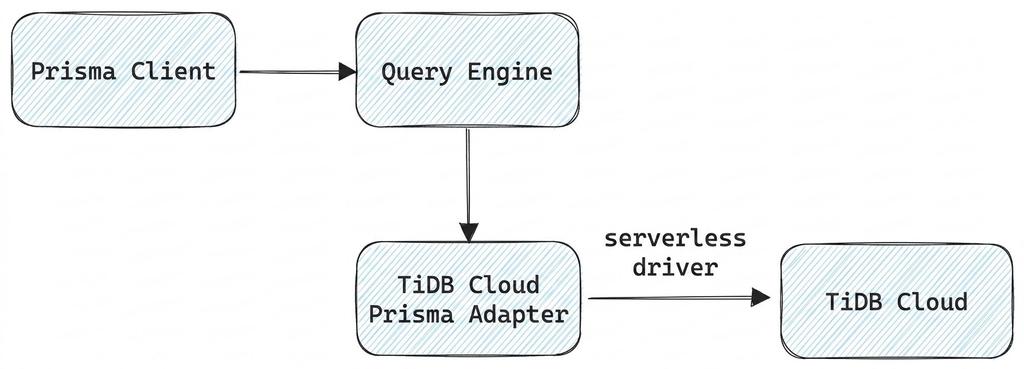
- The Prisma query engine translates client calls into SQL, then hands the statements to a driver to execute. A driver adapter swaps out that driver and leaves the translation step alone. That is how Prisma reaches a database over HTTP instead of a TCP socket.
Because TiDB is MySQL compatible, Prisma treats it as MySQL. Your provider is mysql, and schema files written for MySQL carry over unchanged.

Why Prisma is the default ORM for the Vibe Coding Stack
Prisma’s schema is a single declarative file with readable syntax, which makes it the format coding agents produce most reliably. Ask Cursor or ChatGPT for a data model and you get a schema.prisma back more often than raw DDL. When the target database is MySQL-compatible, that generated schema runs as written.
The usual problem is dialect. Models trained on a corpus heavy in Postgres examples emit Postgres types, and you spend time rewriting serial and jsonb into something MySQL accepts. Switching provider to mysql is the first change, not the only one. Native type attributes have to go with it. @db.Uuid, @db.JsonB, and @db.Inet all fail validation against the MySQL connector. What helps is where those failures land: prisma validate names the attribute and the line it sits on, so you fix them in one pass before anything reaches the database.
The generate step also checks the model’s work. If an agent invents a relation that does not hold, prisma generate and the TypeScript compiler catch it before it reaches a query.
Why the TiDB Cloud Prisma Adapter?
The @tidbcloud/prisma-adapter package lets Prisma Client reach TiDB Cloud over HTTPS instead of a long-lived TCP connection. It sits between the client and the TiDB Cloud serverless driver, taking SQL from the query engine and sending it over HTTP. There is no connection pool in the path.
Three limits on a TiDB Cloud Starter instance make the case concrete. You get 400 concurrent connections, or 5,000 with a spending limit set. Connections might be terminated if they stay open longer than 30 minutes. Also, the docs recommend capping connection lifetime at around 5 minutes. On AWS, the public endpoint idle timeout is 340 seconds.
A pooled Prisma setup in a serverless function runs into all three. Each invocation either pays for a TCP handshake or picks up a pooled connection that has already been closed. Over HTTP, each query is a request, so there is no pool to size and no unused connection to discover mid-query.
The adapter is also the only way to reach TiDB from an edge runtime. Prisma Client cannot open a TCP socket in Vercel Edge Functions or Cloudflare Workers.
PingCAP maintains this adapter, and Prisma lists it among the community-maintained driver adapters. Bugs and version support questions go to the repository’s issue tracker rather than to Prisma.
Set up Prisma with TiDB, Step by Step
Six steps: install the packages, set the ES module type, set a connection string, define a schema, push and generate, then instantiate the client through the adapter. On a free Starter instance, this takes about ten minutes.
Install the Adapter
npm install @tidbcloud/prisma-adapter@6.17.0 @tidbcloud/serverless dotenvnpm install prisma@6.17 --save-devdotenv is required by the query script below. Installing it explicitly matters on pnpm, which does not hoist transitive dependencies the way npm does.
Specify the ES module
Every example here uses import syntax, so package.json needs the ES module flag. Without it, running the query script fails with Cannot use import statement outside a module:
{

  "type": "module"

}
Configure the Environment
// .env
DATABASE_URL="mysql://username:password@host:4000/database?sslaccept=strict"
If you are only using Prisma Client and not migrations, the port and SSL parameters are unnecessary and mysql://username:password@host/database is enough.
Do not commit this file. On Vercel or Cloudflare, set DATABASE_URL as a platform environment variable. For Vercel, the TiDB Cloud integration in the Integrations Marketplace generates the connection variables for you and works with both Starter and Essential, which avoids moving credentials by hand across preview and production.
This step is also what makes edge deployment work. Prisma Client cannot open a TCP socket in Vercel Edge Functions or Cloudflare Workers, so the HTTPS path is what puts your queries in those runtimes at all.
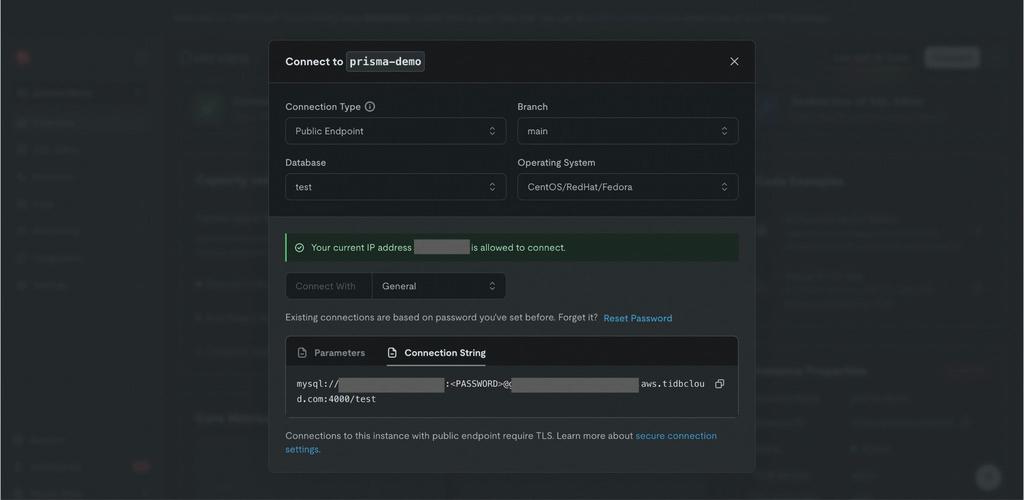
Connect dialog in the TiDB Cloud console.
Define your schema:
// schema.prismagenerator client {    provider = "prisma-client-js"}
datasource db {    provider = "mysql"    url      = env("DATABASE_URL")}
model user {    id    Int     @id @default(autoincrement())    email String? @unique(map: "uniq_email") @db.VarChar(255)    name  String? @db.VarChar(255)}
Then sync the schema and generate the client:
npx prisma db push
npx prisma generate
db push connects over TCP rather than through the adapter. This is the first place the two connection paths diverge, and the compatibility section below covers the rest.
Run and query with the adapter
// query.js
import { PrismaTiDBCloud } from '@tidbcloud/prisma-adapter';
import { PrismaClient } from '@prisma/client';
import dotenv from 'dotenv';

dotenv.config();
const connectionString = `${process.env.DATABASE_URL}`;

const adapter = new PrismaTiDBCloud({ url: connectionString });
const prisma = new PrismaClient({ adapter });

// insert
const user = await prisma.user.create({
    data: {
        email: 'test@prisma.io',
        name: 'test',
    },
})
console.log(user)

// query
console.log(await prisma.user.findMany())

// delete
await prisma.user.delete({
    where: { id: user.id },
})
Transactions use the array form, where operations succeed or fail together.
const createUser1 = prisma.user.create({
    data: { email: 'user1@example.com', name: 'User One' },
})

const createUser2 = prisma.user.create({
    data: { email: 'user1@example.com', name: 'User One duplicate' },
})

const createUser3 = prisma.user.create({
    data: { email: 'user3@example.com', name: 'User Three' },
})

try {
    // fails together, because email is unique
    await prisma.$transaction([createUser1, createUser2])
} catch (e) {
    console.log(e)
    // succeeds together
    await prisma.$transaction([createUser3], { isolationLevel: 'ReadCommitted' })
}
The interactive callback form, prisma.$transaction(async (tx) => { … }), also works. The adapter implements startTransaction, so both shapes are available.
Note the isolation level value. Prisma takes its own PascalCase enum, ReadCommitted, and translates it to SQL form before the adapter sees it. Passing “READ COMMITTED” does not work.
One constraint to design around: transactions are capped at 30 minutes on both Starter and Essential. Rarely an issue for request-scoped work. It matters for bulk backfills, which should be batched rather than wrapped in a single transaction.
Version Compatibility and What the Adapter Does Not Cover
The adapter covers the Prisma Client only. Migrations and introspection connect over TCP, which means a working setup usually needs both paths available: HTTPS for runtime queries, and TCP for schema changes. Keep both in your environment config, or prisma db push fails against a Client-only connection string.
| Over HTTPS (adapter) | Over TCP (standard) | |
| Prisma Client queries | Yes | Yes |
| Transactions, array form | Yes | Yes |
| Transactions, interactive form | Yes | Yes |
| prisma db push | No | Yes |
| prisma migrate | No | Yes |
| prisma db pull (introspection) | No | Yes |
| Vercel Edge, Cloudflare Workers | Yes | No |
The practical consequence for deployment: schema changes do not run from an edge function. Run them from CI or locally against the TCP connection string, and let the deployed runtime use HTTPS for queries only.
Adapter releases track Prisma minor versions. Pick your Prisma version first, then the latest adapter release in the matching minor:
| Adapter | Prisma Client | Serverless Driver |
| v6.17.x | v6.17.x | >=v0.1.0 |
| v6.12.x | v6.12.x | >=v0.1.0 |
| v6.6.x | v6.6.x | >=v0.1.0 |
Generate a TiDB-ready Prisma Schema with Cursor or ChatGPT
The prompt that works names the database, states that it is MySQL compatible, lists entities and relations, and asks for indexes. Without those four elements you get a Postgres-flavored schema you then translate by hand.
What to check before running the output:
- Native Types. @db.Uuid, @db.JsonB, @db.Inet are Postgres and fail validation on the MySQL connector. Use String @db.VarChar(36), Json, and String @db.VarChar(45). serial becomes Int @default(autoincrement()), and text[] becomes a relation table.
- Primary keys, and this one is TiDB specific. Sequential keys concentrate writes on one region. That covers @default(autoincrement()) and any monotonically increasing index, and it also covers cuid(), which is timestamp-prefixed and therefore sorts in creation order. Generated schemas reach for both. Use uuid() or cuid(2), which are random and validate fine on MySQL.
- Indexes. Models often add a single-column index where the query needs a composite one. An index on sessionId alone will not serve where sessionId = ? order by createdAt.
- Cascade Behavior. onDelete is frequently omitted. Decide it deliberately, because agent data accumulates and orphaned rows consume storage quota.
- Explicit @db.Text. An unbounded String maps to VARCHAR(191) on MySQL and indexes without a prefix length, so it needs no attention. The problem is a generated schema writing @db.Text on a field you later want to index. Reserve @db.Text for genuinely long content.
Model AI app data with Prisma: Users, Sessions, Messages, Tool Calls, Memory
Agent applications persist a recognizable set of entities, and the read patterns are narrow. You fetch one session’s messages in order, or a user’s recent sessions, far more often than you run anything analytical across the whole set. That should drive the indexes.
model User {
  id        String    @id @default(uuid())
  email     String?   @unique @db.VarChar(255)
  createdAt DateTime  @default(now())
  sessions  Session[]
}
model Session {  id        String         @id @default(uuid())  userId    String  status    String         @db.VarChar(32)  user      User           @relation(fields: [userId], references: [id], onDelete: Cascade)
  startedAt DateTime       @default(now())
  messages  Message[]
  memory    MemoryObject[]

  @@index([userId, startedAt])
}

model Message {
  id        String     @id @default(uuid())
  sessionId String
  role      String     @db.VarChar(16)
  content   String     @db.Text
  createdAt DateTime   @default(now())
  session   Session    @relation(fields: [sessionId], references: [id], onDelete: Cascade)
  toolCalls ToolCall[]

  @@index([sessionId, createdAt])
}

model ToolCall {
  id        String  @id @default(uuid())
  messageId String
  toolName  String  @db.VarChar(128)
  arguments Json
  result    Json?
  status    String  @db.VarChar(32)
  message   Message @relation(fields: [messageId], references: [id], onDelete: Cascade)

  @@index([messageId])
}

model MemoryObject {
  id        String   @id @default(uuid())
  sessionId String
  kind      String   @db.VarChar(64)
  payload   Json
  updatedAt DateTime @updatedAt
  session   Session  @relation(fields: [sessionId], references: [id], onDelete: Cascade)

  @@index([sessionId, kind])
}
uuid() rather than cuid() or an autoincrement integer. Sequential primary keys concentrate writes on a single region in TiDB, and cuid() is timestamp-prefixed, so it sorts in creation order and behaves the same way. Agent workloads are write-heavy on exactly these tables.
Three more things in that schema are deliberate.
@@index([sessionId, createdAt]) on Message is the composite index that serves chat history reads. Without it, rendering a conversation scans and sorts.
onDelete: Cascade throughout. Agent data grows quickly and sessions get deleted. Without cascade rules you accumulate orphaned tool calls that count against storage. The cascade runs the full depth. Deleting a user removes their sessions, and each session takes its messages, tool calls, and memory objects with it. If identity lives in an external provider like Clerk, Auth0, or WorkOS, drop the User model and keep userId as an opaque string. Deleting a user in the identity provider does not delete their TiDB data, so cleanup becomes app level, typically through a user-deletion webhook. Delete that user’s sessions in TiDB, and the existing cascades from Session down to messages, tool calls, and memory objects handle the rest.
Json for tool arguments and results rather than a normalized column per tool, because tool schemas change more often than your database does.
The argument for keeping this in one MySQL-compatible database is operational. Session state, message history, tool results, and vector embeddings are read together in a single request path. Splitting them across a document store, a vector database, and a warehouse turns one query into three network calls and makes consistency your problem.
Prisma or Drizzle? TiDB Works with Both
Both connect to TiDB as MySQL, so the choice comes down to how much abstraction you want between your code and the SQL, not to compatibility. Prisma gives you a declarative schema, generated types, and a migration workflow. Drizzle stays closer to SQL, with a smaller runtime and query syntax that reads like the statements it produces. Teams that want the schema as a single source of truth pick Prisma. Teams that want to see the SQL pick Drizzle.
Spin Up a Free TiDB Cloud Starter Instance and Connect Prisma
Everything above runs on the free tier. Each TiDB Cloud Starter instance includes a monthly free quota of 5 GiB row storage, 5 GiB columnar storage, and 50 million Request Units. Row storage is the one a Prisma application spends. You can also run up to five free instances per organization before a credit card is needed at all.
Create an instance, copy the connection string, and work through the setup section. If the adapter misbehaves against a Prisma version, open an issue on the GitHub repo.
FAQ
Does Prisma work with TiDB?
Yes. TiDB is MySQL compatible, so Prisma connects using provider = “mysql”, and existing MySQL schemas work unchanged. For serverless and edge runtimes, @tidbcloud/prisma-adapter routes Prisma Client queries over HTTPS instead of TCP.
Can I run Prisma migrations against TiDB Cloud?
Yes, but not through the adapter. prisma db push, prisma migrate, and prisma db pull use the standard TCP connection. Keep both paths available.
Does Prisma work in Vercel Edge Functions or Cloudflare Workers?
With the TiDB Cloud adapter, yes. Edge runtimes cannot open TCP sockets, which is what blocks a standard Prisma setup. The adapter uses HTTPS, which those runtimes allow.
Do I still need the driverAdapters preview feature flag?
No. Driver adapters were stabilized in Prisma 6.16, so the flag stopped being necessary from that release onward.
Which adapter version should I use?
Match the adapter’s minor version to your Prisma minor version, so Prisma 6.17.x pairs with adapter 6.17.x. Note that there is no 7.x adapter. The latest release is 6.17.0, from October 2025, so a project on Prisma 7 has no matching adapter version today.
Is there a transaction time limit on TiDB Cloud?
Yes. On both Starter and Essential transactions are capped at 30 minutes. This is different from the 30-min connection limit, which is about client connections being terminated rather than transactions being rolled back.
Prisma or Drizzle for TiDB?
Both work. Prisma offers a declarative schema and generated types. Drizzle stays closer to raw SQL with a smaller runtime. The database does not constrain the choice.
Spin up a database with 25 GiB free resources.


TiDB Cloud Dedicated
A fully-managed cloud DBaaS for predictable workloads
TiDB Cloud Starter
A fully-managed cloud DBaaS for auto-scaling workloads