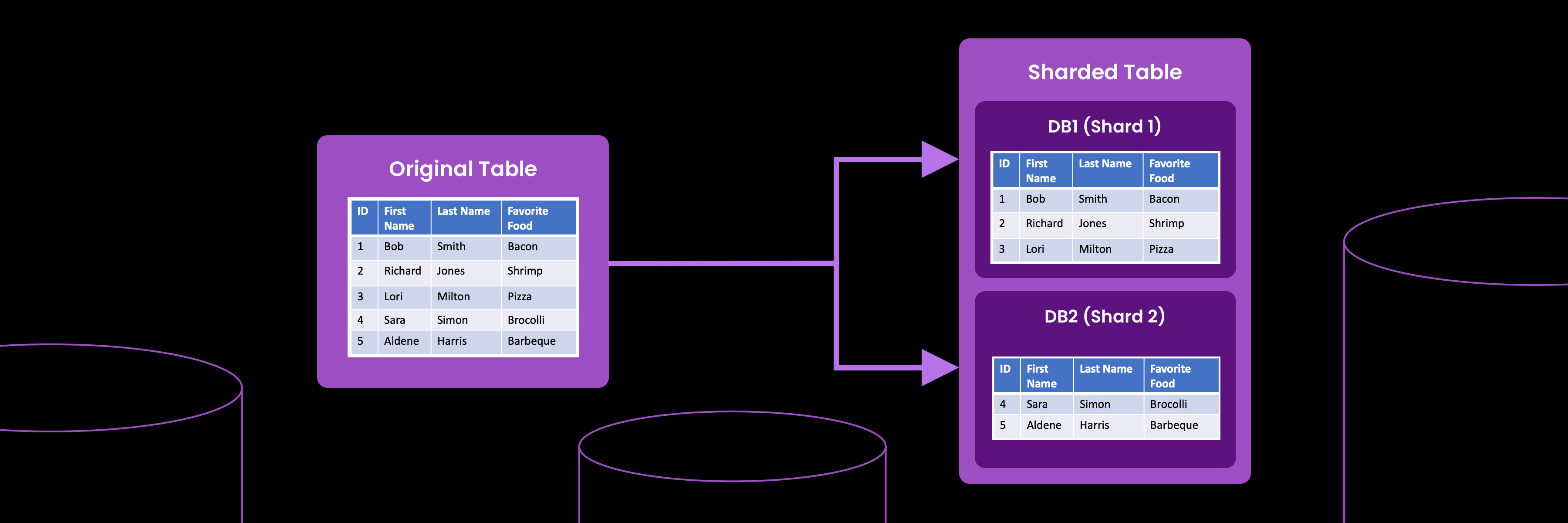
Handling massive datasets, improving read performance, and scaling systems without rewriting applications all start with one foundational technique: SQL query partitioning. By splitting large tables into smaller, more manageable segments, partitioning helps databases prune irrelevant data, reduce scan costs, and deliver consistently fast queries—even as workloads grow.
This guide breaks down the core concepts behind SQL partitioning, how to choose the right partition key and strategy, and what it looks like in practice across MySQL and TiDB. You’ll also see how TiDB’s distributed SQL architecture, automatic sharding, and intelligent pruning make partitioned queries faster and easier to operate at scale.
Whether you’re tuning SQL performance, planning for long-term database scalability, or evaluating distributed SQL platforms, this walkthrough gives you the foundation to make the right technical decisions.
Why SQL Partitioning Matters?
SQL query partitioning is one of the most effective ways to keep query performance predictable as your data volume grows. By breaking large tables into smaller, logically separated partitions, the database can skip unnecessary data during reads, reduce I/O, and scale horizontally without redesigning schemas or rewriting application logic.
Partitioning also plays a crucial role in sql query optimization, improving prune rates so the engine touches only the partitions needed. This directly lowers scan costs and shortens P95/P99 query latencies for both transactional and analytical workloads.
Faster Queries & Database Scalability
Large monolithic tables slow down even the most optimized queries. Partitioning distributes data into smaller segments, making it easier for the optimizer to target only the relevant ranges or hashes.
- Significant reduction in full-table scans
- Higher cache efficiency
- Improved parallelism across storage nodes
- More predictable performance as datasets grow
Partitioning is also foundational for database scalability, especially when paired with distributed SQL systems. Platforms like TiDB take this further by automatically sharding data across nodes and scaling elastically as demand increases.
Learn how teams do this when they modernize MySQL workloads with horizontal scaling → https://www.pingcap.com/solutions/modernize-mysql-workloads/
Streamlined Data Management
Partitioning makes operational tasks easier for growing datasets.
With clear partition boundaries, teams can:
- Archive or drop old partitions without touching the full table
- Reorganize data by time, region, or workload pattern
- Improve maintenance windows by operating on smaller units
- Implement tiered storage strategies
This keeps data management efficient without affecting ongoing query performance.
Simplified Querying and Analysis with the PARTITION BY clause
The PARTITION BY clause makes it easy to group data by time, category, or any field that aligns with real-world access patterns. When the partition key matches common filters, the optimizer can prune more aggressively, improving overall sql performance optimization.
Partitioning also keeps queries clean and easier to maintain. With clear boundaries and predictable patterns, developers can express filters and aggregations without introducing unnecessary complexity.
To see how this fits into distributed architectures, explore how TiDB delivers Distributed SQL at scale → https://www.pingcap.com/tidb/self-managed/
SQL Partitioning Basics: Partition Key, Type, Boundaries
SQL partitioning works by dividing large tables into smaller, more manageable segments. Understanding how partition keys, partition types, and boundaries work together is essential for choosing the right strategy for your workload.
Partition Key
The partition key is the column or set of columns that determines how data is distributed across partitions. Choosing the right partition key is crucial for optimizing performance and manageability. Ideally, the partition key should be frequently used in query filters to enable efficient partition pruning.
Example: Consider a table storing customer orders. Partitioning the table by the order_date column would be a good choice if queries often filter data based on specific date ranges.
Range vs. List vs. Hash Partitioning
Different partitioning strategies help solve different data distribution and query-access problems. Here’s a simplified comparison to help determine which approach fits your schema.
- Range Partitioning: Divides data into partitions based on ordered, contiguous ranges of values (e.g., dates or numeric intervals).
- List Partitioning: Groups data into partitions based on predefined, discrete values from a list
- Hash Partitioning: Applies a hash function to the partition key to distribute rows evenly across partitions
| Partition Type | Ideal Use Cases | Example Predicate |
|---|---|---|
| Range Partitioning | Time-series workloads, rolling retention windows, chronological filters, predictable archival; best when queries target specific time or numeric ranges. | WHERE log_date >= '2025-01-01' |
| List Partitioning | Regional datasets, category-based queries, tenant segmentation; works best when categories are stable and well-known in advance. | WHERE country IN ('US', 'CA') |
| Hash Partitioning | High-cardinality keys, avoiding hotspots, balancing load across nodes; ideal when no natural range exists or data distribution is uneven. | WHERE user_id = 42 |
These three strategies form the foundation of SQL partitioning. Many real-world schemas use a mix—for example, range partitioning on date combined with hash partitioning on user ID inside each range.
Partition Boundaries
Partition boundaries define how data maps into partitions:
- Range boundaries specify the start and end of each interval
- List boundaries define which values belong to each partition
- Hash boundaries are determined algorithmically based on the hash function and number of partitions
Clear boundaries help the optimizer prune data more effectively, reduce I/O, and preserve stable performance as tables grow. They also make operational tasks such as adding, merging, or removing partitions more predictable.
Example: If you partition the customer orders table by year, the partition boundary values could be defined as ‘2022-01-01’, ‘2023-01-01’, and so on. Rows with an order_date in 2022 would be stored in the p2022 partition, and so on.
SQL Query Partition Examples (MySQL & TiDB)
Let’s see how partitioning can be applied in real-world scenarios:
Scenario 1: Time-based Partitioning for Website Access Logs
Imagine a table storing website access logs, expected to grow significantly over time. Queries often involve filtering based on the access date.
Solution: Partition the table by the access_date column using range partitioning. This allows efficient management and querying of data based on specific date ranges.
PARTITION BY clause:
CREATE TABLE access_log (
  id INT NOT NULL AUTO_INCREMENT,
  access_date DATE NOT NULL,
  user_id INT NOT NULL,
  url VARCHAR(255) NOT NULL,
  PRIMARY KEY (id, access_date)
) PARTITION BY RANGE (YEAR(access_date)) (
  PARTITION p2022 VALUES LESS THAN (2023),
  PARTITION p2023 VALUES LESS THAN (2024),
  PARTITION pmax VALUES LESS THAN MAXVALUE
);Benefits:
- Queries filtering by
access_datecan be optimized by pruning irrelevant partitions. - Archiving or dropping older data becomes easier by simply dropping the corresponding partition.
- Scalability is enhanced as additional partitions can be added to accommodate new data.
Scenario 2: List Partitioning for Customer Data by Country
Consider a large customer table with a country column. Frequent queries and reports are based on specific countries.
Solution: Utilize list partitioning to partition the table by the country column, enabling efficient querying and management of data for individual countries.
PARTITION BY clause:
CREATE TABLE customers (
  id INT NOT NULL AUTO_INCREMENT,
  name VARCHAR(255) NOT NULL,
  country VARCHAR(255) NOT NULL,
  PRIMARY KEY (id)
) PARTITION BY LIST (country) (
  PARTITION pUSA VALUES IN ('USA'),
  PARTITION pUK VALUES IN ('UK'),
  PARTITION pIndia VALUES IN ('India'),
  PARTITION pOther VALUES IN (DEFAULT)
);Benefits:
- Queries filtering by specific countries can be optimized by accessing only the relevant partitions.
- Managing data for specific countries becomes easier, as data can be archived or deleted by dropping the corresponding partition.
Scenario 3 — Hash Partitioning for Uniform Distribution
Hash partitioning helps evenly distribute rows when there is no natural range or category. It is effective for high-cardinality keys such as user IDs.
CREATE TABLE user_events (
event_id BIGINT PRIMARY KEY,
user_id BIGINT,
event_time DATETIME,
details VARCHAR(255)
)
PARTITION BY HASH(user_id) PARTITIONS 8;
Benefits
- Even data distribution to prevent hotspots
- Better parallelism for high-cardinality workloads
- More stable performance when filters don’t align with ranges or categories
How TiDB Accelerates SQL Query Partitioning (Sharding & Pruning)
TiDB enhances the benefits of SQL partitioning by combining it with a distributed SQL architecture that automatically shards data and executes queries in parallel across nodes. Instead of managing partitions on a single machine, TiDB distributes them across storage regions and uses a cost-based optimizer to determine which partitions and regions need to be scanned.
This approach improves performance, simplifies operations, and keeps queries efficient even as datasets and workloads scale.
Automatic Data Sharding
TiDB automatically breaks tables and partitions into smaller units called regions. These regions are spread across the cluster so that data is balanced and no single node becomes a bottleneck. As partitions grow, TiDB splits and redistributes regions without requiring manual intervention.
This automatic sharding helps maintain predictable performance over time and gives teams a straightforward path to horizontal growth.
Intelligent Partition Pruning
Partition pruning is built into TiDB’s execution engine. When a query includes filters on the partition key, TiDB evaluates which partitions and regions contain relevant data and avoids scanning the rest. This keeps I/O low and improves response times for both point lookups and analytical queries.
The combination of partition metadata, region boundaries, and optimizer statistics allows TiDB to prune aggressively while maintaining correctness and consistency.
Parallel Execution Across Nodes
Because partitions and regions are distributed across the cluster, TiDB can process queries in parallel across multiple nodes. Each node scans only the data it stores, and the results are merged efficiently during execution. This improves throughput and helps keep performance stable as concurrency increases.
Parallel execution is especially valuable for large scans, analytical queries, or mixed workloads that rely on both transactional and reporting operations.
Consistent Performance at Scale
As data volume and traffic grow, TiDB scales by adding more nodes to the cluster. Partitions and regions automatically redistribute, and the optimizer continues to route queries to the right nodes with minimal overhead. This allows teams to maintain consistent query performance without major schema changes or complex operational steps.
SQL Query Partition Best Practices
Partitioning delivers meaningful performance improvements when it is used thoughtfully. The following best practices help ensure that partitioning works as intended and avoids common pitfalls that slow down queries or complicate operations.
When to Use Table Partitioning vs Data Sharding
Table partitioning and data sharding solve different problems, though they are often used together in distributed SQL systems like TiDB.
Use table partitioning when:
- queries frequently filter on a specific column, such as date or region
- data needs to be archived or removed in well-defined segments
- large tables must remain manageable for reporting, batch jobs, or lifecycle management
- you want to reduce scan costs without changing application logic
Use data sharding when:
- the dataset is too large for a single machine
- high write throughput requires distributing data across multiple nodes
- workload hotspots need to be balanced across the cluster
- horizontal scaling and high availability are priorities
In TiDB, partitioning and sharding complement each other. Partitions organize table data logically, while sharding distributes that data physically across nodes for performance and resilience.
Common Pitfalls to Avoid
Partitioning is powerful, but poor design choices can reduce its effectiveness. The most common issues include:
Too many partitions
Having too many partitions increases planning overhead and slows down queries. Use partitioning where it provides clear filtering or lifecycle benefits, rather than splitting tables too aggressively.
Skewed partition keys
If most rows fall into a small number of partitions, performance can degrade due to hotspots. Choose keys with predictable and balanced distribution, especially for time-series or high-cardinality workloads.
Hot ranges and uneven access patterns
Sequential data—such as inserts on a timestamp column—can overload the most recent partition. Consider combining range and hash strategies or adjusting boundaries to distribute writes more evenly.
Following these guidelines helps maintain efficient pruning, balanced distribution, and stable performance as tables and workloads grow.
Next Steps: Apply SQL Query Partitioning with TiDB
SQL partitioning is one of the most effective ways to keep queries fast and manageable as data grows. Whether you are optimizing an existing schema or planning for long-term scalability, TiDB makes it easier to apply these techniques at scale with built-in sharding, distributed execution, and strong compatibility with MySQL partitioning syntax.
You can explore partitioning directly in TiDB using familiar SQL and see how pruning, sharding, and parallel processing improve performance in real workloads.
Start exploring TiDB:
- Try partitioning in a self-managed environment: https://www.pingcap.com/tidb/self-managed/
- Run your first partitioned queries in TiDB Cloud free tier
FAQs
What is a SQL partition scheme?
A partition scheme is a logical structure that defines how a table is divided into distinct partitions. It specifies the criteria based on which the data will be distributed among the partitions. In SQL, a partition scheme is created using the PARTITION BY clause.
What is table partitioning?
Table partitioning is a technique used in SQL databases to divide a large table into smaller, more manageable parts called partitions. Each partition acts as a separate logical unit, containing a subset of the data in the table.
How does the PARTITION BY clause work?
The PARTITION BY clause is a SQL statement that is used divide a table into distinct partitions based on a specific criteria or attribute. It is typically used in conjunction with the CREATE TABLE statement or the ALTER TABLE statement to define the partitioning scheme for a table.