
Key Takeaways
- A Socratic voice tutor can share a journal app’s entire stack—one codebase, two products.
- Static knowledge plus RAG over source code gives an AI tutor both reliability and depth.
- TiDB’s native vector search keeps relational data and embeddings in one database with no Pinecone sidecar.
- A single
modecolumn on the facts table prevents study noise from polluting personal context.
I give talks for a living. Developer relations means standing in front of rooms full of engineers and explaining complex technical concepts clearly enough that people walk away understanding something new.
The problem is that I retain things far better when I explain them out loud than when I read about them. Most people do. It is why “rubber ducking” works. It is why the best way to learn something is to teach it. The Feynman technique is not a productivity hack—it is how human brains actually consolidate knowledge.
But rubber ducks don’t talk back. They don’t catch when you are wrong, ask follow-up questions, or say “okay, now explain that without using the word ‘basically.'”
So I built something that does: A voice-first AI tutor that uses the Socratic method to make sure I actually know what I think I know.
Why a Voice-First AI Journal Needed a Tutor
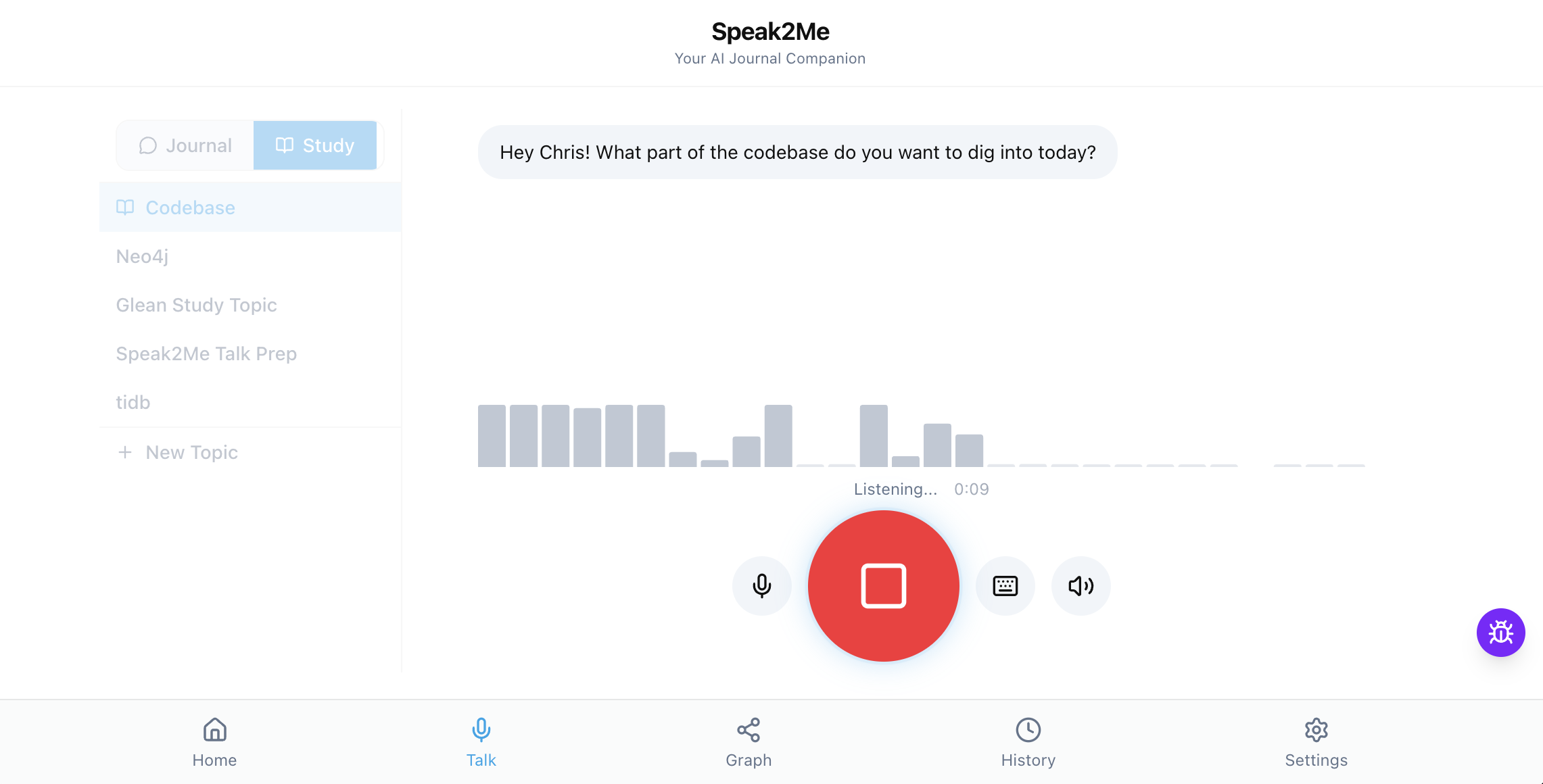
I have been building Speak2Me — a voice-first AI agent — for the past few months. You talk to it, it talks back, and it remembers everything about you across sessions. Real memory, not “that sounds frustrating” generic chatbot responses. If you want the full architecture breakdown, I wrote about that in a previous post on building AI memory that actually works.
Under the hood, Speak2Me runs a three-tier memory architecture: A deterministic profile summary, an immutable facts table with superseding logic, and per-exchange vector search using 3,072-dimension embeddings in TiDB. The system had grown to 12 database tables, 6 external services, 3 memory tiers, a voice pipeline through Hume EVI, and an Inngest background processing queue.
I could ship features. I could fix bugs. But when it came time to prep for a conference talk and actually explain how all the pieces connect—and why I made each decision—I could not hold it all in my head at once.
I could read my own code. I could read my dev log. But reading did not make it stick. What I needed was someone to walk me through my own system and quiz me until I could explain it cold.
That did not exist. So I built it.
How Study Mode Reuses the Journal’s Voice Pipeline
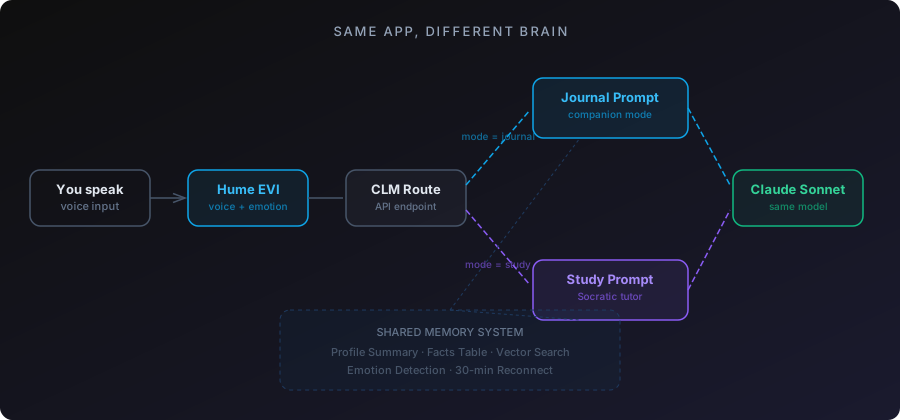
Study mode is not a separate product. It is the same app, the same voice pipeline, the same memory system, and the same TiDB database. Just a different purpose.
In journal mode, the AI is your companion. It listens, remembers, and responds with emotional awareness. In study mode, it is your tutor. It teaches, quizzes, pushes back, and will not move on until you get it right.
The switch is a toggle in the UI—Journal or Study. That toggle changes which prompt builder runs (buildJournalCompanionPrompt vs. buildStudyPrompt), which changes the AI’s entire personality. Same Claude Sonnet model, Hume voice pipeline, and TiDB queries underneath. Different instructions.
This matters architecturally because I did not have to build a second app. Every improvement to the voice pipeline, the memory system, the reconnection logic, or the emotion detection benefits both modes. One codebase, two products.
Building a Socratic AI Tutor with Static Knowledge and RAG
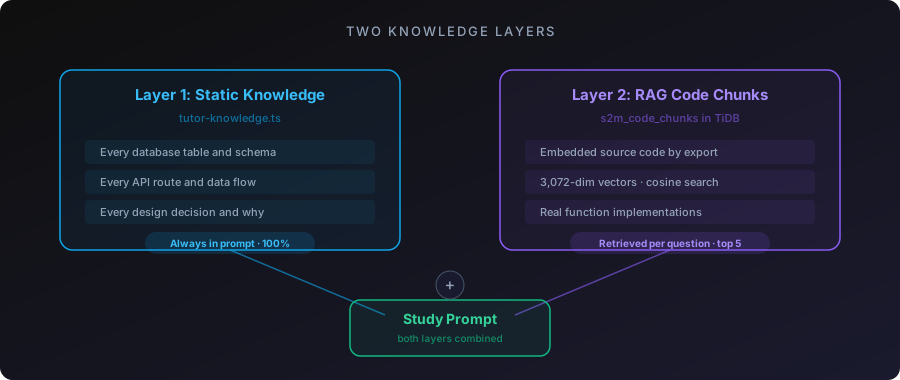
The tutor has two knowledge layers:
- Layer one: Static knowledge. A curated document in
tutor-knowledge.tscovers the complete system overview with every database table, every API route, every data flow, every design decision. This gets included in the study prompt every time. The tutor can always reference the full system architecture without relying on retrieval. - Layer two: RAG over the actual source code. I embedded every exported function from the codebase as vector chunks in TiDB, stored in a
s2m_code_chunkstable alongside the conversation chunks. Same embedding model (text-embedding-3-large), same 3,072 dimensions, same cosine distance search.
When I ask “how does storeFacts work?” the tutor does not guess. It retrieves the actual function from the embedded codebase and explains the real implementation. When I ask “what does the Inngest pipeline do after a session ends?” it pulls the actual step functions and walks through them. (For even better retrieval, TiDB also supports full-text search for hybrid retrieval—combining keyword matching with vector similarity—which I plan to integrate next.)
The Socratic method lives in the prompt. The tutor explains a concept, then asks “can you explain that back to me?” If I get it wrong, it re-teaches and asks again. If I get it right, it moves on. If I try to handwave through something with vague language, it calls me out:
// From buildStudyPrompt
// "When the user gives a vague or incomplete explanation,
//  ask them to be more specific. Do not accept 'it just works'
//  or 'it handles that automatically' as answers."
The AI will not let me fake understanding. That is the whole point.
Isolating Study Facts from Personal AI Memory
Here is a bug that took a while to catch.
The fact extraction pipeline runs after every conversation in journal mode or study mode. It pulls out facts from the transcript and stores them in the facts table. Facts like “Wife’s name is Glenda” or “Daughter born December 16, 2025.”
Except study mode was generating facts like “Speak2Me uses three-tier memory” and “Vector search uses cosine distance at 0.5 threshold.” Technical details about the codebase were getting mixed into my personal profile.
Out of 339 active facts, 56 were study-mode noise. The profile summary was bloated with architecture details sitting next to family information. And because the profile caps at 6K characters in the prompt, the AI was only seeing the first chunk—mostly miscategorized technical junk.
The fix was a mode column on the facts table. It defaults to "journal". Study conversations tag their facts as "study". Every read path in the system—the context-loading route, the profile endpoint, the cache builder, buildProfileFromFacts—now filters to journal-only:
-- Before: all facts, including study noise
SELECT * FROM s2m_user_facts WHERE user_id = ? AND is_active = true

-- After: only journal facts touch the personal profile
SELECT * FROM s2m_user_facts
WHERE user_id = ? AND is_active = true AND mode = 'journal'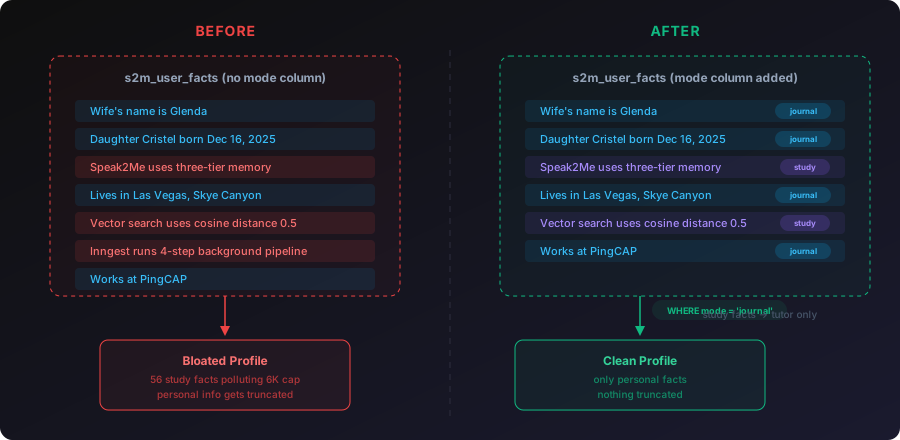
Study facts still get stored. They are useful for the tutor to reference across sessions. But they never pollute the personal profile or the journal prompt. Two separate knowledge spaces in one table, separated by a single column.
I also added per-category caps at this point: 15 most recent facts per category, 20 for identity and family. Without caps, a daily user for a year would accumulate thousands of facts, and the profile would grow without bound. The caps keep it manageable.
And a transcript quality guard: If a session has fewer than 3 user messages or under 200 characters total, skip fact extraction entirely. No more garbage facts from sessions where someone said “hey” and “bye.”
Custom Study Topics: RAG over Any Content
Study mode is not locked to the Speak2Me codebase. There is a BlockNote editor (Notion-style block editor) where you can create custom study topics and paste any content you want.
Have a conference talk script? Paste it in. The AI becomes a talk coach that quizzes you on each section and flags when you skip critical beats. Have technical documentation for a product you are learning? Paste it in. The AI becomes a study partner that teaches the concepts through conversation.
The content from custom topics gets included in the study prompt alongside the static knowledge. The tutor treats it as authoritative material and teaches from it.
I used this to prep for a conference talk. I pasted my full talk script into a custom study topic and practiced through voice. The tutor quizzed me on each beat, caught when I skipped sections, and let me practice delivery repeatedly. I went from stumbling through the material to explaining the entire system—voice pipeline, memory architecture, agent loop—cleanly in under 60 seconds per section.
I could not have done that by reading the script alone. The repetition through voice, being quizzed, and being forced to articulate each concept in my own words is what made it stick.
88 Minutes Straight: Real-World Validation
A friend of mine is a software engineer with about 10 years of experience. He was making a career move into a completely new domain. He needed to understand a company’s product deeply enough to explain it in an interview setting.
I gave him access to Speak2Me. He pasted the company’s documentation into a custom study topic and started a voice session.
He used it for 88 minutes straight on the first day.
What he told me afterward: The app helped calm him down. He had been anxious about not understanding the product well enough, and having a Socratic AI voice tutor patiently walk him through concepts and quiz him repeatedly reduced that anxiety. When he stumbled on an explanation, the AI caught it and re-taught the concept. When he got something right, it moved on. No judgment. No impatience. Just steady, adaptive teaching.
He passed the hiring manager interview and moved on in the process. He told me it was because Speak2Me helped him understand the product well enough to explain it clearly and confidently.
That 88-minute session was the first time someone other than me validated that study mode actually works. And not as a demo or concept, but as a tool someone used to learn something real and then proved they learned it in a high-stakes situation.
How TiDB Powers the Tutor’s Memory
Building study mode reinforced something I discovered while building the journal: Trying to run relational data in one database and vectors in another creates real operational pain. TiDB eliminated that problem from day one.
One database for everything. The user profile, the facts table, the conversation transcripts, and the code-chunk embeddings all live in TiDB. When the tutor needs to answer a question, it runs a single query that joins relational metadata with vector search results:
SELECT c.chunk_text,
       VEC_COSINE_DISTANCE(c.embedding, ?) AS relevance
FROM s2m_code_chunks c
WHERE c.user_id = ?
ORDER BY relevance
LIMIT 5
No second database to sync. No application-layer joins. One query, one network hop.
Fact isolation at the SQL level. The mode column fix described above only works cleanly because facts, profiles, and vectors all live in the same database. Filtering study facts out of the personal profile is a WHERE clause and not a cross-service coordination problem.
Schema flexibility as the product evolves. Study mode added new tables (s2m_code_chunks), new columns (mode on the facts table), and new query patterns. Because TiDB is MySQL-compatible, every migration was a standard ALTER TABLE statement. No driver changes, no ORM swaps. Just SQL.
Scaling without rearchitecting. Each study session generates new embeddings, new facts, and new transcript chunks. As the user base grows, TiDB’s distributed architecture scales storage and compute independently. I have not had to think about sharding, read replicas, or capacity planning. The database handles it.
If you are building an AI application that combines structured data with vector search—whether it is a tutor, a chatbot with memory, or a RAG pipeline—TiDB Cloud Starter lets you start for free and scale as usage grows. One database instead of two means half the infrastructure to manage and debug.
How Vector Search Powers Both Modes Simultaneously
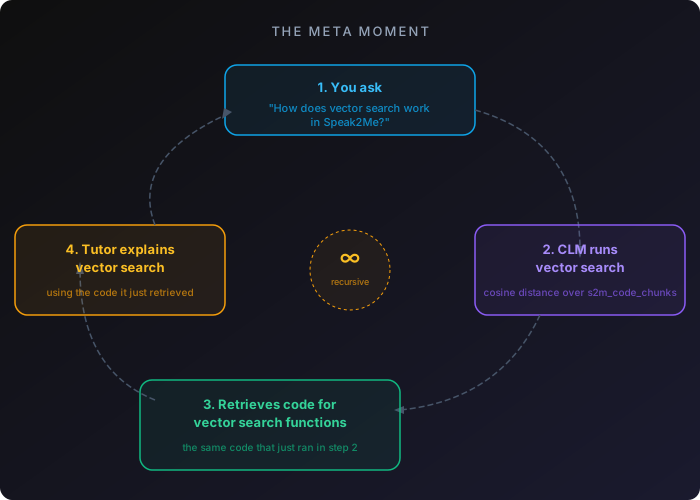
Here is the thing that still gets me.
When I am in study mode asking “how does vector search work in Speak2Me?” the context-loading endpoint is literally running vector search on my question to retrieve the relevant code chunks from TiDB. The tutor is using the exact system it is teaching me about.
The three-tier memory system assembles context for the tutor the same way it assembles context for journal mode. Profile summary tells the tutor who I am. Facts table tracks what I have studied across sessions. Vector search finds the relevant code chunks for whatever I am asking about.
The feature explains itself while executing itself.
Debugging the AI Tutor: Prompt Engineering Fixes
The tutor was not good at first. Three specific problems showed up during real usage.
It would not stay quiet during practice. When I was rehearsing my conference talk and stumbled on a line (normal when rehearsing), the tutor would jump in with filler commentary. It should have recognized I was mid-attempt and stayed quiet until I finished or explicitly asked for help.
It over-corrected against scripts. During talk practice, I would find my natural delivery and say the same point with different words than the script. The tutor would flag it as wrong. But the script is a guide, not a teleprompter. Different words that deliver the same beat are fine. Only missing a critical beat entirely is worth correcting.
It had a verbal crutch. Almost every response started with “Okay, yeah.” Hearing that 30 times in one session is maddening.
All three fixes were prompt engineering, not code changes. I added <talk_practice_rules> to buildStudyPrompt:
<talk_practice_rules>
When the user is practicing a talk or speech:
1. STAY SILENT while they are speaking. Do not interrupt.
   Stumbling and restarting is NORMAL rehearsal behavior.
2. DO NOT police exact wording. The script is a guide.
   Only flag if they skip an entire beat or miss a
   critical moment.
3. When you give feedback, be specific. Say "you skipped
   the Pinecone line" not "you added extra context."
4. Never start a response with "Okay, yeah." Never.
</talk_practice_rules>
The tutor also had accuracy problems. It would explain the sequencing of the voice pipeline incorrectly, describing events in the wrong order. I had to correct my own tutor multiple times on my own architecture.
The root cause: The tutor was assembling information from RAG chunks and getting the flow order wrong. The static tutor-knowledge.ts document needed the exact sequencing spelled out explicitly so the tutor could not reconstruct it incorrectly from partial code chunks.
The lesson: A Socratic tutor that confidently teaches wrong information is worse than no tutor at all. The static knowledge layer needs to be comprehensive enough that the tutor never has to guess at sequencing or relationships between components.
From Flat Facts to a Knowledge Graph
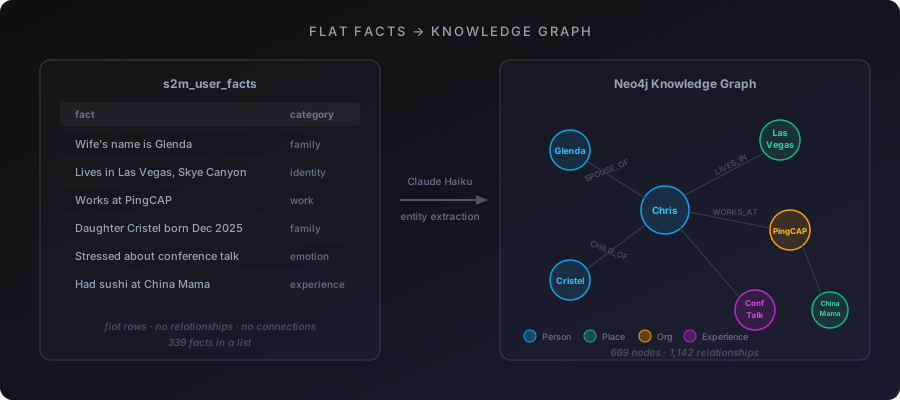
After three months, the facts table had hundreds of entries across multiple users. Flat rows. Each one a string: “Wife Glenda’s birthday is May 5.” “Works at PingCAP.” “Lives in Las Vegas.” These facts have obvious relationships—spouse, employer, location—but in a flat table those connections are invisible. A category column is a label, not a relationship.
I built an entity extraction pipeline that turns flat facts into a knowledge graph in Neo4j. Claude Haiku parses facts into typed nodes (Person, Place, Experience, Topic) and typed relationships (SPOUSE_OF, LIVES_IN, WORKS_AT, CHILD_OF) connecting them. The pipeline runs as a non-blocking Inngest step after store-facts. TiDB stays the source of truth; Neo4j is a derived view.
A backfill across all existing data populated 669 nodes and 1,142 relationships.
Running it at scale exposed real problems. Processing 460 facts in one Haiku call truncated the JSON response mid-object—fixed by batching to 80 facts per call. Non-string property values from Haiku crashed v.replace()—fixed with String(v). Undefined to fields on relationships caused Neo4j’s driver to silently create broken edges—fixed with validation before writes. Large statement batches timed out in a single transaction—fixed by chunking to 50 statements.
Where this connects to study mode: I am building two separate graph views. One for journal mode (your life relationships) and one for study mode (the relationships between concepts you have studied). Looking at your own knowledge as a graph is a different experience from scrolling a list of facts. You see which concepts connect, where the gaps are, and which clusters of understanding have isolated nodes that need more work.
What Study Mode Actually Is
Study mode is a voice-first AI tutor that uses the Socratic method to teach through conversation, quizzes you on the material, and refuses to move on until you can explain a concept in your own words. It is backed by RAG over real source material and persistent memory across sessions.
The technical stack behind it:
- Voice: Hume EVI (WebSocket, emotion detection, TTS)
- Reasoning: Claude Sonnet
- Database: TiDB (user profile, facts, vector search, and code-chunk embeddings in one database)
- Background processing: Inngest
- Knowledge graph: Neo4j
- Topic editor: BlockNote
But the stack is not the point. The point is: If you cannot explain something out loud, you do not know it yet. And now there is a tool that holds you to that standard.
The rubber duck talks back now.
Ready to build AI applications with vector search and relational data in a single database? Get started with TiDB Cloud Starter for free.
Spin up a database with 25 GiB free resources.

TiDB Cloud Dedicated
A fully-managed cloud DBaaS for predictable workloads
TiDB Cloud Starter
A fully-managed cloud DBaaS for auto-scaling workloads