
Key Takeaways
- One pipeline, any source. Debezium captures from MySQL, PostgreSQL, Oracle, and seven other databases; only the source connector changes.
- No proprietary drivers. TiDB speaks the MySQL protocol, so the Debezium JDBC sink writes over a standard
jdbc:mysql://connection. - Migrate and stream in one setup. The initial snapshot seeds existing rows, then switches to streaming live changes.
- Near-zero downtime. Existing data and live changes arrive as one gap-free stream.
- Use TiDB DM for MySQL-only moves. Reach for Debezium and Kafka when the source is not MySQL, or you need a reusable change stream.
Moving data into a new database is rarely a one-shot copy. Migrating off a legacy system, adopting a distributed SQL database, carrying out a heterogeneous database migration, or standing up an analytical replica all share the same challenge. You have to move a large, already-populated dataset and keep it continuously in sync until you are ready to cut over, or stream the changes indefinitely, ideally with near-zero downtime.
Change data capture (CDC) solves both halves of that problem. Instead of re-copying tables on a schedule, CDC tails the source database’s transaction log and streams every committed row-level change to the target.
Debezium reads the native transaction log of each supported database and turns every committed insert, update, and delete into a structured event on Apache Kafka. That change stream is a natural backbone for event-driven architectures. Instead of services polling the database, each data change becomes a durable, ordered event. Independent consumers subscribe to that stream and react on their own, including microservices, cache invalidation, search and vector indexing, data lakes, and real-time analytics.
Because TiDB is MySQL-compatible, the open-source Debezium JDBC sink connector applies the streamed changes over standard JDBC. This guide presents a reusable architecture: any Debezium source → Apache Kafka → Debezium JDBC sink → TiDB, validated with a PostgreSQL example. To use a different source, change only the source connector.
Supported Debezium source connectors
Debezium documents the source connectors below, and any of them can feed this pipeline into TiDB. The only difference between sources is how capture is enabled on the database itself. The delivery side, Kafka to JDBC sink to TiDB, is identical for all relational sources.
| Source database | How Debezium captures changes | Connector docs |
|---|---|---|
| MySQL | Binary log (binlog) in ROW format | mysql |
| MariaDB | Binary log (binlog) | mariadb |
| PostgreSQL | Logical decoding of the WAL (pgoutput) | postgresql |
| Oracle | Redo logs via LogMiner (or XStream) | oracle |
| SQL Server | Native CDC change tables | sqlserver |
| Db2 | SQL-replication (ASN) capture tables | db2 |
| Informix | Logical transaction logs | informix |
| Vitess | VStream (built on MySQL binlog) | vitess |
| Spanner | Change streams | spanner |
| CockroachDB | Changefeeds | cockroachdb |
Solution architecture
The pipeline has three logical stages: capture, transport, and delivery. Each is handled by a dedicated component.
- Capture. A Debezium source connector reads the source database’s transaction log and turns each committed change into a structured change event.
- Transport. Apache Kafka stores those events durably in per-table topics, decoupling source from target and enabling replay and fan-out to multiple consumers.
- Delivery. The Debezium JDBC sink connector consumes the events and applies the equivalent INSERT, UPDATE, and DELETE statements to TiDB over the MySQL protocol.
All connectors run as plugins inside Kafka Connect, the worker framework that manages connector lifecycle, offsets, and restarts. On first start, the source connector performs a consistent initial snapshot of existing data, then switches to streaming from the transaction-log position it recorded when the snapshot began. Existing rows and future changes arrive as one continuous, gap-free stream.
Architecture diagram
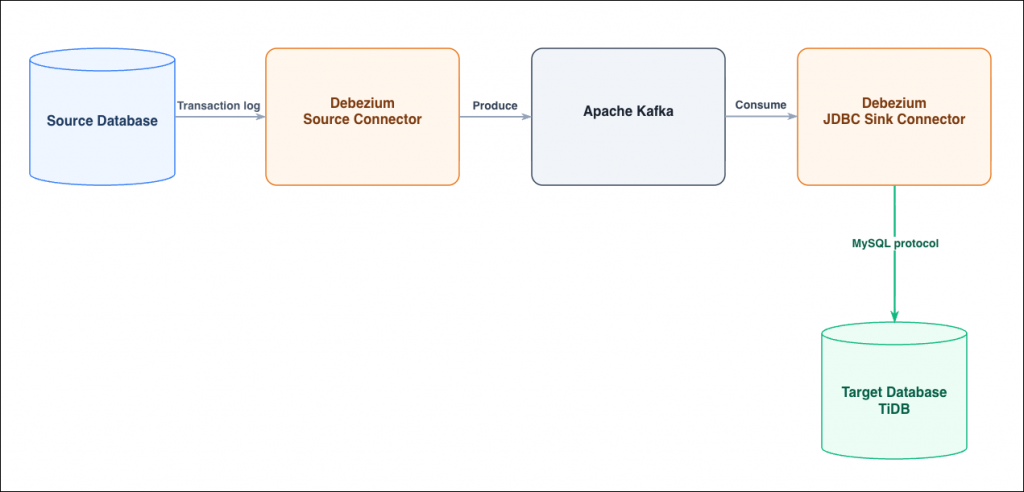
Fig. 1: The capture → transport → delivery pipeline. Only the capture stage changes between source databases.
- Source database. The primary database system. Capture must be enabled on it.
- Debezium source connector. Connects to the source, takes the initial snapshot, then streams change events. Choose the connector that matches your source.
- Apache Kafka. The durable event backbone. Each captured table gets its own topic, retained for replay.
- Kafka Connect. Hosts both connectors, exposes a REST API for configuration, and persists offsets and schema history.
- Debezium JDBC sink connector. Applies changes to TiDB and understands the Debezium envelope natively.
- Target database. The streaming target, a TiDB distributed SQL cluster.
Before you begin
You need:
- A source database supported by a Debezium connector, with log-based capture enabled and a user that can read its change feed.
- A TiDB cluster (TiDB Self-Managed or TiDB Cloud) reachable on port 4000, with a user that can create databases and tables.
- Docker and Docker Compose, on a host that can reach both the source and TiDB.
Migrate data into TiDB with Debezium CDC
The example streams a PostgreSQL table into TiDB. To migrate from a different source, change connector.class and the source-specific keys in Step 3. Every other step is identical.
Step 1: Start Kafka and Kafka Connect
Save this as docker-compose.yml and start it. The Debezium Connect image already bundles the source connectors and the JDBC sink.
version: '3'
services:
  zookeeper:
    image: quay.io/debezium/zookeeper:2.7
    ports: ["2181:2181"]
  kafka:
    image: quay.io/debezium/kafka:2.7
    ports: ["9092:9092"]
    depends_on: [zookeeper]
    environment:
      ZOOKEEPER_CONNECT: zookeeper:2181
  connect:
    image: quay.io/debezium/connect:2.7
    ports: ["8083:8083"]
    depends_on: [kafka]
    environment:
      BOOTSTRAP_SERVERS: kafka:9092
      GROUP_ID: cdc-demo
      CONFIG_STORAGE_TOPIC: connect_configs
      OFFSET_STORAGE_TOPIC: connect_offsets
      STATUS_STORAGE_TOPIC: connect_statuses
      KEY_CONVERTER: org.apache.kafka.connect.json.JsonConverter
      VALUE_CONVERTER: org.apache.kafka.connect.json.JsonConverter
docker-compose up -d
Step 2: Enable capture on the source
For PostgreSQL, enable logical replication and create a role Debezium can connect and replicate with:
-- postgresql.conf (self-managed) or DB parameter group (Aurora/RDS PostgreSQL)
wal_level = logical

CREATE ROLE debezium WITH LOGIN REPLICATION PASSWORD '<source-password>';
GRANT SELECT ON ALL TABLES IN SCHEMA public TO debezium;
Create a sample table and a publication for Debezium to read:
CREATE DATABASE cdc_demo;
\c cdc_demo
CREATE TABLE orders (
  id BIGINT PRIMARY KEY, customer VARCHAR(64), amount NUMERIC(10,2)
);
INSERT INTO orders VALUES
  (1,'alice',10.50), (2,'bob',20.00), (3,'carol',33.33);

CREATE PUBLICATION dbz_pub FOR TABLE orders;
Step 3: Configure the source connector
Save the source connector configuration as source.json. This example captures PostgreSQL. For another database, change connector.class and its source-specific keys.
{
  "name": "src-postgres-cdc_demo",
  "config": {
    "connector.class": "io.debezium.connector.postgresql.PostgresConnector",
    "database.hostname": "<source-host>",
    "database.port": "5432",
    "database.user": "debezium",
    "database.password": "<source-password>",
    "database.dbname": "cdc_demo",
    "topic.prefix": "dbz",
    "table.include.list": "public.orders",
    "plugin.name": "pgoutput",
    "publication.name": "dbz_pub",
    "slot.name": "dbz_slot",
    "snapshot.mode": "initial",
    "decimal.handling.mode": "double"
  }
}
Step 4: Configure the JDBC sink connector for TiDB
Create the target database (the sink auto-creates the table), then save the sink configuration as sink.json. Because TiDB is MySQL-compatible, the connection URL is a standard jdbc:mysql:// URL on port 4000. This step is the same for every source.
mysql -h <tidb-host> -P4000 -uroot -p<tidb-password> -e "CREATE DATABASE cdc_demo;"
{
  "name": "sink-tidb-cdc_demo",
  "config": {
    "connector.class": "io.debezium.connector.jdbc.JdbcSinkConnector",
    "topics": "dbz.public.orders",
    "connection.url": "jdbc:mysql://<tidb-host>:4000/cdc_demo",
    "connection.username": "root",
    "connection.password": "<tidb-password>",
    "insert.mode": "upsert",
    "primary.key.mode": "record_key",
    "primary.key.fields": "id",
    "delete.enabled": "true",
    "schema.evolution": "basic",
    "transforms": "route",
    "transforms.route.type": "org.apache.kafka.connect.transforms.RegexRouter",
    "transforms.route.regex": "dbz\\.public\\.orders",
    "transforms.route.replacement": "orders"
  }
}
Step 5: Register the connectors
POST both configurations to Kafka Connect, then confirm each reports RUNNING:
curl -X POST -H "Content-Type: application/json" --data @source.json \
  http://localhost:8083/connectors
curl -X POST -H "Content-Type: application/json" --data @sink.json \
  http://localhost:8083/connectors

curl -s http://localhost:8083/connectors/src-postgres-cdc_demo/status
curl -s http://localhost:8083/connectors/sink-tidb-cdc_demo/status
Verify the initial snapshot
The snapshot is a one-time step that seeds the target with whatever already exists. As soon as both connectors are running, the source connector’s initial snapshot copies the three existing rows through Kafka and into TiDB. Query the target:
mysql -h <tidb-host> -P4000 -u root -p<tidb-password> \
  -e "SELECT * FROM cdc_demo.orders ORDER BY id;"
The pre-existing rows are already present in TiDB:
+----+----------+--------+
| id | customer | amount |
+----+----------+--------+
|  1 | alice    |   10.5 |
|  2 | bob      |     20 |
|  3 | carol    |  33.33 |
+----+----------+--------+
Debezium applies the snapshot logically to the target database. On the source it reads each existing row with a consistent SELECT and emits it as a change event. The JDBC sink then writes those rows into TiDB as ordinary batched SQL over the MySQL protocol.
For large databases, seed with a native import instead. A logical, row-by-row snapshot is convenient but slow and load-heavy once a table runs to tens of millions of rows or more. In that case, load the pre-existing data with a physical or bulk tool. Export it with the source’s native backup or dump utility and import it into TiDB with IMPORT INTO.
Then let Debezium handle only the ongoing stream. Set the source connector’s snapshot.mode to no_data (capture schema, skip the row snapshot) or never, and align the connector’s start position with the export’s consistency point, the WAL LSN or binlog GTID at which the backup was taken, so no changes are missed between the bulk load and the start of CDC.
Real-time changes
Now apply a mix of changes on the PostgreSQL source: an insert, an update, and a delete.
INSERT INTO orders VALUES (4,'dave',44.44);
UPDATE orders SET amount=99.99, customer='alice-updated' WHERE id=1;
DELETE FROM orders WHERE id=2;
Within a few seconds, re-query TiDB. All three change types have propagated:
+----+---------------+--------+
| id | customer      | amount |
+----+---------------+--------+
|  1 | alice-updated |  99.99 |
|  3 | carol         |  33.33 |
|  4 | dave          |  44.44 |
+----+---------------+--------+
Row 4 was inserted, row 1 was updated, and row 2 was deleted, exactly matching the source. The pipeline now streams continuously. Every subsequent committed change on the source appears in TiDB in near real time.
Monitoring and troubleshooting
Connector status
Check the health of each connector and its tasks through the REST API. A healthy connector and task both report RUNNING:
curl -s http://localhost:8083/connectors/src-postgres-cdc_demo/status
curl -s http://localhost:8083/connectors/sink-tidb-cdc_demo/status
If a task has FAILED, its status includes the stack trace. You can restart a failed task without recreating the connector:
curl -s -X POST http://localhost:8083/connectors/sink-tidb-cdc_demo/tasks/0/restart
Clean up
To release resources, delete the connectors and tear down the stack when you are done:
# Remove the connectors
curl -s -X DELETE http://localhost:8083/connectors/sink-tidb-cdc_demo
curl -s -X DELETE http://localhost:8083/connectors/src-postgres-cdc_demo

# Stop and remove all containers and their Kafka state
docker-compose down -v

# Optionally drop the demo databases on the source and on TiDB
#   DROP DATABASE cdc_demo;
Note.
docker-compose down -valso deletes the Kafka topics, connector offsets, and schema history. The next start therefore performs a fresh initial snapshot. Preserve the volumes if you want to resume streaming from where you left off.
Conclusion
This guide presented one reusable, open-source architecture for streaming real-time change data into TiDB from any of Debezium’s supported source databases. The architecture is a Debezium source connector, Apache Kafka, and the Debezium JDBC sink. Only Step 1, enabling capture, and a few source-specific connector properties change between databases. The transport and delivery into TiDB stay the same. Because TiDB is MySQL-compatible, the JDBC sink delivers changes with no proprietary drivers or adapters, and the same pipeline migrates pre-existing data through Debezium’s initial snapshot. That makes it suitable for both one-time migration and ongoing replication and fan-out.
For a homogeneous MySQL-to-TiDB migration where you do not need Kafka or multiple downstream consumers, consider TiDB’s purpose-built TiDB Data Migration (DM) tool. Choose Debezium and Kafka when your source is not MySQL, or when you want a durable change stream that can also feed search indexes, data lakes, caches, or other services alongside TiDB.
Spin up a MySQL-compatible TiDB Cloud cluster in minutes and point this Debezium pipeline at it today. To plan a production cutover, read the TiDB migration overview.
Experience modern data infrastructure firsthand.

TiDB Cloud Dedicated
A fully-managed cloud DBaaS for predictable workloads
TiDB Cloud Starter
A fully-managed cloud DBaaS for auto-scaling workloads