
In the vast landscape of databases, ensuring zero-downtime upgrades and operation continuity remains a challenge. Due to inherent design limitations, traditional databases often introduce significant downtime during upgrades – a challenge that can spell operational chaos for businesses reliant on real-time data access.
Enter TiDB, a cutting-edge distributed SQL database that offers a solution to overcome this challenge. Built on a robust, cloud-native, and loosely coupled architecture, TiDB introduces online rolling upgrades – a feature that enables zero-downtime upgrades with uninterrupted operations.
In this post, we will explore the unique and easy-to-use upgrading mechanisms of TiDB with a hands-on demonstration.
Why Zero Downtime Matters in Production Environments
When production goes dark, the meter spins fast. Recent industry surveys show the average cost of an hour of IT downtime now exceeds $300,000 for most mid-to-large enterprises, and a significant share report $1–5 million per hour depending on the workload and industry.
Uptime Institute’s outage analyses reinforce the trend: major incidents are costly and increasingly scrutinized by regulators and boards, which raises the bar for resilience and change safety. Even conservative calculators place typical downtime between $100k and $540k per hour, which aligns with many teams’ internal incident postmortems. In short, every planned maintenance window you eliminate and every risky schema change you can do online directly protects revenue, reputation, and SLOs.
| Industry | Typical Range (USD/hr) | Notes |
|---|---|---|
| Financial Services | $300,000 – $5,000,000+ | Large enterprises frequently report ≥$300k/hr; high-stakes incidents can exceed $1–5M/hr. |
| E-commerce / Retail | $140,000 – $1,000,000 | Common “per minute” averages translate to ~$140k–$540k+/hr, with peaks higher for major events. |
| SaaS / Cloud | $300,000 – $1,000,000+ | Mid-to-large enterprises commonly cite ≥$300k/hr; severe incidents can cross $1M. |
| Manufacturing | $260,000 – $1,360,000+ | Benchmarks cluster around ~$260k/hr; recent reports show averages >$1.3M/hr in some regions. |
What this means for zero-downtime upgrades in TiDB: If your environment runs dozens of services across shared database clusters, the difference between online DDL/rolling upgrades and even a brief maintenance window can be six figures per incident. Investing in automation for online schema evolution, rolling restarts, and version changes is not a “nice to have.” It is a material cost saver that keeps roadmaps moving on schedule.
Challenges of Traditional Database Upgrades
Legacy database platforms still assume stop-and-wait maintenance windows, which clashes with 24×7 SaaS and fintech realities. Teams struggle with true online schema change: blocking DDL, long locks, and table copies that spike IO and trigger timeouts. To dodge outages they bolt on brittle dual-writes, triggers, or shadow tables, adding risk while slowing delivery. Upgrades also collide with versioning conflicts across ORMs, client drivers, and SQL dialects; planner differences, reserved keywords, and collation quirks cause regressions and rollbacks.
Without first-class rolling updates, many stacks require cluster-wide restarts or read-only windows, producing scheduled downtime, cache thrash, and retry storms. These stop-and-wait techniques may work for small fleets, but they collapse under multi-region, multi-tenant load, amplifying queue backlogs and replica lag. The takeaway: If your upgrade path depends on blocking DDL, coordinated app outages, or all-at-once node restarts, you are carrying avoidable risk—precisely the gap zero-downtime approaches like TiDB are built to close.
TiDB’s Distributed SQL Architecture for Zero Downtime
Traditional databases often use “stop-and-wait” techniques, freezing all operations for the time-consuming upgrade process. In contrast, TiDB uses an online rolling upgrade strategy. This approach ensures zero-downtime upgrades by upgrading components in a specific sequence:
- Placement Driver (PD) servers
- The TiKV servers
- The TiDB servers
Each server upgrades one at a time, ensuring that other servers seamlessly handle the incoming load, resulting in a smooth and uninterrupted upgrade experience.
Here’s a closer look at how each key component contributes to the process:

Figure 1. Auto-upgrading architecture
| Component | Definition | Auto-Upgrading Mechanism |
| Placement Driver (PD) Servers | PD servers act as the cluster manager, managing metadata, scheduling, and load balancing. | During the upgrade, each PD server is upgraded one at a time. If a PD is the current leader, leadership is transferred first, causing only a brief pause in active TSO requests without affecting ongoing transactions or client connections. |
| TiKV Servers | TiKV is the distributed transactional key-value storage layer, responsible for data storage and retrieval. | TiKV servers are upgraded one at a time. Before upgrading, the leader for each Region is transferred to another TiKV server, thereby ensuring that ongoing operations are not disrupted. |
| TiDB Servers (Facilitated by TiProxy) | TiDB is the stateless SQL server responsible for SQL query processing, maintaining sessions, and handling transactions. | TiProxy assists in the smooth upgrading of TiDB servers by sitting between the network load balancer and the SQL Layer. It migrates client sessions to other TiDB servers during the upgrade, thereby ensuring zero disruption to client applications. |
This upgrade mechanism ensures that at each stage of the upgrade, the client experiences zero downtime and continues to interact with the database as if nothing has changed. In TiDB’s world, upgrades are not an interruption but a seamless transition. To learn more about how the upgrade mechanism works, see Maintaining Database Connectivity in Serverless Infrastructure with TiProxy.
Cloud-Native and Horizontally Scalable by Design
TiDB’s resilience starts with its architecture: a cloud-native, shared-nothing design that cleanly separates stateless SQL compute (TiDB) from stateful storage (TiKV) with Raft replication and optional TiFlash for analytics. That separation means you can roll out changes, add capacity, or replace nodes one at a time without taking the service down. When demand spikes or a node fails, the cluster rebalances leaders and regions automatically, so throughput and availability stay steady while upgrades proceed in the background.
Here’s why this enables zero-downtime change:
- Elastic scale-out/scale-in: Add or remove TiDB (compute) and TiKV (storage) nodes online; traffic spreads automatically via PD scheduling.
- Fault-tolerant storage: Raft keeps multiple replicas; leader elections and region movement happen live during maintenance.
- Rolling everything: Upgrade binaries, apply patches, and change configs node-by-node while the cluster serves reads/writes.
- Workload isolation: Use Placement Rules and TiFlash to keep heavy scans off OLTP paths, preserving p95/p99 during upgrades.
- Operational safety nets: Online DDL, point-in-time recovery, and rich observability reduce change risk and shorten MTTR if something regresses.
High Availability with PD Servers and TiKV/TiDB Components
Placement Driver (PD) is TiDB’s control plane. It keeps the cluster healthy and highly available by (1) maintaining the global cluster metadata (stores, regions, leaders), (2) providing a monotonic timestamp oracle (TSO) for distributed transactions, and (3) scheduling region placement and leader elections across TiKV nodes according to capacity, load, and your Placement Rules. PD continuously ingests heartbeats from TiKV, detects failures within seconds, and triggers safe rebalancing or leader transfers so read/write traffic stays online during node restarts, upgrades, or hardware issues.
Step-by-Step Demonstration of a Zero Downtime Upgrade
To provide a tangible illustration of TiDB’s zero-downtime upgrade capability, let’s walk through a real-world demonstration using a self-hosted TiDB cluster. While fully-managed TiDB Cloud provides these capabilities out-of-the-box, a self-hosted environment allows for a more detailed exploration of the upgrade process.
We conducted the demo on AWS. We have provided a step-by-step guide with detailed scripts, programs, CloudFormation templates, and workflow so that you can do it yourself. Feel free to refine or reproduce it in other cloud-based demonstration implementations. In this section, we will only focus on the observations through the upgrading process.
Pre-Upgrade Preparations and Scaling Best Practices
While the primary focus is on demonstrating zero downtime during upgrades, TiDB’s architectural design also allows for proactive scaling. This is particularly useful if your workload relies heavily on parallel processing. We recommend the following practices for online upgrading:
- Before the upgrade: Proactively scale out a TiDB server instance to ensure a smooth rolling upgrade. This scaling can also extend to TiKV server instances depending on your workload requirements.
- After the upgrade: TiDB allows you to scale in, effectively saving on operational costs. You can manage the scaling either manually or through TiDB’s auto-scaling solutions.
Pre-Upgrade Observations
We have set up three terminal windows for the demonstration:

Figure 2. Terminal setup
- Top terminal: Running the TiProxy service.
- Middle terminal: Displays our sample application with four active database connections. These connections are inserting data into the databases at a uniform frequency, routed through a network load balancer and the TiProxy service.
- Bottom terminal: Query events inserted by the example application and show the number of insert requests processed by each TiDB server.
As you can see, there are two TiDB servers actively processing approximately 170 events each. They are receiving an equal number of connections are processing an equal number of requests. Note that we used two TiDB here for both high availability and smooth upgrading.
The middle terminal and bottom terminal together represent the application workloads – one for writing and the other for reading.
Before the upgrading, we confirmed the TiProxy status in the AWS console:

Figure 3. TiProxy status in the AWS console
And we also confirmed that The current TiDB version is v6.5.1, and our target upgrade version is v6.5.2.

Figure 4. Initial cluster status
Let’s now quickly talk about how to monitor queries in production. Here’s what to watch (every 1-5 minutes):
- Top digests by total latency and by errors to catch regressions fast.
- Plan changes for hot queries (same SQL digest, different plan digest).
- Retry/lock-wait signals: growing
write_conflict,deadlock, orbackoffcounts. - P95/P99 drift on critical endpoints (keep a short allowlist of digests).
And here are some operator tips:
- Keep a small “watched digests” list (5–10) mapped to user-visible endpoints so on-call can judge impact in seconds.
- Freeze the baseline 15–30 minutes pre-change, then compare only
_deltacolumns during the rollout. - Track plan flips alongside p95/p99; if both move in the wrong direction, pin or re-analyze stats post-node return.
- Alert when a critical digest shows p95 > baseline × 1.5 for 2 consecutive intervals, or when errors_delta > 0 and rising.
Rolling Updates in Action
Initiating the upgrade to version 6.5.2 was as straightforward – simply execute the following command:
$ tiup cluster upgrade tidb-demo v6.5.2 --yesHere’s how the different components were upgraded sequentially:
Placement Driver (PD) Servers: Upgraded one-by-one without causing any interruptions to the sample application.
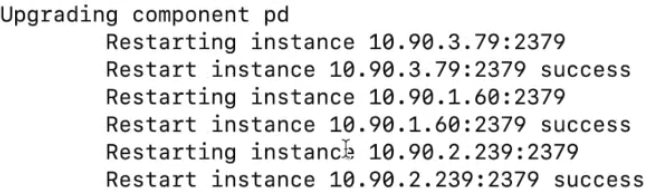
Figure 5. PD upgrade process
TiKV Servers: Each TiKV node was upgraded sequentially. The leader role for each Region was transferred to another server before proceeding with the upgrade. Again, no disruptions were observed.

Figure 6. TiKV upgrade process
TiDB Servers: TiProxy played a pivotal role here. Before upgrading each TiDB server, TiProxy moved its active sessions to another TiDB server, ensuring uninterrupted service. For example, before upgrading TiDB server with IP 1.216, TiProxy migrated its hosted sessions to server 3.163.

Figure 7. TiDB upgrade process
Throughout the upgrade process, the four sessions in our sample program remained active, and the client did not notice the upgrade process.
Here’s how rolling upgrades proceed without interruption:
- PD servers (control plane): Upgrade one PD at a time. Before each restart, PD transfers internal leadership; the remaining PDs continue serving TSO and scheduling, so transactions and placement decisions proceed normally.
- TiKV nodes (storage): Drain leaders from the target store, then restart that node. Raft elects a new leader for any affected regions, so reads/writes route to healthy peers. PD restores replica count and balances leaders in the background.
- TiDB servers (compute): Because TiDB is stateless, restart or replace nodes one by one behind the load balancer. Existing sessions drain; new sessions attach to healthy TiDB nodes, keeping connection scale and query throughput steady.
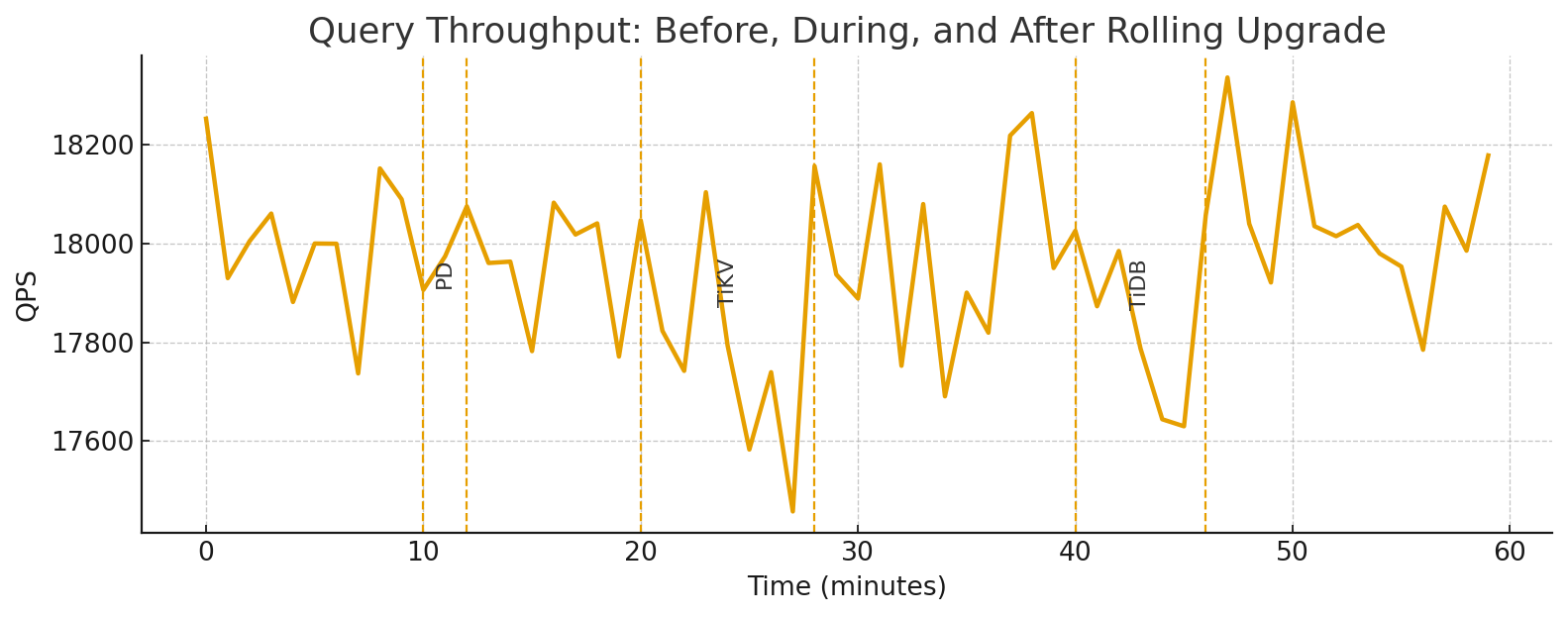
What you should see: Query throughput (QPS/TPS) stays flat with only minor ripples during each component’s sub-step. Error rates and tail latencies remain within baseline bands.
Online Schema Change Example
TiDB executes DDL online, so you can evolve schemas while traffic flows. Here’s a minimal, production-ready pattern you can paste into your session while load tests or real workloads are running.
-- 1) Add a new nullable column safely (no app pause)
ALTER TABLE orders
  ADD COLUMN promo_code VARCHAR(32) NULL DEFAULT NULL COMMENT 'marketing code';

-- 2) Create an index online to speed up a hot path
CREATE INDEX idx_orders_created ON orders (created_at);

-- 3) (Optional) Backfill a derived column without blocking OLTP
--    Do it in small batches from the app or a job runner.
--    Example: 5k rows at a time to avoid hotspots.
UPDATE orders
SET promo_code = NULL
WHERE promo_code IS NULL
LIMIT 5000;

-- 4) Observe DDL progress non-disruptively
ADMIN SHOW DDL JOBS 5;

-- 5) Verify the planner uses the new index (no restart required)
EXPLAIN ANALYZE
SELECT id, created_at
FROM orders
WHERE created_at >= NOW() - INTERVAL 7 DAY;
Tip: keep long-running backfills batch-sized and idempotent, and monitor tail latencies while the index backfill runs. In TiDB, the DDL pipeline handles the online phases (delete-only, write-only, write-reorg, public), so reads and writes stay available throughout.
Best Practices for Zero Downtime in Cluster Management
Here’s a quick checklist you can use to manage zero downtime in TiDB:
Scheduling rolling updates:
- Use maintenance windows sized in small, repeatable batches (one PD → a few TiKV stores → one TiDB at a time).
- Pre-drain leaders on the target TiKV store; confirm leader count trending to ~0 before restart.
- Stagger restarts with a cool-down (3–5 min) to let PD rebalance regions/leaders.
- Pin a rollback checkpoint per step (package version + config diff + BR/PITR restore point).
- Freeze change scope: no concurrent heavy DDL, compactions, or BR jobs during the rolling phase.
Monitoring cluster health during upgrades:
- Track p95/p99, error rate, and QPS/TPS per TiDB instance; alert on p95 > 1.5× baseline for two intervals.
- Watch Top SQL (latency and errors) and plan flips for the hottest digests.
- On storage, watch TiKV CPU, scheduler pending tasks, raft ready/append, and leader concentration by store.
- On PD, check TSO rate/latency, region balance, and store health; verify no long-tailed scheduling.
- Re-run quick checks after each node returns:
-- Top latency (delta window)
SELECT digest_text, exec_count_delta, sum_latency_delta/1000 AS ms
FROM information_schema.statements_summary
ORDER BY sum_latency_delta DESC LIMIT 10;

-- Leader skew by store
SELECT store_id, SUM(CASE WHEN is_leader=1 THEN 1 ELSE 0 END) AS leaders
FROM information_schema.tikv_region_peers GROUP BY store_id ORDER BY leaders DESC;
Leveraging MySQL compatibility for smooth migration:
- Lift-and-shift schemas first; keep app code unchanged (MySQL protocol + dialect).
- Use TiDB’s online DDL to evolve tables post-cutover (no app pause).
- Validate critical queries with EXPLAIN/ANALYZE and add indexes online:
CREATE INDEX idx_orders_created ON orders(created_at);
EXPLAIN ANALYZE SELECT * FROM orders WHERE created_at >= NOW() - INTERVAL 7 DAY;- For data movement, use TiDB Dumpling/Lightning for initial load and TiCDC for change sync; plan a blue-green cutover with feature flags.
- Keep a compatibility checklist (SQL modes, collations, reserved keywords, drivers/ORMs) and upgrade client libraries in lockstep with the cutover plan.
Conclusion – Future-Proof Your Database with TiDB
Zero-downtime isn’t a stunt. With TiDB’s cloud-native, distributed SQL architecture, you get an always-on data tier: rolling upgrades across PD/TiKV/TiDB, high availability via Raft replication and automatic leader rebalancing, online schema changes under load, and horizontal scalability for both reads and writes. The result is predictable SLOs, safer change velocity, and fewer fire-drills without app rewrites.
Ready to see TiDB in your environment? Explore our TiDB Demo Center to watch online upgrades in action, or dive into our documentation for step-by-step guides on rolling updates, online DDL, and migration tooling.
Experience modern data infrastructure firsthand.

TiDB Cloud Dedicated
A fully-managed cloud DBaaS for predictable workloads
TiDB Cloud Starter
A fully-managed cloud DBaaS for auto-scaling workloads