Introduction
You finally received the green light to ship RAG. But then reality shows up:
- Someone asks, “Where do embeddings live?”
- Another person asks, “How do we keep them in sync?”
- Your on-call asks, “So… we’re running two databases now?”
This playbook shows you how to navigate two distinct courses of action:
- The classic “two-DB tango”: transactional DB + standalone vector database.
- The TiDB route: an embedded vector database where vector similarity search and SQL live together in one system.
You’ll discover a practical path to RAG retrieval that reduces moving parts, maintains data consistency, and supports real hybrid search patterns.
Who is This Playbook for: Storage Leads, SREs, & AI Startup Developers
This playbook is for the engineers who own (or inherit) the reliability, scale, and cost of a RAG data stack. If you manage or build these systems, you know that while new capabilities ship fast, operational drag arrives later when simple architecture diagrams turn into incident reports.
As a storage lead or SRE, your KPIs involve:
- Latency Stability: Keeping search and retrieval stable even under heavy load.
- On-Call Surface Area: Reducing the number of managed systems to minimize pages.
- Data Integrity: Avoiding “silent failure modes” like drift between your source-of-truth SQL DB and a standalone vector database like Pinecone or Milvus.
- Multi-tenant Control: Enforcing sane behavior so one AI experiment doesn’t cause a global outage window.
And if you’re a developer at an AI startup, you’re optimizing for:
- Speed to production: Shipping RAG without standing up and integrating yet another datastore.
- Simplicity: Fewer services, fewer pipelines, fewer “where does truth live?” debates.
- Cost discipline: Preventing vector infrastructure and sync pipelines from becoming your biggest surprise bill.
- Flexibility: Iterating on schemas, chunking strategies, and models without rebuilding your entire platform.
TiDB 8.5 addresses these challenges by embedding vector search directly into the SQL engine. This allows you to store chunks, metadata, and embeddings together, run ANN retrieval with SQL joins, and enforce multi-tenant guardrails to keep performance stable while controlling costs.
Pain: RAG Needs, Extra Vector DB Deeds
The fundamental pain of modern RAG is the “extra luggage” of a separate data plane.
Two Databases, Double Trouble
A standalone vector database such as Pinecone, Qdrant, or Milvus can absolutely work. But the minute you introduce a second data plane, you add:
- Another cluster to deploy, scale, patch, and secure.
- Another query path to monitor (and explain) when latency spikes.
- Another data pipeline to keep consistent.
And in practice, your “RAG architecture” becomes a choreography problem: ingestion, chunking, embedding generation, vector upserts, metadata joins, and cache invalidation across systems.
Sync Drift & Latency Spikes
Two failure modes show up fast in production:
- Sync drift: Your source-of-truth data changes, but the embeddings in the vector store lag or fail to update.
- Hybrid query tax: Your application must perform a “vector search over here” and then a “SQL filter/join over there”. This makes every request a multi-hop distributed transaction that increases latency and lacks the guardrails of a single query engine.
The worst part? These issues often look “fine” in happy-path testing, but then appear in production under bursty traffic, partial failures, or backfills.
DIY Route: Standalone Vector Store Ops (The Two-DB Tango)
The “two-DB tango” is the classic approach of maintaining a transactional database alongside a standalone vector database.
Deploy, ETL, Monitor, Repeat
This route requires constant operational toil:
- Provisioning: You must build and run a separate cluster, choosing index types and setting sharding.
- Data Pipeline: You have to ETL embeddings from your OLTP database to the vector store on a schedule, often using change-data-capture (CDC) pipelines with complex retry logic.
- Maintenance: You must patch, upgrade, and run separate backup/restore drills for a second system
It works. It just has a cost: more moving parts.
Hybrid Queries in App Code
In a two-system design, “hybrid search” often turns into application glue:
- Query vector DB → get topK IDs.
- Query SQL DB → join IDs to metadata, permissions, tenant rules, freshness constraints.
- Re-rank in the application.
- Return results.
That is doable. It is also a reliability bet: if either side is slow or stale, the whole request degrades.
TiDB Route: Embedded Vector DB Power
TiDB’s approach is simple: put vectors next to your rows and let SQL do the heavy lifting.
TiDB supports vector data types (VECTOR / VECTOR(D)) designed for storing embeddings, with dimension enforcement and vector index support. It also supports vector search indexes (ANN via HNSW) and distance functions like cosine and L2.
Vector Columns Beside Rows
Instead of splitting your world in two, you store the chunk text, the metadata you filter on (tenant, permissions), and the embedding vector in the same table.
Example schema (single-DB retrieval table):
CREATE TABLE rag_chunks (
id          BIGINT PRIMARY KEY,
tenant_id   BIGINT NOT NULL,
doc_id      BIGINT NOT NULL,
chunk_text  TEXT,
source      VARCHAR(128),
meta        JSON,  -- flexible metadata (tags, uri, permissions, etc.)
updated_at  TIMESTAMP DEFAULT CURRENT_TIMESTAMP ON UPDATE CURRENT_TIMESTAMP,

-- 1536 is a common embedding dimension; use whatever your model outputs.
embedding   VECTOR(1536),

-- Build an ANN vector index (HNSW) for fast similarity search

VECTOR INDEX idx_embedding ((VEC_COSINE_DISTANCE(embedding)))
);
This ensures ACID consistency across your transactional and vector data, so when a row updates, the vector updates with it, eliminating sync drift.
Vector columns are first-class: they support dimension enforcement and an optimized storage format vs. dumping vectors into JSON. And vector search indexing is available across TiDB Self-Managed and TiDB Cloud deployment tiers (with minimum version guidance).
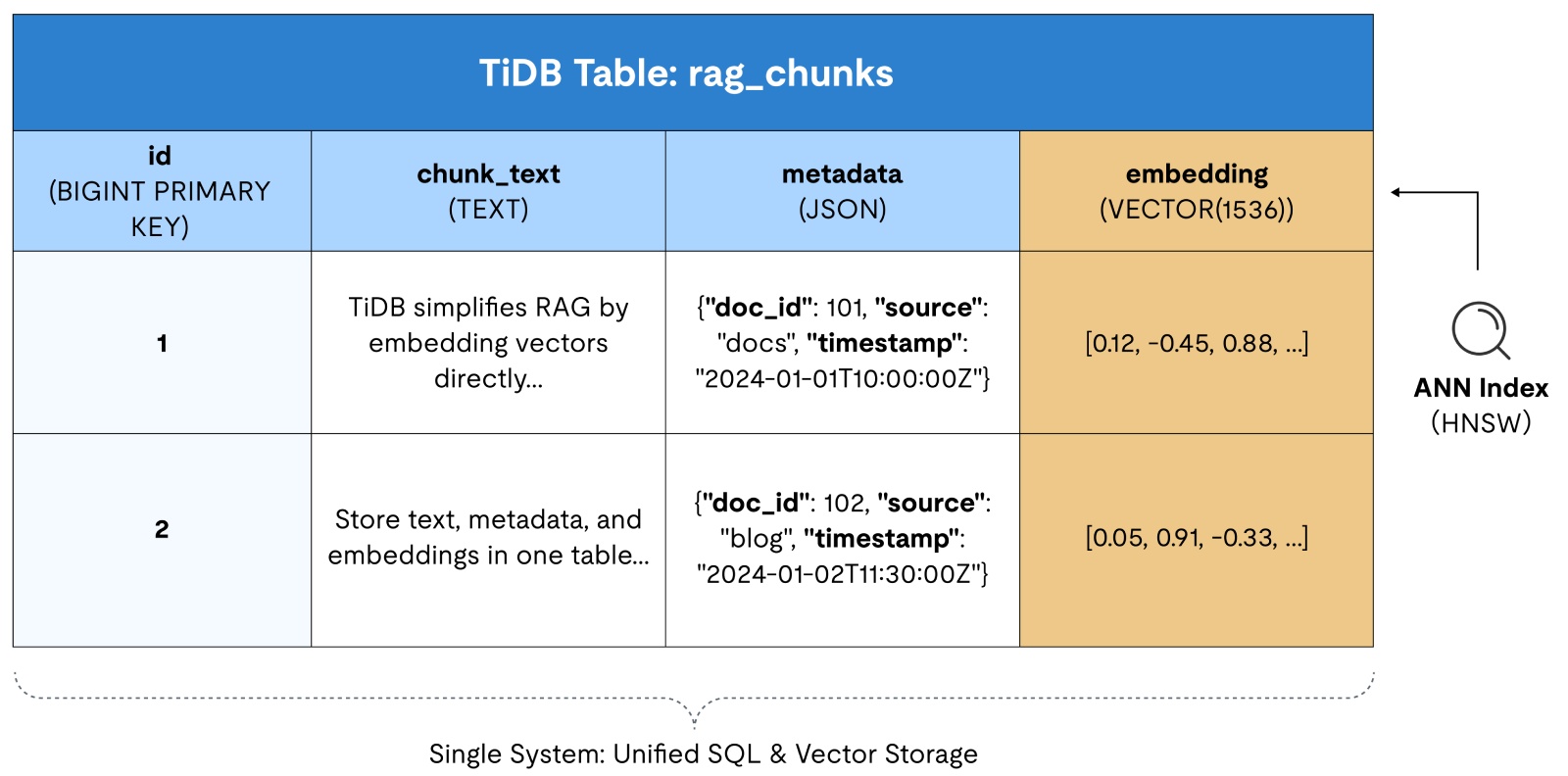
Figure 1. An example of a single TiDB table containing chunk text, metadata columns, and a VECTOR embedding column with an ANN index.
Hybrid Similarity + SQL Joins
By using an embedded vector database, you can perform similarity searches, tenant filtering, and permission checks with one query planner.
Basic vector similarity search (cosine distance):
SELECT id, doc_id, chunk_text,
VEC_COSINE_DISTANCE(embedding, '[0.1, 0.2, ...]') AS distance
FROM rag_chunks
ORDER BY distance
LIMIT 10;
This ORDER BY ... LIMIT pattern is how TiDB applies the vector index for ANN search.
Important gotcha (and how to handle it):
A pre-filter in WHERE can prevent the vector index from being used under SQL semantics. In TiDB, you can use the “KNN first, filter after” pattern.
SELECT *
FROM (
SELECT id, tenant_id, doc_id, chunk_text,
VEC_COSINE_DISTANCE(embedding, '[0.1, 0.2, ...]') AS distance
FROM rag_chunks
ORDER BY distance
LIMIT 50
) t
WHERE tenant_id = 42
ORDER BY distance
LIMIT 10;
Yes, you may return fewer than 10 if your post-filter removes results. But that is the tradeoff.
Optional upgrade: full-text + vector (hybrid search)
TiDB also offers full-text search with relevance ordering (BM25) and multilingual parsing, which is complementary to vector search in RAG scenarios.
Example: add a FULLTEXT index on chunk text:
ALTER TABLE rag_chunks
ADD FULLTEXT INDEX (chunk_text)
WITH PARSER MULTILINGUAL
ADD_COLUMNAR_REPLICA_ON_DEMAND;
Then you can retrieve exact-keyword matches (and join/filter normally) using fts_match_word().
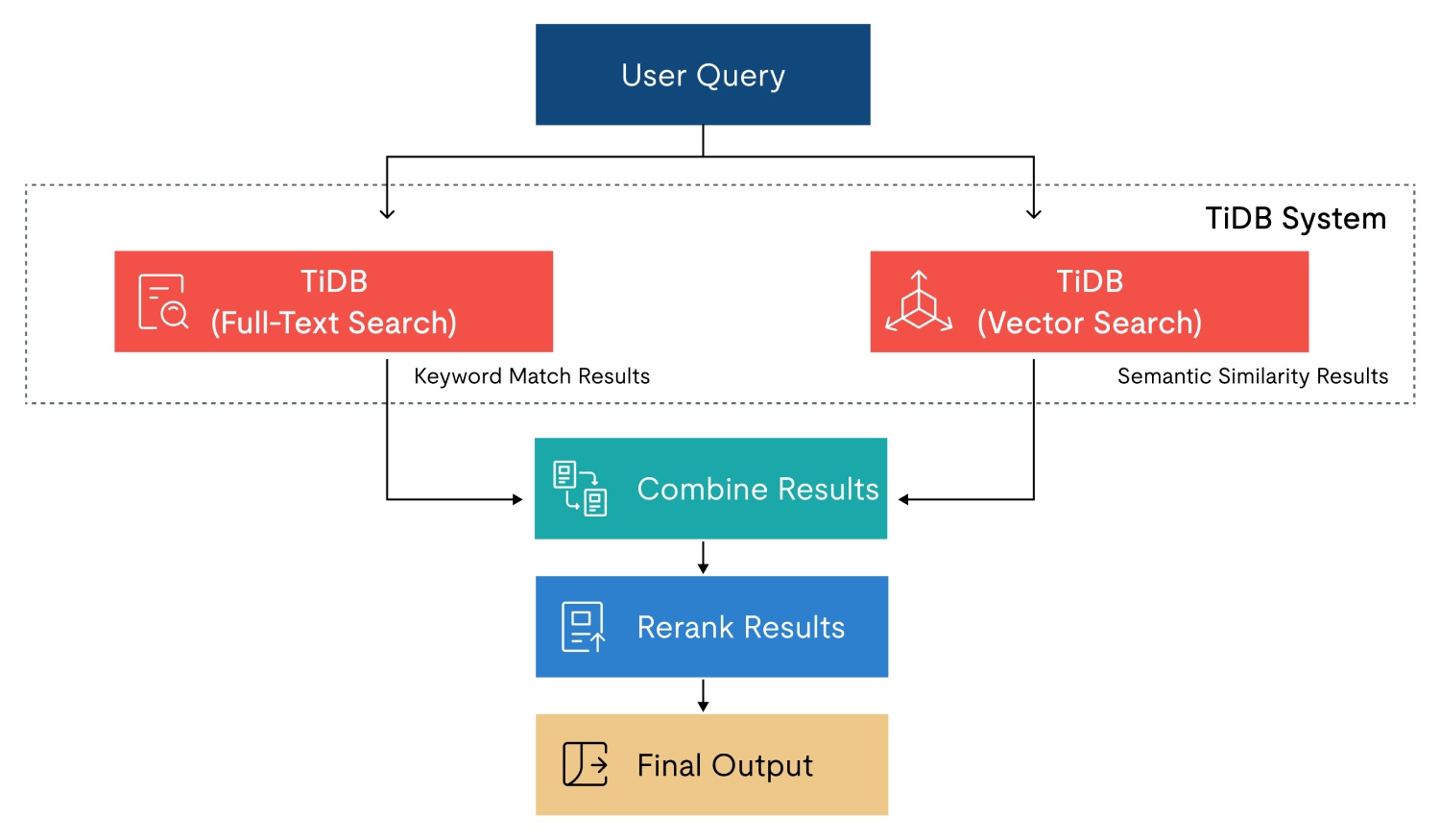
Figure 2. Hybrid search flow where TiDB runs full-text and vector search, then results are combined and reranked.
Labor Showdown: Ops Hours & Incidents Count
Now let’s make this concrete. Below is a simple way to compare operational surface area. This is not a benchmark, but rather a workload checklist you can plug your own numbers into.
| Workstream | SQL DB + vector DB | TiDB embedded vector DB |
| Provisioning | Two clusters / services | One cluster |
| Monitoring | Two dashboards, two alert trees | One |
| Data correctness | Sync + drift detection | Single write path |
| Backfills | Dual write + index rebuild plans | Table load + index build |
| Incident blast radius | Query path splits across systems | One query engine |
Step-by-Step Guide
If you want a working RAG retrieval layer quickly, follow these steps.
Upgrade, Ingest, Query, Tune
Step 1: Upgrade / Install TiDB 8.5 (with Vector Search enabled)
TiDB Cloud (a fully-managed DBaaS offering of TiDB, fastest path):
- Create a TiDB Cloud cluster on a plan that supports Vector Search.
TiDB Self-Managed (TiDB on-prem with full operational control, production-like):
- Deploy TiDB 8.5 plus TiFlash nodes (ANN indexing relies on TiFlash).
- Run a quick smoke test to prove vector types and functions are active:
CREATE TABLE vector_smoke_test (
id INT PRIMARY KEY,
v  VECTOR(3)
);

INSERT INTO vector_smoke_test VALUES (1, '[0.3, 0.5, -0.1]');
SELECT VEC_L2_DISTANCE(v, '[0.3, 0.5, -0.1]') FROM vector_smoke_test;
Step 2: Create tables with VECTOR(D) (pick your embedding dimension)
Pick D based on your embedding model’s output dimension. Use fixed dimension (VECTOR(D)) if you want an ANN index.
Recommended baseline schema (RAG-ready):
CREATE TABLE documents (
id        BIGINT PRIMARY KEY,
tenant_id BIGINT NOT NULL,
title     VARCHAR(255),
is_active TINYINT NOT NULL DEFAULT 1
);

CREATE TABLE rag_chunks (
chunk_id   BIGINT PRIMARY KEY,
tenant_id  BIGINT NOT NULL,
doc_id     BIGINT NOT NULL,
chunk_text TEXT NOT NULL,
embedding  VECTOR(1536) NOT NULL,  -- <- set to your model’s dimension
updated_at TIMESTAMP DEFAULT CURRENT_TIMESTAMP ON UPDATE CURRENT_TIMESTAMP,

VECTOR INDEX idx_embedding ((VEC_L2_DISTANCE(embedding))) USING HNSW
);
To keep in mind: A vector index can only be built on one vector column and it cannot be a composite index with other columns.
If you add the vector index after table creation and the table has no TiFlash replica yet, create one first:
ALTER TABLE rag_chunks SET TIFLASH REPLICA 1;Step 3: Ingest embeddings (TiDB Lightning or bulk INSERT)
You can insert vectors using the bracket string format: '[<float>, <float>, ...]'.
Option A: TiDB Lightning (recommended for big backfills)
- Export chunks to CSV/Parquet with columns like:
chunk_id,tenant_id,doc_id,chunk_text,embedding
- Store
embeddingas a string like'[0.01, 0.02, ...]'. - Use TiDB Lightning to load fast, then wait for indexes to finish building before benchmarking.
Option B: Bulk INSERT (simple + works everywhere)
- Batch inserts (e.g., 1k–10k rows per batch) and keep writes idempotent:
INSERT INTO rag_chunks (chunk_id, tenant_id, doc_id, chunk_text, embedding)
VALUES
(1, 42, 1001, '...', '[0.01, 0.02, ...]'),
(2, 42, 1001, '...', '[0.03, 0.04, ...]');
Option C: Auto Embedding (fastest proof, no vectors required up front)
If you want to validate the end-to-end loop without generating embeddings in your app first, use Auto Embedding. You simply insert plain text, and TiDB generates and stores the vectors for you.
-- Create a table with auto-embedding (dimension must match the model)
CREATE TABLE documents (
id INT PRIMARY KEY AUTO_INCREMENT,
content TEXT,
content_vector VECTOR(1024) GENERATED ALWAYS AS (
EMBED_TEXT("tidbcloud_free/amazon/titan-embed-text-v2", content)
) STORED,
VECTOR INDEX ((VEC_L2_DISTANCE(content_vector))) USING HNSW
);

-- Insert text only (vectors are generated automatically)
INSERT INTO documents (content) VALUES
("Electric vehicles reduce air pollution in cities."),
("Solar panels convert sunlight into renewable energy."),
("Plant-based diets lower carbon footprints significantly.");

-- Search using plain text (TiDB embeds the query automatically)
SELECT id, content
FROM documents
ORDER BY VEC_EMBED_L2_DISTANCE(
content_vector,
"Renewable energy solutions for environmental protection"
)
LIMIT 3;
You can use Option C to get a working semantic retrieval loop in minutes. You can then switch to Option A/B when you want full control over your embedding pipeline, dimensions, models, and metadata joins.
Step 4: Build the RAG service (ANN via ORDER BY L2 distance + SQL joins)
Your service flow:
- Take user query text
- Generate
query_embeddingin the app - Run ANN search (KNN via
ORDER BY … LIMIT) - Join to authoritative metadata (tenant, permissions, status)
- Return top chunks to the LLM
Core ANN query (L2 distance):
SELECT chunk_id, doc_id, chunk_text,
VEC_L2_DISTANCE(embedding, :qvec) AS distance
FROM rag_chunks
ORDER BY distance
LIMIT :k;
Step 5: Bench & tune: index build, recall, QPS, and tail latency
Before you benchmark:
- Confirm the vector index is fully built after large loads (otherwise results look artificially slow).
- Verify the index is being used with
EXPLAIN ANALYZE.
Benchmarks to run (minimum set):
- Latency: p50 / p95 / p99 for the retrieval query
- Throughput: max sustainable QPS at acceptable p95
- Recall: recall@k on a labeled eval set (or a “silver truth” set from historical clicks)
Primary tuning levers:
- Candidate pool size: increase
:cand_kfor better recall; watch p95 - Embedding dimension: lower dimensions reduce compute and index cost (tradeoff: accuracy)
- Payload size: exclude vector columns from results; keep returned rows small
- Warm-up behavior: run representative queries to warm the index before measuring p95
- Index readiness: benchmark only after the system has caught up post-ingest/backfill
Operational Best Practices
Operating an embedded vector db follows many of the same patterns as standard TiDB administration.
Vector-Aware Metrics in TiDB Dashboard
Treat vector retrieval like any other latency-sensitive query path:
- Watch query latency percentiles for the KNN query.
- Watch TiFlash health and replication status if you depend on ANN indexes.
- Use
INFORMATION_SCHEMA.TIFLASH_INDEXESto validate index build completion after big ingests/backfills.
On-call tip: alert on “index build lag after ingest” the same way you’d alert on replica lag in other systems.
Online Re-Indexing & Auto-Scaling Recommendations
You will eventually change something:
- A new embedding model (dimension change).
- A new similarity function choice (cosine vs L2).
- A new chunking strategy (data reshapes).
Plan for:
- A backfill window.
- Index build time.
- Controlled rollouts by tenant or by doc source.
TiDB documents restrictions like “vector index needs a distance function,” “TiFlash must be deployed,” and “fixed dimensions are required for vector indexes.”
Full-Cluster Backup Including Vector Data
Operationally, treat embeddings as first-class data:
- Back up the tables that store chunk text + vectors.
- Practice restore drills that validate the retrieval path (not just row counts).
- After restore, verify TiFlash replicas and vector indexes are healthy (and rebuild if your restore workflow requires it).
If you already run TiDB backup/restore with BR, keep your existing process and add a retrieval validation step to the runbook.
Proof in Production
In this section, you’ll see how teams are using TiDB Cloud + Vector Search to ship real AI workflows, reduce fragmentation, and keep critical analysis fast and reliable at scale.
New Retail Giant: 45% Lower Costs with a GraphRAG Knowledge System
A leading New Retail company needed a better way to search and apply internal knowledge across two high-pressure environments: IT operations (troubleshooting, maintenance, incident response) and restaurant operations (SOPs, safety protocols, recipes, training). Their documentation was scattered across sources, slowing resolution times and increasing operational friction.
They implemented a knowledge graph-based RAG (GraphRAG) system powered by TiDB Cloud and TiDB Vector Search to unify retrieval across content types and deliver contextual answers for both engineers and frontline staff.
Outcomes
- Reduced documentation search time from ~30 minutes per query to seconds.
- Improved retrieval accuracy by 10%.
- Reduced training time by ~40%.
- Drove a 70% decrease in support ticket resolution time.
- Achieved 90% user adoption across technical and restaurant teams.
- Delivered a 45% reduction in costs tied to maintaining fragmented knowledge bases.
Innovative SaaS Company: Real-Time Customer Feedback Intelligence with TiDB + AI
This SaaS company built an AI-powered feedback management platform that needed to ingest feedback from multiple channels, run semantic search, detect patterns, and surface actionable insights fast. Traditional analysis was too slow, and customers struggled to extract meaning from raw feedback, especially when they needed real-time response loops.
They used TiDB Cloud as the core database layer, pairing it with vector search to power advanced semantic retrieval and pattern discovery, with an AI-driven experience (dashboard + chatbot + analysis tools) on top.
Outcomes
- 75% reduction in feedback analysis time.
- 90% improvement in pattern recognition accuracy.
- 99.9% system reliability.
- 40% average increase in customer satisfaction rates.
- Successfully processed 1M+ feedback entries.
- 95% accuracy in AI-generated insights.