

Key Takeaways
- Treat AI-generated database code as a first draft. Assistants learn from single-node MySQL and Postgres, so their assumptions don’t all hold on distributed SQL.
- The dangerous failures are silent. Unsupported syntax errors loudly; a missing
ORDER BYjust returns plausible results that change between runs.- Review schema, transactions, indexes, writes, and queries. Primary key types, ID ordering, composite index order, and write hotspots are where generated code breaks.
- MySQL compatibility keeps the review surface small. Most generated code works as written; the gaps are a short, checkable list.
AI-assisted coding — prompting an AI coding assistant to write application code, schemas, and queries instead of hand-writing them — is now how most feature work starts. The generated code compiles, the tests pass, and the PR looks clean. What the assistant cannot tell you is whether that code is correct on your database. This blog is a review checklist for AI-generated database code: what to verify in schemas, transactions, indexes, write patterns, and SQL before any of it reaches production on TiDB.
What Is AI-Assisted Coding — and Where Does It Break at the Database Layer?
AI-assisted coding means a developer describes intent and an assistant produces the implementation. In practice that covers GitHub Copilot completing a repository method, Cursor scaffolding a migration, or Claude Code generating an entire data access layer from a prompt. AI-assisted app development extends the same pattern across the stack: schema, API, tests, and the SQL underneath.
The upside is real and worth naming plainly. Boilerplate disappears. Prototypes that took a sprint take an afternoon. A developer who has never written a Spring @Transactional block gets a working one on the first try. That speed is why the shift happened.
The failure mode is quieter. AI coding assistants are trained overwhelmingly on single-node MySQL and PostgreSQL code — decades of it. So AI-generated code encodes single-node assumptions: that a row lock is cheap and local, that auto-increment IDs come back in order, that result sets have a natural order, that a SAVEPOINT behaves identically everywhere. On a distributed SQL database, some of those assumptions hold and some of them produce silent correctness bugs — code that runs, returns results, and is wrong. Instead of treating AI-generated database code as finished work, treat it as a first draft written by someone who has never seen your storage layer.
The rest of this blog is what to check, section by section.
Choosing the Best AI Coding Assistant for Database Work
Roundups of the best AI coding assistant rank tools on autocomplete quality and IDE integration. For database work, three different criteria decide whether generated code survives production:
- Does it know your actual database, not just “generic SQL”? An assistant that has your schema, your TiDB version, and your MySQL-compatibility context in scope generates different DDL than one pattern-matching on “SQL database.” Feeding it your
SHOW CREATE TABLEoutput and the relevant docs page costs one prompt and changes the output materially. - Can it explain its schema and index choices? If the assistant cannot justify why a composite index is ordered
(tenant_id, created_at)rather than the reverse, neither can your reviewer. Reviewable reasoning matters more than confident output. - Does it work inside your stack? Migrations, test fixtures, and CI are where database mistakes get caught. AI coding tools that only operate in the editor push the entire review burden onto humans.
None of that removes the review step. It narrows what you have to catch. For SDKs, templates, and reference implementations to point an assistant at, see Build AI Applications.
Why AI-Generated Database Code Needs a Review Layer
This page is written for database architects, database administrators, infrastructure engineers, and application developers — the same audience as always, now reviewing far more code than they write.
As an open source distributed SQL database, TiDB in most cases serves as a scale-out MySQL database without manual sharding. Because of its distributed nature, there are differences between TiDB and traditional relational databases like MySQL. For the full list, see TiDB MySQL Compatibility.
Those differences used to surface during migration, when a human was reading every line. They now surface in AI-generated pull requests, at volume, from developers who never learned the MySQL assumptions they are inheriting. The gap between “MySQL-compatible” and “identical to MySQL” is exactly where AI-generated code needs a second look — and it is a narrow, enumerable gap, which is what makes this reviewable.
Reviewing AI-Generated Transactions and Locking
Concurrency is where assistants produce the most confident and least examined code. Ask for “safely decrement inventory” and you will get a SELECT ... FOR UPDATE pattern lifted from standalone MySQL, often wrapped in nested transaction logic. Here is what to verify on TiDB.
TiDB supports snapshot isolation. For the underlying model, see Transaction Overview and TiDB Transaction Isolation Levels.
Optimistic vs. Pessimistic Locking in AI-Generated Concurrency Code
Start by establishing which transaction mode the code actually runs under. Since TiDB v3.0.8, pessimistic transaction mode is the default, so SELECT ... FOR UPDATE blocks and waits much as it does in MySQL InnoDB. Under optimistic mode — still available via tidb_txn_mode or BEGIN OPTIMISTIC — TiDB caches writes and validates at commit, retrying and backing off on conflict. If the assistant generated code that disables retry or explicitly opens optimistic transactions while using SELECT ... FOR UPDATE, the later transactions in a conflict set roll back rather than queue.
Mode aside, hot-row contention is the real review item. These are the patterns to flag:
- Counters, where one field is incremented continuously.
- Flash sales, where newly listed inventory sells out in seconds.
- Account balances in financial workflows, where the same row is modified concurrently.
In any database, concurrent SELECT ... FOR UPDATE transactions against one row serialize. In a distributed database, each lock acquisition is also a network round trip, so the serialized queue is slower than it would be on a single node. Correctness holds; throughput collapses.
The best practice has not changed: move the hot counter out of the row. Implement it in a cache (Redis, Codis) and reconcile to TiDB, or shard the counter across N rows and sum on read. When an assistant hands you an inventory-decrement or hot-counter implementation, this is the refactor to require before merge.
Nested Transactions and Savepoints That Won’t Survive Review
Under ACID semantics, concurrent transactions are isolated from one another, so transactions cannot truly be “nested.” At read committed, repeated reads inside one transaction see data committed in between — non-repeatable reads. Most RDBMS products default to RC, and some developers treat that as a feature and build “nested transaction” logic on top of it. AI assistants reproduce the pattern because it fills their training data.
Consider a T1–T8 timeline. Session 1 opens a transaction at T2 and runs a query. Between T3 and T5, session 2 opens, writes a row, and commits. Session 1 then updates that row at T6, commits at T7, and at T8 queries the val that session 2 wrote.
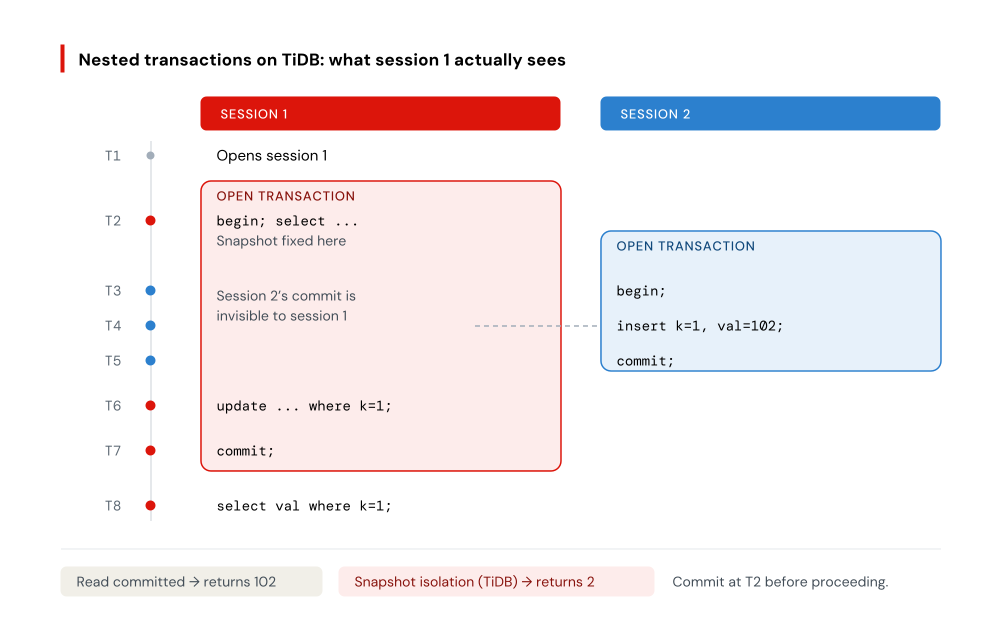
At RC, T8 returns 102 and the nesting appears to work — but only because one thread simulated it. Under real concurrency, transactions interleave and the result is unpredictable. Under snapshot isolation or repeatable read, session 1’s view is fixed at T2, so session 2’s write does not change what session 1 reads at T6: Row 0 is updated instead, and T8 returns 2. The fix is application logic — commit at T2 before proceeding.
Savepoints need a version check. Spring’s PROPAGATION_NESTED starts a subtransaction backed by a savepoint:
BEGIN;
INSERT INTO T2 VALUES(100);
SAVEPOINT svp1;
INSERT INTO T2 VALUES(200);
ROLLBACK TO SAVEPOINT svp1;
RELEASE SAVEPOINT svp1;
COMMIT;
TiDB has supported SAVEPOINT, ROLLBACK TO SAVEPOINT, and RELEASE SAVEPOINT since v6.2.0, so PROPAGATION_NESTED works — with one flag for review. In a pessimistic transaction, ROLLBACK TO SAVEPOINT does not release locks taken after the savepoint; all locks clear at commit or rollback. Code expecting contention to ease mid-transaction behaves differently than on MySQL. On v6.1 or earlier, savepoints are unsupported and the nested logic must go.
Oversized Transactions in AI-Generated Batch Code
Ask an assistant for a backfill or a data migration and it will typically write one loop inside one transaction. TiKV, TiDB’s storage engine, is built on RocksDB and an LSM-tree; TiDB uses two-phase commit, and large transactions are bounded accordingly.
TiKV stores data as key-value pairs, and the limits are expressed in those terms. One table row maps to one KV pair, and so does each index entry — a table with two secondary indexes writes three KV pairs per inserted row. On current versions:
- A single row is limited to 6 MiB by default (
txn-entry-size-limit), adjustable up to 120 MiB. - Total transaction size defaults to 100 MiB (
txn-total-size-limit), with a maximum of 1 TB. Since v6.5.0 this configuration is no longer the recommended control; transaction memory accrues to session memory usage andtidb_mem_quota_queryapplies. - The 5,000-statement ceiling (
stmt-count-limit) applies only to retryable optimistic transactions. Pessimistic transactions and optimistic transactions with retry disabled are not bound by it.
For bulk CREATE, DELETE, and UPDATE work, rewrite the single large transaction as paged statements committed in phases, using ORDER BY with LIMIT offsets:
update tab set value='new_value' where id in (select id from tab order by id limit 0,10000);
commit;
update tab set value='new_value' where id in (select id from tab order by id limit 10000,10000);
commit;
update tab set value='new_value' where id in (select id from tab order by id limit 20000,10000);
commit;
Each batch commits independently, so a failure costs one page rather than the whole job. If the generated migration has no commit inside the loop, that is the edit to make.
Reviewing AI-Generated Schema, Keys, and Constraints
Schema is the first thing an assistant writes and the thing reviewers skim hardest — the DDL looks like every other CREATE TABLE they have read. Three things to check.
Don’t Let AI Assume Sequential Auto-Increment IDs
TiDB’s auto-increment IDs are guaranteed unique and incremental within a single TiDB server, but not allocated sequentially across the cluster. IDs are allocated in batches per instance, so with concurrent inserts across multiple tidb-server instances, a row inserted later can receive a smaller ID. Gaps are also normal: if no primary key is specified, _tidb_rowid shares an allocator with the auto-increment column, which is why IDs can advance by two.
mysql> CREATE TABLE t(id INT UNIQUE KEY AUTO_INCREMENT);
mysql> INSERT INTO t VALUES();
mysql> INSERT INTO t VALUES();
mysql> INSERT INTO t VALUES();
mysql> SELECT _tidb_rowid, id FROM t;
+-------------+------+
| _tidb_rowid | id   |
+-------------+------+
|           2 |    1 |
|           4 |    3 |
|           6 |    5 |
+-------------+------+
Any AI-generated code that treats the ID as an ordering or completeness guarantee is a bug: keyset pagination on id, “the newest record is MAX(id)“, gap detection as a data-quality check, or cursors that assume no holes. Order by an explicit timestamp or a monotonic column instead. If the application genuinely requires sequential allocation, TiDB provides an AUTO_INCREMENT MySQL compatibility mode — enable it deliberately, not by assumption. Note also that from v7.0.0, auto-increment columns no longer have to be a primary key or index prefix.
Primary Key Types: Prefer bigint unsigned
Auto-increment IDs usually exist to enforce uniqueness, so they are declared as the primary key or a unique index, with not null. The column should be an integer type, and bigint specifically. int auto-increment columns run out even on standalone databases; TiDB handles far more data and allocates IDs across multiple instances in parallel, so int exhausts faster. Since IDs are not negative, adding unsigned doubles the usable range — unsigned int tops out at 4,294,967,295, unsigned bigint at 18,446,744,073,709,551,615.
`auto_inc_id` bigint unsigned not null primary key auto_increment comment 'auto-increment ID'Assistants frequently default to INT AUTO_INCREMENT because that is the most common pattern in their training data. Check the type on every generated table.
Do not assign auto-increment values manually. Manual assignment triggers frequent updates to the global maximum and degrades write performance. Leave the column out of the INSERT, or pass NULL and let TiDB allocate:
mysql> create table autoid(`auto_inc_id` bigint unsigned not null primary key auto_increment comment 'auto-increment ID', b int);
mysql> insert into autoid(b) values(100);
mysql> insert into autoid values(null,1000);
mysql> select * from autoid;
+-------------+------+
| auto_inc_id | b    |
+-------------+------+
|           1 |  100 |
|           2 | 1000 |
+-------------+------+
Foreign Keys and Unique Constraints AI Tools Take for Granted
TiDB enforces UNIQUE constraints through primary keys and unique indexes, with two operational differences: adding or dropping a CLUSTERED primary key is unsupported, and DROP COLUMN will not remove a primary key column. Generated migrations that plan to “fix the primary key later” will not apply.
Foreign keys are a version question, and one where older blog posts and older training data both mislead. TiDB has supported foreign key constraints with referential integrity checks since v6.6.0. Foreign keys created before v6.6.0 stay ineffective after upgrade — SHOW CREATE TABLE marks them /* FOREIGN KEY INVALID */ — and must be dropped and recreated. And in pessimistic transactions, foreign key checks take an exclusive lock on the parent row by default, so an AI-generated child table taking high-concurrency writes against few parent rows is a contention source; from v8.5.6, tidb_foreign_key_check_in_shared_lock switches those checks to shared locks.
Unique-constraint timing is subtler, and mode-dependent. In pessimistic transactions — the default since v3.0.8 — TiDB checks uniqueness when the statement executes (tidb_constraint_check_in_place_pessimistic, default ON). Optimistic transactions skip that read and verify at commit, which is faster on batch inserts but means a duplicate surfaces only at COMMIT and rolls back the whole batch:
mysql> create table t1 (a int key);
mysql> insert into t1 values(1);
mysql> begin;
mysql> insert into t1 values(1);
Query OK, 1 row affected (0.00 sec)

mysql> insert into t1 values(1);
ERROR 1062 (23000): Duplicate entry '1' for key 'PRIMARY'
mysql> commit;
ERROR 1062 (23000): Duplicate entry '1' for key 'PRIMARY'
The first error fires because both duplicates sit inside one transaction; the second fires at commit, when those records are finally compared against the table. Setting tidb_constraint_check_in_place=1 at session level restores in-place checking for optimistic transactions.
The review question is narrow: does the error handling assume the duplicate-key error arrives at INSERT time? Under optimistic transactions it arrives at COMMIT, and a try/catch around the individual statement never fires.
Reviewing AI-Generated Indexes
Indexes are data and occupy storage. In TiDB, indexes are stored as key-value pairs in the storage engine just like table rows — one index row is one KV pair. A table with 10 indexes writes 11 KV pairs per inserted row. Assistants add indexes liberally, one per query they were asked to optimize, and that write amplification is invisible in a code review that only reads the SELECT statements.
TiDB supports primary key indexes, unique indexes, and secondary indexes, on single or multiple columns. FULLTEXT indexes are unsupported outside TiDB Cloud Starter in certain AWS regions, and descending indexes are unsupported — generated DDL containing either will not do what it appears to.
Indexes can be used when the query predicate is among:
=, >, <, >=, <=, like '...%', not like '...%', in, not in, <>, !=, is null, is not nullThe optimizer decides whether to use them. Indexes cannot be used for:
like '%...', like '%...%', not like '%...', not like '%...%', <=>Leading-wildcard LIKE is worth calling out separately, because “search by name” prompts reliably produce LIKE '%term%' alongside an index the assistant just created to support it. That index will not be used.
Composite Index Column Order: The Mistake AI Makes Most
A composite index is declared as key tablekeyname (a,b,c). The ground rule matches other databases: put high-selectivity columns first so fewer rows survive the first filter. The TiDB-specific detail is how a range predicate on a leading column affects the columns behind it. Consider:
select a,b,c from tablename where a<predicate>'<value1>' and b<predicate>'<value2>' and c<predicate>'<value3>';- If the predicate on a is
=orin, composite index(a,b,c)extends to condition b:
select a,b,c from tablename where a=1 and b<5 and c='abc'- If both a and b use
=orin, the index extends to condition c:
select a,b,c from tablename where a in (1,2,3) and b=5 and c='abc'- If a uses a range predicate, the index access range stops there. Conditions on b and c are applied as filters within the rows a already selected, not as index range boundaries:
select a,b,c from tablename where a>1 and b<5 and c='abc'So: equality and IN columns lead, range columns trail. Check this on every composite index an assistant generates, because the ordering that reads most naturally in English — created_at, tenant_id, status — is usually backwards. Composite index (a,b,c) also serves select c, count(*) from tablename where a=1 and b=2 group by c, where the where clause follows the same principle.
Verify with EXPLAIN rather than by inspection. An index that appears in the plan as a full scan with pushed-down filters is doing much less work than the assistant assumed when it wrote the DDL.
Reviewing AI-Generated Write Patterns for Hotspots
Batch write-back is a common cause of write hotspots. TiKV is a range-based key-value system, and the key determines which Region receives the write:
- When the primary key is an integer (
int,bigint), the key is the primary key. - When TiDB creates the hidden
_tidb_rowidcolumn for the table, the key is that hidden column.
Either way, monotonically increasing keys mean consecutive inserts land in one Region — one set of nodes absorbing the entire write load while the rest of the cluster idles. This is the distributed-systems behavior assistants have no training data for: on a single node, sequential keys are a benefit.
Scatter Write Hotspots with SHARD_ROW_ID_BITS and AUTO_RANDOM
For tables with non-integer primary keys or no primary key, TiDB uses an implicit auto-increment ROW ID, and heavy INSERT volume concentrates in a single Region. SHARD_ROW_ID_BITS sets the number of shard bits in that hidden column, scattering the ROW ID across Regions. Setting it too high generates excessive RPC requests and raises CPU and network overhead.
SHARD_ROW_ID_BITS = 4— 16 shardsSHARD_ROW_ID_BITS = 6— 64 shardsSHARD_ROW_ID_BITS = 0— default, 1 shard
CREATE TABLE t (c int) SHARD_ROW_ID_BITS = 4;
ALTER TABLE t SHARD_ROW_ID_BITS = 4;
For tables that do use an integer auto-increment primary key — the shape assistants generate by default — use AUTO_RANDOM instead of AUTO_INCREMENT. It assigns unique, non-sequential values, which removes the write hotspot at the source. TiDB’s own documentation recommends AUTO_RANDOM over AUTO_INCREMENT for this reason. Applying it means confirming the application does not depend on ID ordering — which is the same check as the auto-increment section above.
Run any high-ingest generated schema through this question once: does this table’s key increase monotonically under load? If yes, scatter it before launch, not after the first hotspot page.
Partitioned Tables for High-Volume Writes
A partitioned table scatters one logical table across multiple physical tables. With partition rules designed around the actual write distribution, partitioning further reduces hotspot risk. TiDB supports HASH, RANGE, LIST, and KEY partitioning; unsupported types are treated as a normal table with a warning, so generated DDL using SUBPARTITION or an unsupported type will silently produce an unpartitioned table. For AI-generated high-ingest designs — event logs, telemetry, agent traces, append-only audit tables — partitioning by a time or tenant column is usually the right pairing with AUTO_RANDOM.
Reviewing AI-Generated SQL Queries
These are the silent ones. The queries in this section do not raise errors; they return results that are subtly wrong or unstable, which is the hardest class of bug to catch in review.
Unsupported Syntax: CREATE TABLE AS SELECT
TiDB does not support CREATE TABLE tblName AS SELECT stmt (#4754). Assistants emit CTAS constantly for temp tables, backups before a migration, and derived reporting tables, because it is idiomatic in MySQL and PostgreSQL. Replace it with two statements — CREATE TABLE ... LIKE, which copies the source schema, followed by INSERT INTO ... SELECT:
CREATE TABLE orders_backup LIKE orders;
INSERT INTO orders_backup SELECT * FROM orders WHERE created_at < '2026-01-01';
This one at least fails loudly. The next two do not.
Full GROUP BY for Stable Result Sets
With ONLY_FULL_GROUP_BY disabled, MySQL permits a SELECT to reference non-aggregated fields absent from the GROUP BY clause. Other databases treat this as a syntax error, because the result set is unstable.
In the following statements, the first uses full GROUP BY — every field in the SELECT also appears in GROUP BY — and returns a stable three-row result covering all three class/stuname combinations:
mysql> select a.class, a.stuname, max(b.courscore) from stu_info a join stu_score b on a.stuno=b.stuno group by a.class, a.stuname order by a.class, a.stuname;
+------------+--------------+------------------+
| class      | stuname      | max(b.courscore) |
+------------+--------------+------------------+
| 2018_CS_01 | MonkeyDLuffy |             95.5 |
| 2018_CS_03 | PatrickStar  |             99.0 |
| 2018_CS_03 | SpongeBob    |             95.0 |
+------------+--------------+------------------+
The next two statements are byte-identical to each other and return different rows. They group only by class, so with two distinct classes the result has two rows — but class 2018_CS_03 contains two students and nothing in the semantics determines which one is returned:
mysql> select a.class, a.stuname, max(b.courscore) from stu_info a join stu_score b on a.stuno=b.stuno group by a.class order by a.class, a.stuname;
+------------+--------------+------------------+
| class      | stuname      | max(b.courscore) |
+------------+--------------+------------------+
| 2018_CS_01 | MonkeyDLuffy |             95.5 |
| 2018_CS_03 | SpongeBob    |             99.0 |
+------------+--------------+------------------+

mysql> select a.class, a.stuname, max(b.courscore) from stu_info a join stu_score b on a.stuno=b.stuno group by a.class order by a.class, a.stuname;
+------------+--------------+------------------+
| class      | stuname      | max(b.courscore) |
+------------+--------------+------------------+
| 2018_CS_01 | MonkeyDLuffy |             95.5 |
| 2018_CS_03 | PatrickStar  |             99.0 |
+------------+--------------+------------------+
Same query, different row. A test suite that asserts on one of these passes until it doesn’t.
TiDB includes ONLY_FULL_GROUP_BY in its default SQL mode, so a non-full GROUP BY is rejected on a default cluster:
mysql> set @@sql_mode='STRICT_TRANS_TABLES,NO_ENGINE_SUBSTITUTION,ONLY_FULL_GROUP_BY';
mysql> select a.class, a.stuname, max(b.courscore) from stu_info a join stu_score b on a.stuno=b.stuno group by a.class order by a.class, a.stuname;
ERROR 1055 (42000): Expression #2 of ORDER BY is not in GROUP BY clause and contains nonaggregated column '' which is not functionally dependent on columns in GROUP BY clause; this is incompatible with sql_mode=only_full_group_by
The review item is the cluster, not just the query: if sql_mode was relaxed at any point for migration compatibility, AI-generated non-full GROUP BY queries will run and will return unstable rows. Confirm ONLY_FULL_GROUP_BY is still set before trusting that the database is catching these for you.
ORDER BY for Deterministic Order in a Distributed Database
SQL semantics require ORDER BY to get ordered output. On standalone databases, data lives on one server and unordered results often come back in primary key or index order anyway — stable enough that developers stop writing ORDER BY, and assistants learn to omit it. TiDB is a distributed SQL database: data is spread across multiple servers and the TiDB layer does not cache it, so the display order of a query without ORDER BY is unpredictable. TiDB also does not follow MySQL 5.7’s behavior where GROUP BY expr implies ORDER BY expr.
Sorting is also literal. In this example, only one field is specified, so only that field is sorted — rows within 2018_CS_03 appear in no particular order:
mysql> select a.class, a.stuname, b.course, b.courscore from stu_info a join stu_score b on a.stuno=b.stuno order by a.class;
+------------+--------------+-------------------------+-----------+
| class      | stuname      | course                  | courscore |
+------------+--------------+-------------------------+-----------+
| 2018_CS_01 | MonkeyDLuffy | PrinciplesofDatabase    |      60.5 |
| 2018_CS_01 | MonkeyDLuffy | English                 |      43.0 |
| 2018_CS_03 | SpongeBob    | PrinciplesofDatabase    |      88.0 |
| 2018_CS_03 | PatrickStar  | LinearAlgebra           |       6.5 |
| 2018_CS_03 | SpongeBob    | DiscreteMathematics     |      72.0 |
| 2018_CS_03 | PatrickStar  | ProbabilityTheory       |      12.0 |
+------------+--------------+-------------------------+-----------+
Any generated code that reads “the first row” of an unordered result — LIMIT 1 without ORDER BY, pagination without a total ordering, a report that assumes insertion order — is a correctness bug on TiDB, not a style preference. Require an explicit, fully-specified ORDER BY.
The AI-Generated Code Production-Readiness Checklist for TiDB
Run this against any AI-generated schema, migration, or data-access layer before it merges.
| Artifact | What to verify |
|---|---|
| Schema & keys | Primary keys are bigint unsigned, not int. No code depends on sequential or gap-free auto-increment IDs. Foreign keys were created on v6.6.0 or later (check for /* FOREIGN KEY INVALID */). No CLUSTERED primary key changes assumed in later migrations. |
| Transactions | Transaction mode is explicit and matches the error-handling path. No hot-row SELECT … FOR UPDATE counters — move to cache or shard the row. Savepoint behavior verified against cluster version (v6.2.0+) and lock-release semantics. Batch jobs commit per page, within the 6 MiB row and 100 MiB transaction defaults. |
| Indexes | Composite index order: equality and IN columns lead, range columns trail. No index created to serve a leading-wildcard LIKE. Index count justified against per-row KV write amplification. Plans confirmed with EXPLAIN. |
| Writes | Monotonic keys scattered with AUTO_RANDOM or SHARD_ROW_ID_BITS. High-ingest tables partitioned with a supported partition type. |
| Queries | No CREATE TABLE AS SELECT. Full GROUP BY everywhere, with ONLY_FULL_GROUP_BY still in sql_mode. Explicit ORDER BY wherever order is consumed. No SKIP LOCKED, descending indexes, or SELECT … INTO @variable. |
Why TiDB’s MySQL Compatibility Makes AI-Assisted Development Safer
TiDB is compatible with the MySQL protocol and the common features and syntax of MySQL 5.7 and 8.0, which means an assistant’s MySQL fluency transfers almost entirely. Connection handling, data types, joins, the ORM layer, the migration tooling — the generated code works. What remains is the enumerable list above: the places where distributed behavior differs from single-node behavior. That is a much smaller review surface than a database with its own dialect, where every generated query is suspect.
The same architecture that creates those differences is what the code is being written for. TiKV handles transactional writes with horizontal scaling and no manual sharding; TiFlash serves analytical queries from the same data through an HTAP architecture, so operational and analytical workloads share one system rather than an ETL pipeline between two. For teams building AI applications, that extends to vector search and RAG and to persistent context for AI agents — vector similarity and ACID relational writes in the same transaction, against the same database, which removes the sync lag and consistency gaps of running a separate vector store.
For deployment, TiDB Cloud Starter auto-scales and suits variable or early-stage workloads; TiDB Cloud Dedicated fits predictable production workloads with steady capacity requirements.
Build AI-Ready Apps on TiDB
Start free with TiDB Cloud Starter and run the checklist above against your own generated code: Start for Free. For SDKs, templates, and reference implementations to give your assistant real context, see Build AI Applications. If you want to walk through a migration or an AI workload with an engineer, Book a Demo.
FAQ
Can AI coding assistants generate production-ready TiDB code?
Mostly, with a review pass. Because TiDB is MySQL-protocol compatible, assistants trained on MySQL produce working code for connections, types, joins, and ORM layers. The gaps are distributed-systems behaviors: transaction limits, ID ordering, index column order, write hotspots, and result ordering.
Is AI-generated SQL safe to ship without review?
No. The risky failures are silent, not loud. Unsupported syntax like CREATE TABLE AS SELECT errors immediately, but a missing ORDER BY or a non-full GROUP BY returns plausible results that change between runs. Those pass tests and surface in production.
Does TiDB support foreign keys?
Yes. TiDB supports foreign key constraints with referential integrity checks from v6.6.0. Foreign keys created before v6.6.0 stay ineffective after upgrading and must be dropped and recreated. In pessimistic transactions, foreign key checks lock parent rows exclusively by default.
Why aren’t my auto-increment IDs sequential?
TiDB allocates auto-increment IDs in batches per TiDB server. IDs are unique and incremental within a server, but concurrent inserts across instances produce out-of-order values, and a shared allocator with _tidb_rowid creates gaps. Use a timestamp column for ordering, or enable AUTO_INCREMENT MySQL compatibility mode.
What’s the most common AI indexing mistake on TiDB?
Composite index column order. Assistants order columns by how the query reads rather than by selectivity. If a leading column uses a range predicate, the index access range stops there and remaining conditions become filters. Put equality and IN columns first, range columns last.
Experience modern data infrastructure firsthand.


TiDB Cloud Dedicated
A fully-managed cloud DBaaS for predictable workloads
TiDB Cloud Starter
A fully-managed cloud DBaaS for auto-scaling workloads